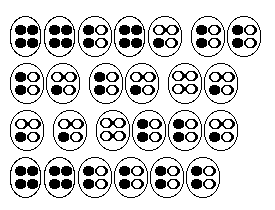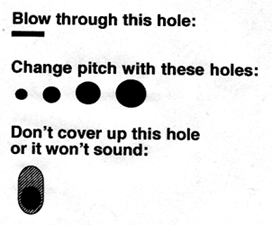
1. Grasp ocarina with both hands. Place index and middle fingers over the holes. one finger per hole. 2. Now blow into it. That's the lowest note, with all the holes covered.
This note tells you what key the ocarina is in. Try lifting different combinations
of fingers
|
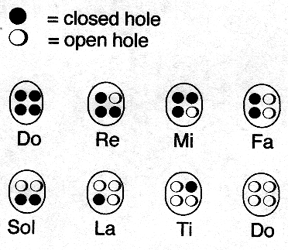
3. Now try the scale, as shown above. An octave scale is also known as a diatonic scale.
4. Si is an extra note that is used in many songs. It is one whole step down from the high Do. |
|
| Fine Tuning with
the Breath
On an ocarina, the pitch will vary by how hard you blow. To stay on key, you have to use the correct breath pressure. You should be able to use the same breath pressure on all the notes. You can use either a keyboard or a chromatic tuner to determine whether you are staying on pitch. Eventually with practice you will develop an ear for this...or maybe you already have a good ear! Occasionally an ocarina will be a little flat or a little fuzzy on
its top notes. If that's the case you will have to blow it a little harder
to keep the highest note (high Do) on pitch.
|
Fine Tuning with
the Fingering
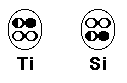
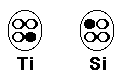
Sometimes the "Ti " and the "Si "notes on an ocarina will be sharp. This will be especially noticeable when you're playing a song and one or two intervals don't sound quite right. Sharp Ti and Si notes are a common problem for many ocarina makers. There are a couple ways you can adjust this by making slight fingering changes, as shown below. You can use either one of these methods: 1. Half-holing
2. Alternate fingering
|