|
I will explain this very clearly. All the bots your
will download have nearly the same configs.
FAQ
Read this quick FAQ before going on!
Q: Whats a config?
Answer: A config is where you put your information
regarding your bot. Information such as Botname/Password/Cdkey.
Q: Where can i get a cd key?
Answer: This is something nobody is willing to give
for free. A cd key is the validation code giving you access
to battlenet, you must trade for cd keys or steal them from
wal-mart :).
Thats how a cd key looks like: 4844-42353-7832
Q: Whats the difference between Valid and Not Valid
cd keys?
Answer: Valid bnet cd keys look exaclty like normal
cd keys but they are registered at blizzard. You can't enter
bnet with a normal cd key but you are able to play single
player.
Q: What are realms?
Answer: Battle.net is seperated into 4 realms for
each zone such as Useast/Uswest/Europe/Asia.
Q: What are proxies
Answer: Proxies look like IP numbers but they work
differently. With proxies you can uprade your loading
capacity of bots.
Now after reading this you should know whats the next
step gonna be!
Configuration
Username: Put a botname (Account must be owned by you
or non-existant)
Password:
Your password (From the account you own or non-existant)
Bot Owner: Your SN (This name will have the highest
access to your bot)
CdKey: 6343-54323-3453 (Must be Valid)
Hash: Make sure you set the name for each cd key you
put.(Star/W2bn/d2)
Realm:
Useast.battle.net/Uswest.battle.net/Europe.battle.net/Asia.battle.net
Trigger: Any character to command the bot
(./,/`/=/+/-)
Home Channel:
op xMCx
New bot versions might not need Hash Files and some bots
automaticly load without having to set hash name.
Legend
SN = ScreenName(YourBattleNetName)
Hash = Files taken from a Bnet game placed into bot for
loading.
/ = Seperates - Gives a choice - Like that "or" that.
Demo
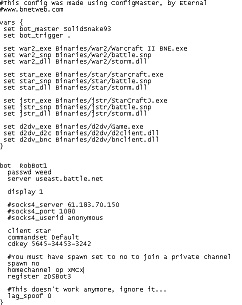
Taken
from ZDS BOT - Click on the Picture for Full View
|