Browsers' Cache Exploitation
Yo... OCY started to explore browsers' cache a very looooooooong time ago, when they still make computers out of wood and stones... Very surprisingly, in this so-called ' I.T. era ' when almost anyone has somewhat used the internet before, only very few bright people realise the existence of the cache folders. Well, this is where we are going to work on this time, good OCY will focus on the Big 2 browsers: Netcape and M$ Internet Explorer (IE). Before we start to talk about anything, donwload the example code for this article here: Browsers.zip......
What can we find in browsers' cache folders?
Aiyoyoh... If you are asking this, you must be unaware that you are missing a lot in privacy invasion programming! Anyway, here are some:
1.
Webpages downloaded ( interested already? )
2.
All those images ( starting to snigger? )
3.
Cookies ( provided you know how to decode the info inside, sadly, I don't
know how... )
Well, the 3 things above is already a very good reason on why we should explore browsers' cache folders. Now, OCY tells you about...... Micro$oft's Internet Exploiter!
Internet Exploiter
The very first problem we have to solve is: WHERE is the cache folder? Well, most of the time, the cache folder for IE is C:\Windows\Temporary Internet Files\. ( of course, change the 'C:\" and the "Windows" to your hard drive and windows directory, respectively ) Anyway, OCY found out that it is NOT that SIMPLE... On some machines, the Temporary Internet Files\ is there, but the TRUE cache folder is located somewhere else ( hidden in the deep, deep incomprehensible Windows directory ). Well, to locate the cache folder we have to look up the registry - the place where Winbloze programs store tonnes and tonnes of secrets. After searching around the registry with Regedit.exe, good OCY found the following key:
HKEY_LOCAL_MACHINE\Software\Microsoft\Windows\CurrentVersion\Internet Settings\Cache\Paths
Haha! There it is! Then, under "Directory" value, you should find the cache folder... On my computer, ( with IE 5 installed ), it is: C:\WINDOWS\TEMP\Temporary Internet Files\Content.IE5. What next? Of course, it is digging deep inside the huge folder and search for something we are interested!!!!
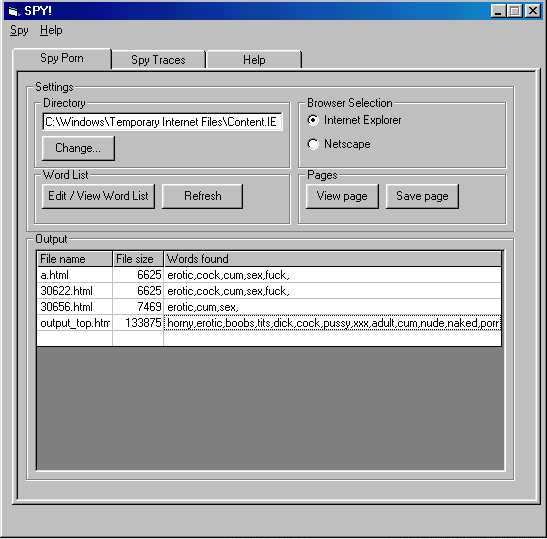
Now, the problem left with us is: HOW and WHAT to search? The answer is totally dependent on YOU. For example, OCY is particularly excited when he catches someone viewing porn, so what he will do is: search for webpages ( ext. .htm or .html ) and scan for 'dirty' words like 'sex', 'porn', 'fuck' ...... in those pages. And that is done by my favourite program, of course. Using a program to do all those stuff actually speeds things up a lot, and quite useful to find exactly what you want. To give you an idea of what OCY's magnificient tool is, here is a screen shot:
See? My proggie weeds out what I want quite quickly... ( Not very fast, though, 'cos I coded this tool in Visual Basic ). When I want to search for something different, say hatred instead of porn, all I need to do is just click the "Edit / View word list" button, and from there, I key in all the 'target' words I am interested in. ( The word list is a text file, which consists of lines of 'target' strings that I want to look for in the cache folder ). Well, boy, if you are starting to get interested in this proggie, I am banging you with this bad news - in the example code, I am going to give you only a SCALED DOWN version of this program, 'cos I made some modifications to the complete ( and old ) one, to make it's word searching more faster. Besides, I change the "View Page" and "Save Page" code to be simpler: to view the page, I just simply call the default browser, instead of displaying it on a super complex I.E. 5 "WebBrowser" control.
Well, let's talk a little bit about our super notorious, pontianak Windows 9x/Me... ( I don't know whether the following strange scenario fits into the NT/XP scene. ) This is about the deep, deep, haunted jungle of the Windoze directory. Well, on my computer at least, with Internet Exploiter 5.0 installed, the registry says that the cache folder is at: C:\WINDOWS\TEMP\Temporary Internet Files\Content.IE5\ Very good! But do you think that is the whole story? Bullshit! Aha! Windoze says: "Haha! Stupid user thinks that he can find the \Content.IE5\ folder! Hohohohohohoho!" Well, I browsed to the ....\Temporary Internet Files\ folder, and prepared to look for the \Content.IE5\, but alas! Where the hell is it?????? ( That folder is NOT even hidden!!!!? ) Why don't you try on your computer too as well? I am still pretty astonished at this...
Well, if Micro$oft thinks that it is producing good software, they are obscenely wrong this time. Do you know something? Explorer.exe failed to locate that stupid \Content.IE5\ 'missing(?)' folder, and yet, in V.Basic, a call to Dir() managed to find it, and my proggie continues to explore the contents of that folder... That means, Explorer.exe somehow hides that Content.IE5 folder from us! Well, to my confusement, I managed to view that folder's contents under a few programs: ACDSee, M$ Word 97, but NOT under those proggies which show the standard "Open File" dialouges.
Oh noooooooooo! I have been talking too much about Micro$oft's Internet Stalker! Let's get rid of it out off our beautiful life and start talking about another code monster: Netscape!
Netscape Communicator
And yet another code-zilla, a huge whopping 5.31 Megabytes pontianak raksasa for Netscape.exe itself on my computer! And the DLLs in the Netscape install folder is more than 4 whopping megabytes! My Netscape is version 4.77 ( I think, 'cos I forgot a very long time ago). But, never mind, it is at least a little less bugged than that awful M$ Internet Exploiter.
Well, I failed to find the cache folder from the registry... But, of course, it is because it is NOT the right way! If we explore the Netscape install folder ( C:\Program Files\Netscape\ most of the time ), we find the \Users\ folder, and inside there, there will be a \default\ folder (default user, or any user), and maybe some other users' folder... And in each user's folder, we find our target! It is emblazoned with our favourite word: the \Cache\ folder! Hei hei hei hei... Now we know how easy it is to locate the cache folder(s)... And to look for our target 'dirty' pages, we of course use OCY's magnificient Browser's Cache Exploiter! ( provided in the example code, coded in V.B 6 ).
Okay, we are done with Netscape... Nooooooooooooooooooooo! Wrong!!! Wait a minute... Did OCY tell you that the registry is full of secrets? Never mind, OCY tells you here what Netscape hides in the registry, and in its' install folder.
Well, in the registry: Netscape plants this information suicide bomb in this key: HKEY_CURRENT_USER\Software\Netscape\Netscape Navigator\biff\users\default\servers . My friend, do you know that you can get the 'default' user's username and password for e-mail access there? It is UNENCRYPTED! Hey Netscape guys, if you people code such a Code-zilla, why not encrypt all those stuffs? As I said in the Password Windows essay, privacy on the Intnernet ( and everywhere on your computer ) is damned to the fate of extinction. ( Netscape guys and M$ IE guys, sorry, but you people 'contributed' a lot to the death of privacy. )
Yo, and that was ONLY the registry! Did I say about the Netscape folder? Yes, besides the \Cache\ folder we find in the users' folders, we actually find a lot more if you keep a sharp eye on other files. Aha! There is the \Mail\ folder! Inside there, there is the whole bunch of the e-mails you have sent, read, drafted, and even deleted e-mails! - UNENCRYPTED AGAIN! "Oh holy shit! Netscape users are in deep shit now!", yells the crazy and frenzied OCY, who cares so much about privacy.
How to use OCY's Browser's Cache Exploiter :)
Errrrmh... This prog is a simplified version of another OCY's tool ( I don't want that to be downloaded by anybody, so don't waste time looking for it on my site :-p ). Anyway, I consider myself super-duper generous to recode a 'crippled' but equally powerful version for you. ( Do you know that even coding a smaller thing like that took me 2 days? My time is precious! )
Before you start compiling the code with VB 6, you are supposed to read the readme.txt file in the zip file. There are instructions ready for you to slightly modify the code to suit your system. So, if you do not follow the instructions there, don't blame me for coding a proggie that does not work on your computer, OK?
To start using the prog, click on the "Internet Explorer" or "Netscape" radio button, then click refresh to update the flex grid's content. After the prog is done with the job ( the hourglass mouse pointer turns back to normal ), you click on the flex grid, to choose which html file you wanna view, and then click the "View Page" button, to launch your default browser to view it.
Well, friends, I do not explain any code in this essay, 'cos I consider you all are good enough to understand it. :) Anyway, is there anybody who do not understand Visual Basic? If you don't, hei hei hei, I am not going to do anything about it anyway... :)
- by the crazy, and yet brilliant OCY