 |
|
| VIDEO SWITCHING!! |
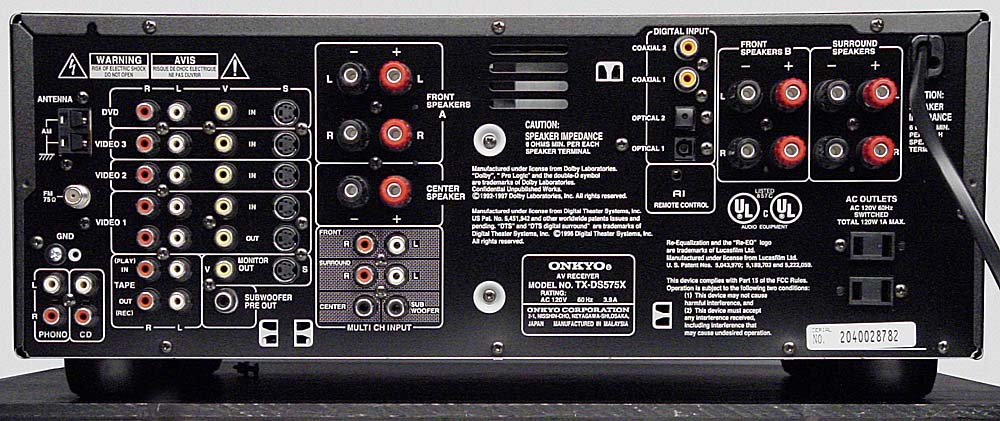
| So why are there so many inputs on a receiver?? Are you obligated to run video through the receiver before connecting it to the TV?? What about the audio inputs?? Welp, the zillion inputs are for what Video Switching! Composite Video Switching (yellow, white, red RCA): The best way to illustrate composite video switching is through real-life example. Refer to the receiver above: Let's say I have a Playstation, a VCR, and a Satellite. Also, let's say I have a TV with one composite video input. Obviously, three A/V sources cannot connect to the TV's single input. That's when the recevier comes into play. The Onkyo TX-DS575x featured above is a good example of a multi-input receiver, so to hook up all the sources, I would... 1. Plug the Playstation's RCAs into the Video 1 input located at the left, fourth row. 2. Using a pair of audio cables and a video cable, plug them into the VCR's RCA output, and plug the other ends into the Video 2 input on the receiver. 3. Using a pair of audio cables and a video cable, plug them into the Satellite's RCA output, and plug the other ends into the Video 3 input on the receiver. 4. Most importantly, plug a video cable from the receiver's Monitor Out (above the Sub pre-out jack) to the TV's video RCA input (typically yellow) Turn on the receiver and TV, switch to Video mode on the TV, and press the corresponding buttons on the front of the recevier depending on which source you use. It's that easy! S-Video and Component Video Switching: This goes along the same lines as composite video switching. If your TV is S-Video or Component Video deprived, and you have more of these sources than your TV can handle, you can use an equipped receiver to do the switching. (Note the 575x can handle S-video switching, but not Component Video switching). Optimum Picture: Of course, video switching is not advisible for the best picture. A DIRECT CONNECTION FROM A VIDEO SOURCE TO THE TV IS THE BEST CONNECTION. Switching was born for the inputless TVs as hinted above. Important Note: You cannot use an S-video cable for the Composite Monitor Out and use Composite Video cables for the video ins and vise versa. Composite for Composite, S-Video for S-Video, EYE FOR AN EYE! (There are receivers, however, that are capable of converting S-Video to Composite and vise versa....make sure you read the manufacturer's specs.) |
 |

|
| Copyright 2001, 2002 |
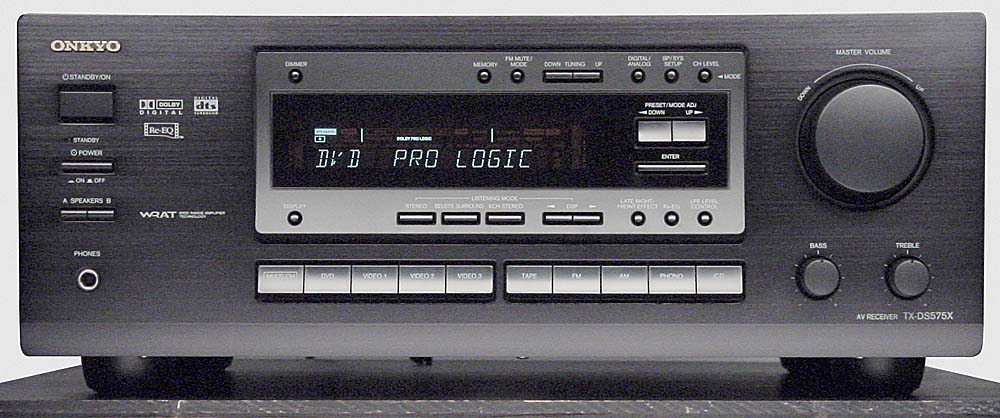
| Onkyo TX-DS575x |
 |
|
|