
Let's start by listing some html tags and what they do:
<h1>text</h1> <h2>text</h2> <h3>text</h3> <h4>text</h4> <h5>text</h5> <h6>text</h6>
These tags allow you to determine the size of the text you write in between it. The tag h1 being the largest text and h6 the smallest.
You must understand that html is not case sensitive, this means that it doesn't matter if you write:
<Html> or <html>
If you wan't to make a space bettween paragraphs you need to write the following between the two lines.
<p>
This works practicaly like the push of the enter button.
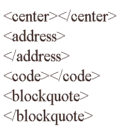
The above are called text offsets. Hence their name they kind of set the text aside or off their set. The tag center, centers the text and pictures within the middle of the two tags. Address seperates a physical mail address from the rest of the text. Code seperates a computer program listing from the rest of the document. And blockquote seperates a quotation from the rest of the text.
<img src="image.gif">
Now you need to know that you can only put pictures that have the extension of gif or jpeg, on the internet. But don't fret! If you have a picture that is a bmp or any other extension you can open it up in a picture editor and save it as a gif or jpeg. You must understand though that when you do this the picture looses some of its quality depending on the extension it was before.
Write the following
<a href="page.html">text</a>
In the text area you write the text you want the link to display.
With this you can create a link to anywhere incuding another website! Like this:
<a href="http://www.coolsite.com">Go to coolsite!</a>
If you want to know how to make a link with a picture this is how you do it:
<a href="wow.html"><img src="thepicture.gif" alt="go here!"></a>
The alt attribute allows you to write text that appears when your mouse moves over it. This can be used when just inserting a picture too.
Well that's it for this part of the tutorial! By now you should be able to do quite a bit with html, but there is still a lot more to learn!
Go on to the next tutorial
Go to top of page