The GPS ROBOT
Designed By:
Chris Middleton
February 23rd 2001
Introduction:
The following report will examine in detail the operation of every aspect of the project. Plus the applications and expansion available for the project upon completion
As far as technologist projects cover, none have ever covered such a broad range of specialties as the project that is currently in prototype stage. It is an Ultrasonic sonar guided, remote, autonomous, all-terrain robot using the global positioning system. Using the some of the newest technology on the market this project has quickly become a reality.
The analysis this level of project is complex and will be broken down in to several separate parts for easy explanation of the operation and building of the robot.
How the global positioning system is used in the project.
What does the laptop do for the robot?
How the communication system is setup.
What tasks the host station performs.
The operation of the motor controls.
Why the micro controller was chosen and how it is used.
The ultrasonic sonar theory of operation.
Abstract:
The core design of the robot relies on the ability of the on board laptop to process the GPS data from raw longitude and latitude. Next the laptop sends the vector to the micro controller, which is a multi-threaded processor with onboard EEPROM.
The remote coordinates are transmitted from the base station to an 8031 serial to parallel buffer, which then sends the data to a dual tone multi frequency encoder, which transmits through a portable phone handset. This data is received through the base of the portable phone. This goes to a DTMF decoder, which is then read by the micro-controller to a multiplexed serial bus shared with the GPS receiver.
The control data is then sent out from the micro-controller in a pulse width modulated format to the motor controls. The motors each drive a separate wheel on a custom tri-cycle frame, which allows precise control of the robot.
A Polaroid 6500 ultrasonic sonar module with a series 7000 transducer will be used in single echo mode to produce a histogram of obstacles around the vehicle using a 12-position 30 degree beam width scan.
The vehicle is approximately. 35kg with batteries, laptop, controls and supporting high durability frame, the frame is the 3rd prototype with two possible configurations.
Conclusion:
The robot is currently able to only navigate using the GPS control system. The sonar system works correctly but looses calibration during operation. The future model will have the sonar working correctly but with two modes of processing one single echo mode for on board processing and multiple echo mode for tracking and recognition of objects. Another advancement will be an ISM band transceiver with a 50kbps connection for streaming the multiple echo signals into an off board processor and back as avoidance vectors. This connection will also allow for easier operation by allowing the status of various conditions be observed such as temperature, power consumption and battery level.
The frame is also being changed to allow for better control over potholes and sharp drop offs.
In the not so near future, as a production model the drive system would be hydraulically operated by a small gas motor. Also the frame would be made of a light weight composite material and boast a variety of sensors allowing for better terrain sensing.
Presentation:
The Global Positioning System:
The global positioning system is of great importance to the project it allows for measurement free navigation so the emphasis can be on the control and communication system.
The global positioning system was first developed by the military during the late 1960's and put into operation in the 1970's. It uses twenty-four geo stationary satellites; each satellite transmits a specific frequency range out of the entire allocated bandwidth for the GPS system. The satellites operate by sending a series of frequency modulated scan lines across the area covered, never repeating the same frequency twice, similar to how a television displays a picture. The satellites have a foot print that over laps approximately twenty percent, which allows for better indication of positions under dense cover. The receiver has complex digital signal processing which determines the received frequencies of up to 12 satellite channels and determines the position from the known satellite position and frequency transmitted from each.
In the late 1980's during the end of the cold war the United States Government released a series of algorithms used for calculating global position, intended for commercial use. They intentionally injected a frequency shift to all the satellites to give results only accurate to 150 meters to ward off terrorist use; this was titled Selective Availability (SA). As signal processing progressed up to the point to where it is today the accuracy became closer to 30 meters and on August 16th 2000 the selective availability was turned off. Now most modern receivers are accurate to with in 2.5 meters in any direction. This now makes many exciting possibilities for exact tracking of position globally such as the GPS robots, automobile navigation and others that will surely follow.
The NMEA 0183 standard allows for any compatible GPS device to be used as a source of co-ordinates these devices range from wristwatch size to antenna-mounted units found on boats and transport trucks.
The coordinates are sent from the GPS eagle explorer to the laptop at 4800 baud with no parity and one stop bit. The data is sent in National Marine Electrical Association standard 0183. This standard is a shared bus topology used to allow everything from hull stress sensors to collision avoidance, to communicate with a centralized control system.
The Recommended Minimum Navigation Co-ordinate Information is sent in string format as
$GPRMC,HHMMSS,A,UUDDMM,L,UUUDDMM,T,S.S,D.D,ddmmyy,V.V,T,*CK<cr><lf>
Where:
$GPRMC= Information Header
HHMMSS=Time (UTC)
A = { a=valid data
{ v=invalid data
UUDDMM=latitude (units;degrees;minutes)
L=Direction (North/South)
UUUDDMM=longitude
T=Direction (East/West)
S.S =Ground Speed (Knots)
D.D =Direction in degrees
mmddyy=Date
V.V =Variation from Magnetic North
CK=checksum
<cr><lf> =carriage return and line feed
Two other additional codes are received one called GPGLL which is the same as the GPRMC code but with no ground speed or magnetic variation included. The other is GPRMB which is used for differential GPS communication which uses ground referances and special equipment for better accuracy.
The software can be explained as follows. Please use the included code section to follow better if desired. See Fig 1
OPEN "COM1:4800,N,8,1" FOR RANDOM AS #1
Opens the serial port for Bi-directional Mode
LINE INPUT #1, D$
Waits for line feed byte, then moves received sentence to storage string.
IF LEFT$(D$, 6) = "$GPRMC" GOTO RMCPROCESS
IF LEFT$(D$, 6) = "$GPGLL" GOTO STARTR
IF LEFT$(D$, 6) = "$GPRMB" GOTO STARTR
GOTO RXCODEPROCESS
Compares first six characters then if GLL or RMB was received it will go to the start and wait for the next sentence. If it was RMC the program will go to the RMC processing section, which strips the sentence in to separate parts. Else if it is not a GPS code it will go to a section RXCODEPROCESS that will check and decode the longitude and latitude out of the sentence and use it in the navigation solution, as the intended destination.
The next section of code, which actually does the calculation, is complex and will be explained. This is the control routine as indicated in Fig. 2
CONTROL:
IF SECONDS(C) = LAST OR VALID$(C) = "V" THEN
REALVALID = 0
GOTO STARTR
ELSE
REALVALID = 1
VALIDCOUNTER(C) = 1
WRITE #1, CHR$(90)
END IF
Upon entering in to the routine the program first checks to make sure the time has changed since the LAST GPS co-ordinate was received, at the same time the VALID flag is checked to ensure validity. The REALVALID flag is then set to zero to indicate the data is invalid and returns to the STARTR of the program to wait for the next sentence. Else if the REALVALID counter is set true to indicate the sentence is a valid navigation co-ordinate. The array VALIDCOUNTER keeps track of which are the valid sentences stored in memory and used later for averaging the co-ordinates to compensate for temperature drift of the co-ordinates as the GPS unit warms up. The program then outputs a serial vector of 90 degrees indicating to go straight until the processing is done.
PROJECTEDVECTOR = ATN((RXLATMCOPY - LATMCOPY) /
(RXLONMCOPY - LONMCOPY))
This line takes the Arc Tangent of the received latitude minus the current average latitude divided by the received longitude minus the current average longitude. This results in an angle in radians.
PROJECTEDVECTOR = (PROJECTEDVECTOR) * (180 / PI)
The program then converts radians to degrees.
IF PROJECTEDVECTOR < 0 THEN
IF (RXLONMCOPY - LONMCOPY) < 0 AND
(RXLATMCOPY - LATMCOPY) > 0 THEN
PROJECTEDVECTOR = (PROJECTEDVECTOR + 90) + 270
ELSE
PROJECTEDVECTOR = (PROJECTEDVECTOR + 90) + 90
END IF
ELSE
IF (RXLONMCOPY - LONMCOPY) < 0 AND
(RXLATMCOPY - LATMCOPY) < 0 THEN
PROJECTEDVECTOR = PROJECTEDVECTOR + 180
END IF
END IF
Using the CAST rule. If the PROJECTEDVECTOR is negative in only the second and fourth quadrant the test for this is to see which value is negative, the longitude or latitude. If the longitude (y axis) is negative but the latitude (x axis) is positive then the angle is in the fourth quadrant. Next you add 90 degrees to the negative value to return a positive angle then add 270 degrees because it is in the fourth quadrant. Any other negative angle is in the second quadrant, so you add 90 degrees to the positive angle. The same procedure is followed for positive angles except you only add 180 degrees, if both co-ordinates are negative with respect to the destination.
IF C < 5 THEN
IF (LONM(C) - LONM(C + 2)) = 0 THEN
PRINT "DIVIDE BY ZERO"
GOTO SKIP
END IF
BEARING = ATN((LATM(C) - LATM(C + 2)) / (LONM(C) - LONM(C+2)))
BEARING = (BEARING) * (180 / PI)
--> Quadrant compensation goes here. <--
ELSE
IF (LONM(C) - LONM(C - 4)) = 0 THEN
PRINT "DIVIDE BY ZERO"
GOTO SKIP
END IF
BEARING = ATN((LATM(C) - LATM(C - 4)) / (LONM(C) - LONM(C-4)))
BEARING = (BEARING) * (180 / PI)'CONVERT RAD => DEG
-->Quadrant compensation goes here.<--
This section of code determines the current movement vector of the robot. The routine compares the co-ordinate received five cycles before, to the current co-ordinate. If the co-ordinates are the same for the longitude it will result in a zero, which would result in an error when it processes the ARC Tan (Difference in Latitude/Difference in Longitude). To eliminate this it skips the BEARING calculation and VECTORSOLUTION navigation section. In Qbasic there is no convention for creating a cyclic array (last position points to the first) so you must manually make one. This is shown above where an array was declared from one to seven but since the program reads the fifth last co-ordinate received, at an array position of six the program tries to read the eighth position. This results in a program crash, so once the main program counter (C) is greater then five, the program looks five positions back to get the correct value. Next the ARC Tan is found for the BEARING, converted to degrees then compensated for the quadrant position through the same process previously described.
VECTORSOLUTION = BEARING - PROJECTEDVECTOR
IF VECTORSOLUTION < -200 THEN
VECTORSOLUTION = VECTORSOLUTION + 360
ELSEIF VECTORSOLUTION > 200 THEN
VECTORSOLUTION = VECTORSOLUTION - 360
END IF
The final VECTORSOLUTION is the difference between the PROJECTEDVECTOR and the BEARING. This solution has one flaw if the difference is greater then 180 degrees the output will be in the wrong direction. If the solution is greater then +- 200 degrees the program will complement the angle by adding -+ 360 degrees this results in a vector that accurately represents the angle, which the robot should turn.
The rest of the program either selects a predefined turn if the angle is small and sends the actual vector, if it is greater then 35 degrees.
This vector that is output by the computer has a range from 0à 181 zero being hard left and 90 being straight and 180 is hard right and 181 is stop.
The Receiver
The receiver is a one of the most vital parts of the project; originally the design was selected because of the simplicity of the receiver. By using dual tone multiple frequency (dialing tones) decoders with a cordless phone as the transmitter and receiver. The design allows for use of the existing cellular networks to control the robot, which would be ideally suited for the intended purpose of an inner city delivery vehicle.
The receiver first gets the DTMF tones from the base for the cordless phone. Next this is coupled to a DTMF decoder, which decodes the data in to a four-bit word. This word is read by the micro-controller, which stores and collects all the data until the required format condition is meet. Once meet the sentence is sent via the same serial port bus shared by the GPS to the laptop, which uses the received sentence as the desired destination for the robot.
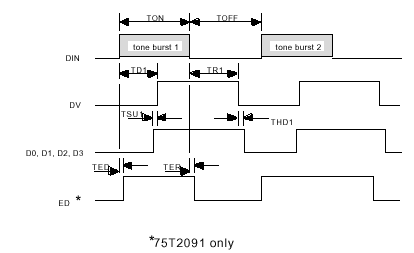
The DTMF transceiver utilized was a TDK 75T2091 not all the features that this chip provides were used. For example we used it only for receiving and did not use any call progress features as the receiver was coupled through capacitors to the secondary side of the base unit. This was done to eliminate any side effects the transformer would have on the detection time. The receiving section is very simple as the tone comes in the decoder places the value on the outputs and then asserts the Data Valid pin.
The data valid pin is feed into a NOT gate which inverts the signal and goes into the micro-controller.
CC=1
C=0
if (GetPin(11)=0) then
call Sleep(0.0)
DTMFRX(CC)=0
DTMFRX(CC)= DTMFRX(CC) + (GetPin(10)*1)
DTMFRX(CC)= DTMFRX(CC) + (GetPin(9)*2)
DTMFRX(CC)= DTMFRX(CC) + (GetPin(8)*4)
DTMFRX(CC)= DTMFRX(CC) + (GetPin(7)*8)
if DTMFRX(CC)=10 then
DTMFRX(CC)=0
end if
The micro-controller will wait in a loop; polling the input until pin number eleven goes low. Once low the routine will call the sleep function where 0.0 indicates other threads can be run during this routine. The data lines from the decoder are connected to pins ten to seven. One or zero is returned from the GetPin function the binary weight is multiplied by the returned value. Each time DTMFRX() is added to the previous value. When finished if the value is 10 this indicates the value zero was punched in the handset so the number is converted to zero instead.
call sleep(0.1)
if (DTMFRX(CC)<16) AND (DTMFRX(1)<>DTMFRX(2)) AND (C<>16) Then
If DTMFRX(CC)>9 then
'Do nothing
Else
nOutput=Output
Output = CStr(DTMFRX(CC)) & nOutput
C=C+1
end if
If the received number is greater then nine the program will not concatenate the number to the sentence Output. If the number is smaller then nine the letter counter C is incremented once to indicate that the number was converted to a string value and then attached to the existing string. This processes refresh is set to 0.1 seconds to allow for other programs to run.
If CC=1 Then
CC=CC+1
Else
CC=1
End if
This section prevents the same number from being taken twice or more. It may seem redundant but every time it cycles through the value changes from once to two or two to one. This is used above in the IF statement to return false if the two are equal, this indicates that the Data Valid pin is still low. This way the sentence is not added to but waits until the space character is sent through changing the stored value to eleven so any zero to nine number will be stored on the next cycle only once.
ElseIf (C = 16) then
Call PutPin(5,bxOutputHigh)
call sleep(0.3)
Call PutStr(Output)
Call NewLine()
C=0
end if
Call PutPin(5,bxOutputLow)
end if
Loop
If the number counter C is 16 this indicates the sentence is complete and ready to send. The relay which controls the transmission source is then set high which stops the GPS and opens the line from the micro-controller to the laptop. After a small time delay the string Output is sent, when complete a carriage return and line feed is sent indicating to the laptop the sentence is finished. The laptop separates the longitude and latitude and stores it for use as the destination co-ordinate; the laptop software ignores any partial sentences. The relay is then turned off to allow the GPS to send data once again. The program loops back to the start and runs again.
The Transmitter
The transmitter allows a remote user to enter in a co-ordinate through a regular desktop computer and have it sent to the robot for use as the desired destination.
First the user enters in the longitude then latitude; the numbers are converted to strings and merged. Once merged the string is sent via the serial port to an 8031 minimum system. The embedded program strips away the quotation marks and Line Feeds. Once this is complete the controller then sends the data parallel to the DTMF generator. The data that is sent by the micro-controller has a space inserted between each number this allows for the receiving controller to identify when the number has changed. See Fig. 4
|
Start |
0-9 |
0-9 |
0-9 |
0-9 |
0-9 |
0-9 |
0-9 |
0-9 |
End |
||||||||
|
B |
X |
B |
X |
B |
X |
B |
X |
B |
X |
B |
X |
B |
X |
B |
X |
B |
|
|
Lon |
End |
||||||||||||||||
|
B |
X |
B |
X |
B |
X |
B |
X |
B |
X |
B |
X |
B |
X |
B |
|||
|
Lat |
|||||||||||||||||
|
MEANING |
DECIMAL |
HEX VALUE |
|
Number 0à 9 |
0à 9 |
0à 9 |
| SPACE |
11 |
B |
The chart above shows how the communication was set up between the receiver and transmitter. This method of having the longitude sent then the latitude separating each number with a space is because as long as the DTMF receiver has a valid tone it will decode and assert the data valid output. The output is then inverted and sent to the micro-controller. The micro-controller will continuously read until the Data Valid output is brought low from a lack of recognizable tones or the tone is stopped. To ensure proper reception each character is sent at least 6 times the required length. However this causes the controller to read several hundred times, this in turn freezes the controller. To combat this between each
read, a task Sleep of 0.1 seconds is called this allows the other controller functions to proceed while the receiver code is not executing.
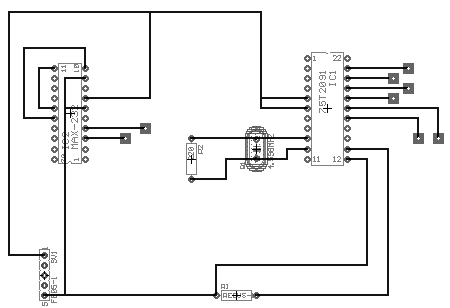
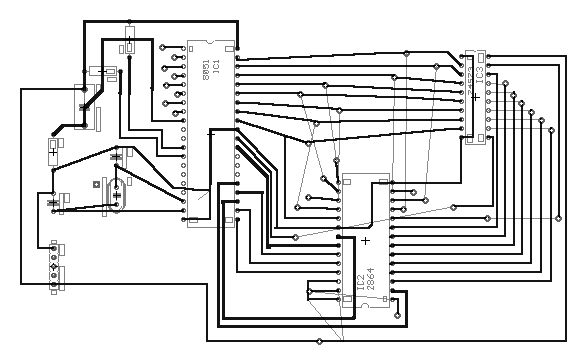
This output from the 8031 system is connected to the DTMF data lines, using Port 0 bits 0à 3. Bit 7 is used to operate the latch input of the DTMF generator, bit 6 Operates the reset input.
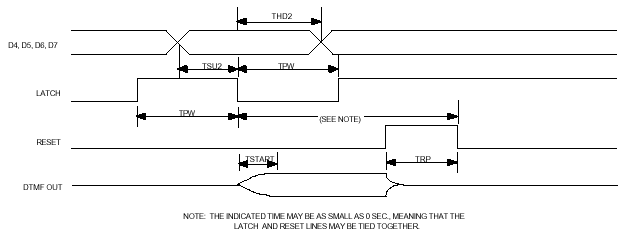
The only major problem encountered in this section was the communication between the computer and the 8031. The serial port was unable to capture the correct number from the serial data. The program worked correctly in theory however the group had come to the conclusion that it was the actual cables and the micro-controllers sensitivity to bit alignment errors that had caused the malfunction. The solution, which is now under development, is a windows based terminal type dialing program that will incorporate the DTMF dialing through the built in modem. The advantage to this re-design is the lowered cost by not using the sensitive 8031 micro-controller, EPROM, latch, MAX-232, 75T2091 DTMF generator, miscellaneous resistors and numerous cable assemblies. The hardware does work however because it has been tested using preset values stored in EPROM to use as the DTMF numbers, instead of the malfunctioning serial port. This program was very simple and employed only placing the value on Port 0 every few milliseconds.
SEND:
WRITE #1, LONGA$
WRITE #1, LAT$
PRINT "THANK YOU DATA SENT IS EFFECTIVE IN 10 SEC"
GOTO START
The program was similar to the GPS program except it was writing the string to the serial port instead of reading it from the port. The port was set to a baud rate of 4800.
Motion Control
Motion control is often one of the most difficult problems facing robot designers. The designer must keep track of every variable to be able to accurately place the robot in its environment. This is where the GPS comes shinning through, with the ability to output ground speed, approximate direction and precise location all in real time. This allows the designer to lower cost by removing several sensors and use less powerful controllers at the same time providing worry free operation.
For example if the surface the vehicle is traveling on changes from a hard surface to a slippery surface the controller would think that it is still going forward when one wheel could be slipping causing a gradual error in the navigation. Where the GPS navigation is relative and provides real time updates of direction and location so the robot could be going slowly to the left and the program would compensate for the direction until it is on course.
The direction of travel is determined by the value coming in from the serial port of the laptop. From this vector the program generates two pulse width modulated signals. The signals are then output to pair of high current MOSFET drivers and then connected to the motors.
The robot has two motors one for each wheel on each side using this configuration allows for the robot to turn up to 360 degrees if required. The motors are brushed, coreless, 90 watt, permanent magnet DC motors. The coreless design consists of a fiberglass former with coils wound on it the permanent magnets are in the center and surrounding it. These motors are very efficient, have high torque and will run from 1.5 volts to 18 volts.
The driver circuit is well designed for its purpose, and will deliver up to 63 amps to an inductive load continuously. MOSFET’s are ideal for these conditions the one chosen was the IRFZ44, it provides very low ON resistance (Rds) in addition to having built in reverse polarity protection.
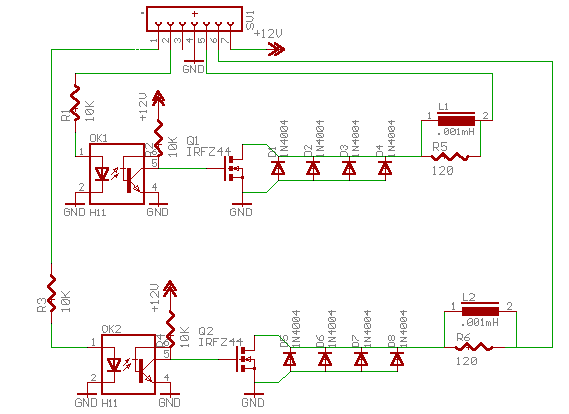
The output of the micro-controller is a dual pulse width modulated signal, which operates from 0-->56Hz, at DC and 50% duty cycle respectively. The output for each channel comes from pins 26 and 27; this is then inverted to buffer the BX-24 micro-controller from the output. This changes the active state of the control board to positive voltage because the input to the MOSFET gate is pulled up.
If the current was flowing from collector to emitter in the opto coupler it could burn it out if a large surge current increased the gate capacitance too high. Thus when it switched it would produce a negative voltage, which could destroy the opto-coupler leaving it open or shorted resulting in loss of control.
The operation of the vector decoding is quite complex and will require a deeper look in to the programming involved.
Component in the Main sub routine
Do
DataReady = StatusQueue(InputBuffer)
Checks to see if the serial port has data ready.
If (DataReady) Then
Call GetQueue(InputBuffer, ReturnVector, 1)
If it does have data ready it goes to the buffer, which is pointed towards the returned vector with one byte only being retrieved.
If (ReturnVector<>34) and (ReturnVector<>13) then
If the vector is a quotation mark or a carriage return the program does not set the vector.
If Semaphore(VectorFlag) then
Vector=ReturnVector
VectorFlag=False
end if
end if
If the multitasking flag for the vector is not set available the Semaphore() function returns zero. This prevents the object avoidance from setting the same vector only to have it erased before it is performed which could result in a crash. After the value is set the flag is set to false to make the vector available to other tasks.
The navigation sub routine
Const PWMmode8bit As Byte = bx0000_0001
This is a defined word to indicate the timers low byte is being used only in automatic reload mode. The PWM output can have 255 different pulse widths.
Const MaskOC1A As Byte = bx1000_0000
Const MaskOC1B As Byte = bx0010_0000
Mask the internal reload timer to output pins.
Register.TCCR1B = 0
Ensure the timer is off.
Register.TCCR1A = PWMmode8bit
Set timer mode byte.
Call PutPin(PinOC1A, bxOutputLow)
Call PutPin(PinOC1B, bxOutputLow)
Set the pins 27 and 26 to a active high output
Register.OCR1AH = 0
Register.OCR1AL = 0
Register.OCR1BH = 0
Register.OCR1BL = 0
Clear duty cycles on for the timer outputs.
Register.TCCR1B = 4
Start Timer1 according to 56Hz.
Register.TCCR1A = Register.TCCR1A Or MaskOC1A
Register.TCCR1A = Register.TCCR1A Or MaskOC1B
Apply mask to outputs, hence sending timer to the outputs.
do
if (Vector>80) and (Vector<100) then
Register.OCR1AH = 0 'a=left=pin26;;;;b=right side=27
Register.OCR1AL = 128
Register.OCR1BH = 0
Register.OCR1BL = 128
If the vector is close to 90 degrees (straight) it sets both motors for 50% duty cycle
elseif Vector <80 then
Register.OCR1AH = 0 'a=left=pin26;;;;b=right side=27
Register.OCR1AL = (CByte(Vector\90)*64)+ 63 Register.OCR1BH = 0
Register.OCR1BL = 128
Call Sleep(2.0) Register.OCR1AH = 0 'a=left=pin26;;;;b=right side=27
Register.OCR1AL = 128
Register.OCR1BH = 0
Register.OCR1BL = 128
Vector=90
If the Vector is to the left it will take the received vector, get the ratio of turn it represents multiply it by 64 and add it to 64. This in turn will keep the right wheel at 50% duty cycle, at the same time decreasing the duty cycle of the left wheel proportional to the received vector. This reduction in duty cycle will last for two seconds until the robot is turned. After, the robot will be set straight again, until the next vector arrives.
elseif (Vector>99) and (Vector<181) then
Register.OCR1AH = 0 'a=left=pin26;;;;b=right side=27
Register.OCR1AL = 128
Register.OCR1BH = 0
Register.OCR1BL = (CByte((Vector-90)\90)*64)+63
Call Sleep(2.0) Register.OCR1AH = 0 'a=left=pin26;;;;b=right side=27
Register.OCR1AL = 128
Register.OCR1BH = 0
Register.OCR1BL = 128
Vector=90
This section does the same as the above but for the right wheel and 180 degrees minus 90 to get the ratio of turn.
else
Register.OCR1AH = 0
Register.OCR1AL = 0
Register.OCR1BH = 0
Register.OCR1BL = 0
call Sleep(0.15)
end if
loop
The robot will turn both motors off if a vector greater then 180 arrives.
The Chassis
The chassis of the robot is the key component to being able to navigate off road or on road. The initial design was first going to be a fully off road spiked track driven system with scissor arms to control the turns and to keep it upright. The original design was going to be able to climb over large obstacles and even try to climb fences. The fence climbing ability quickly lost interest as the power to final weight ratio would have required several horsepower to even attempt to climb. The other issue faced was the arm movement early in the project, high torque sail servo’s were used but quickly failed to due constant weight against them. Their replacements were high torque gear motors. They too failed in the same manner because the robot was left upright over several days resting on the motors. Later that month the spiked belt claimed one a shirtsleeve and very nearly three of the designers’ finger. In addition the motors drew over ten times their rated current, which would have surely shortened their lives. These problems were the robots cry for re-design.
The new improved chassis sports two 90-watt coreless DC motors each coupled to a twelve-inch scooter wheels. The chassis is a tricycle design with a very short wheelbase; this allows the previous designs frame to be used with out major redesign. The new design is a very high-speed design with twice the original power. The frame was modified to include a torsion beam suspension. This isolates the rear suspension from the jolts and bumps from the front wheel.
The frame is made of extruded DIN rail used in industrial applications and all parts are aluminum except for the chain and sprockets.
The BX-24 Micro controller:
With the vast assortment of processors on the market you must look at your personal requirements before the hardware. The processor is an atmel AT85S35 with a 32kb EEPROM, regulator and Serial Peripheral Interface, on a standard wide 24 pin DIP.
Our requirements were for an easily programmable high power micro controller with many IO ports and expansion capability. We looked at several Basic Stamps, PIC’s and Oopic. We determined the best solution was the BasicX-24 Netmedia micro controller package. It has eight DAC/ADC IO’s that also serve as an either input or output with or with out pull-up with TTL/CMOS/TRISTATE IO configuration. With another eight Digital IO’s with a hardware interrupt and an input capture port. In addition it can play digital audio stored in EEPROM from any DAC pin.
The most useful feature is the ability of the processor to produce Dual PWM outputs with no Processor Overhead. It comes configurable to use a standard SPI Interface for external RAM or EEPROM. Plus two serial ports with a data rate up to 484 Kbs. Plus an in circuit debugger option for output to a host via the first serial port. The two LED’s on board provide easy indication at run time. The processor is an ultra fast 32 MIPS processor with multithreading ability for up to 1024 separate tasks.
This all adds up to a fantastic processor for our uses in addition it uses a very high level language, Visual Basic. They have made it syntax compatible in every respect. With a wide variety of functions available including base processor assembler commands for modification of the operating system or to send the timers to the output to produce custom functions including pulse width modulation
The Ultrasonic Sonar:
Using the Polaroid 6500 sonar module, a series 7000 transducer and a rotating base. The robot will scan its surroundings to determine the location of obstacles and avoid them. With twelve sonar positions and a 30-degree beam width all directions will be measured for obstacle density. The sonar has only one problem, the turret that was used was an old label printer roller, which has too much gear backlash. This causes problems because as the robot jitters over the ground the sensor receives false triggers from the edge of the encoder wheel. In turn the controller counts the pulses to fast and eventually strangles it by stretching the power cable too far winding the wire around the roller. Another problem is the sonar program losses its reference. These problems are currently being resolved with inductive sensors instead of optical sensors.
Another improvement under way is using the sonar in multiple echo mode, allowing sixteen distances to be returned from one field. The problem with this and the current design is the lack of processor RAM. Future improvements will be an Industrial, Scientific, Medical band transceiver that uses low power and spread spectrum transmission to increase bandwidth. The new transceiver supports up to a 50Kbs data rate, it would be connected to the current debug port one this in turn would be sent to the host computer for processing. The host would use this to perform a fuzzy analysis of the objects around it and with edge detection to recognize the horizon. The needed memory would be at least (16 samples* 12 positions* 3 elevations* 2 for the mask *2 using integers +80 for the process stack)= 2384 bytes of RAM needed.
The programming section is necessary because it is one of the most complex sections of the project; it was not included in the original contract but added as an option. Hence the lack of description, which would be several more pages.
TempArray(3)=0
TempArray(1)=0
call PutPin(echo,bxInputTristate)
call PutPin(init, bxOutputLow)
call PutPin(blnk,bxOutputLow)
do
call Sleep(0.0)
if (GetPin(18) = 1) and (RunOnce = False) then
c=c + 1
call PutPin(19, bxOutputHigh)
Call PutPin(init, bxOutputHigh)
call PutPin(echo,bxInputTristate)
call RCtime(echo,0,tof) ‘measure time for time of flight
distance(c)=Cint((tof / 2.0) * 34400.00) ‘convert to cm
Call PutPin(init, bxOutputLow)
if (c <> 12 ) then ‘run again if not in last position
RunOnce =True
end if
elseif (GetPin(18)=0) and (RunOnce = true) then
RunOnce=false 'reset for next index
end if
if (c=13) and (RunOnce = false) then
for c = 1 to 12 step 1
if (distance(c) > TempArray(1)) then
TempArray(1)=distance(c) 'set as the distance
TempArray(2)=c 'set position
elseif distance(c) < TempArray(3) then
TempArray(3)=distance(c)
TempArray(4)=c
end if
next
call PutPin(19, bxOutputHigh)
if (TempArray(3)<300) and (TempArray(4) >4) and (TempArray(4) < 9) then
'do replacement of semaphore vector until next gps update
If Semaphore(VectorFlag) then
if TempArray(2) > 7 then
Vector=180
elseif TempArray(2)<5 then
Vector=0
end if
VectorFlag=False
end if
end if
call PutPin(19, bxOutputLow) 'send sonar back to start
do
if (GetPin(18)=0) then ‘count number of encoder position
SendBackSonarCounter=SendBackSonarCounter + 1
end if
loop until SendBackSonarCounter=12
SendBackSonarCounter=0
call PutPin(19, bxOutputHigh) 'start new scan
call Sleep(0.1) 'kill momentum
c=0
end if
loop
Budget Requirements:
Mechanical parts: DIN rail, nuts, bolts and chain drive=$200
Motor: 1/8hp maxim coreless motor X 2 --$1200 new=paid $200
GPS: eagle explorer GPS = ON LOAN
High torque sail servo X 2 = $80
High torque gear motors X 2 =$100
Shinny training wheels = $40
BMX wheel=$50
Micro controller: Netmedia bx-24 X2 =$350
Cordless Phone= $45
Shift registers, MOSFET’s and perf. Board = $40
DTMF decoders=$30
2 X 12Volt gel cells 7.0 Ah = ON LOAN
Polaroid 6500=$100
Series 7000 transducer=$40
P-Mosfet’s= $50
Random IC’s=$50
TOTAL COST OF PROTOTYPE DEVELOPMENT à $1375
Estimated Reproduction Cost Using New Components à $2000
Total Time=200 hours +
Total Lines of code = 1600+
References:
GPS Interfacing
www.cs.ukc.ac.uk/research/infosys/mobicomp/Fieldwork/Notes/gps_if.html
NMEA Information
http://vancouver-webpages.com/peter/nmeafaq.txt
Polaroid OEM
www.polaroid-oem.comNetmedia Inc.
www.basicx.comNMEA Information
www.geocities.com/ResearchTriangle/System/3240/BOAT/nmea.htmlEagle Electronics
www.eaglegps.comFollow link
Garmin Inc.
www.garmin.comTDK Corp.
www.tdk.com
THIS DOCUMENT IS NOT A CONTRACT OR AGREEMENT AND HAS NO EFFECT ON ANY PREVIOUS AGREEMENTS WRITTEN OR IMPLIED. ALL ITEMS LISTED ABOVE ARE/WILL BE PROPERTY OF CHRIS MIDDLETON AS OF APRIL 1ST 2001.