-
What
TopGUI?
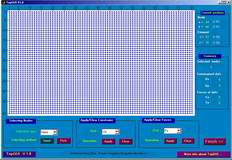
TopGUI is
a preprocessor program for Ole Sigmund's 99 line topology optimization
code. It is a Matlab GUI program designed for applying
displacement constraints and forces to the nodes of the FEA model.
-
Why
TopGUI?
Ole Sigmund's 99 line topology optimization code
sucessfully implemented the SIMP method for topology optimization,
which is an useful tool and is rather popular in engineering
education and research. However since the 99 line code applies
displacement constraints and forces by directly assigning values for certain
arrays,it may be bothering to modify the code whenever you run it
for diffrent constraints or loads. By using TopGUI you can easily
apply displacement constraints and loads to your FEA model without
editing the code, and will on longer have to recall the numbering
rule for nodes and elements in the code.
-
How
TopGUI works?
TopGUI
is a single function .m file (topgui.m) and is based on GUI
programming. It works rather independent on original program and the
original program can use TopGUI by doing slight modification.
TopGUI is called in
Sigmund's program as following:
[fixeddofs
F]=topgui(nelx,nely);
Then the function topgui generates a
GUI. In this GUI user can specify the displacement constraints and
loads to the model. When all constraints and loads are inputed, press
the finish button on the right-bottom of the window. Then the
function topgui returns two arrays(fixeddofs
and F) which are needed in
the original program and indicate constrained dofs and nodal
forces respectively.
After all to make TopGUI work, you have to
do slight modification to the original 99 line code as folows:
1. At the beginning of the main fucntion
insert the blue codes as follows:
function top(nelx,nely,volfrac,penal,rmin);
global fixeddofs F
[fixeddofs F]=topgui(nelx,nely);
...
2. In function
[U]=FE(nelx,nely,x,penal).
We do some
modification to ensure that the array fixeddofs and F are
assigned value by function topgui in main function
top(nelx,nely,volfrac,penal,rmin).
At the beginning insert the blue codes as follows:
function [U]=FE(nelx,nely,x,penal)
global fixeddofs F
...
Then remove the sentence "F = sparse(2*(nely+1)*(nelx+1),1);"
and the sencentces assigning values to array F and fixeddofs,such
as
"F(2,1) = -1;"
and
"fixeddofs = union([1:2:2*(nely+1)],[2*(nelx+1)*(nely+1)]);"
Put the topgui.m and the modified top.m
in the same directory and set it to current direcroty under Matlab.
So you can begin use TopGUI by input as the original 99 line code:
>> top(80,50,0.4,3,1.5)
|