
W
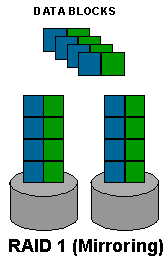
HAT IS RAID ? Raid stands for "Redundant Array of Inexpensive Disks". It is a system by which you can distribute data amongst a number of disks which obtain,depending on the case, either a speed increase, or full fault tolerance which protects against data loss. The different RAID levels are known as RAID 0, RAID 1, RAID 0+1 and RAID 4 or 5. Today we�ll talk about RAID levels 0 & 1.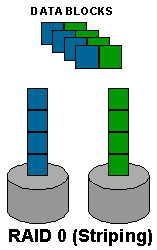
RAID
0 - High Performance
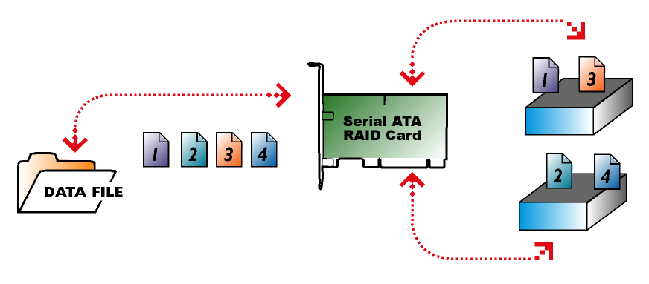
Data
files are split and saved on two hard drives. When the user opens the same
data file again, the files are read from two hard drives instead of one
drive thus giving twice the performance of a single a drive. However, the
user sees the capacity of both hard drives as only one single drive letter
capacity.
RAID 0 � �Striping�
With RAID 0, data is spread (or �striped�) across two drives.
- Because the data is split between two drives, the information moves between the processor and storage system faster.
- System storage capacity is double the size of the smallest drive.
- Imagine a car going around a race track and only able to give you a piece of information when it passes the finish
line.
Two cars
can handle the same information twice as fast.
When would you use RAID 0?
- Any application which requires very high speed storage, but does not need redundancy. Photoshop temporary files are a
good example.
Benefits of RAID 0:
- Increased Performance, Double drive capacity.
RAID 1 - Data Protection
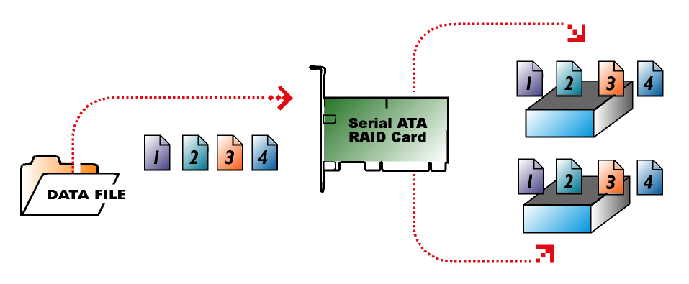
The
same data files are saved on two hard drives simultaneously.
Therefore, each hard drive is an identical copy of the other at all
times. If one drive fails,
the second drive will continue to work. The data is saved and there
is no PC down time. Once the defective hard drive is replaced, the data
from the good hard drive will automatically be copied to the new replaced
hard drive, even while the user is using the system.
RAID 1 � �Mirroring�
With RAID 1, data is duplicated on multiple drives
- uBecause
the same data is copied onto each drive, the data is protected.
- Provides immediate disaster recovery when a drive fails.
�When would you use RAID 1?
u - Applications which require redundancy with fast random writes; entry-level systems where only two drives are available. Small file servers are an example.
�
Benefits
of RAID 1:
- Reliability and data protection
Comparison of RAID 0 and 1
RAID 0 |
RAID 1 |
|
Unparalleled performance and huge capacity for storage intensive applications |
Create failsafe storage for all your important data while increasing read performance |
Digital Video & Audio |
Secure Data |
Photoshop and photo-editing applications |
Easiest system recovery |
Publishing, Graphics |
Any application where data is important and the storage system is at risk for failure |
Gaming applications |
Important data, such as financial records/small business, medical files |
Multi-tasking |
Low cost storage insurance for life of PC |
Get the most out of your computer�s performance |
Protect the data that�simportant to you |
------------------

Copyright � 2003, All Rights Reserved. Mobile : +91(0) 9811328969, @mail :- [email protected]