 |
|
|
|
|
|
|
|
|
|
|
|
|
|
|
|
|
|
|
|
|
|
|
|
|
|
|
|
|
|
|
|
|
|
|
|
|
|
|
|
|
|
|
|
|
|
|
|
|
|
|
|
|
|
|
|
|
|
|
|
|
|
|
|
|
|
|
|
|
|
|
|
|
|
|
|
|
|
|
|
|
|
|
|
|
|
 |
|
|
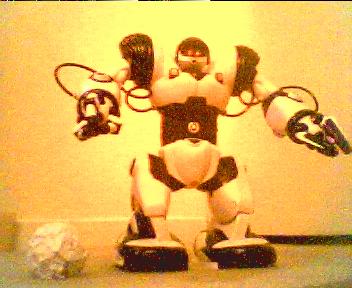
ROBOSAPIEN |
|
|
|

|
|
|
|
|
|
  |
|
|
|
|
|
MY MODIFICATIONS |
|
|
Pictures |
|
Glitch |
|
|
|
Robosapien |
|
|
Videos |
|
|
Tricks |
|
|
|
|
|
|
|
|
Modify |
|
|
|
|
|
|
|
|
IR Control |
|
|
|
|
|
|
|
|
|
|
|
 |
|
|
|
Home |
|
About Me |
|
 |
|
|
|
|
Links |
|
|
|
|
|
|
|
|
|
|
|
|
|
|
|
|
|
|
|
|
|
CONTROL ROBOSAPIEN FROM POCKETPC 2003 USING WINDOWS2003MOBILE |
|
|
|
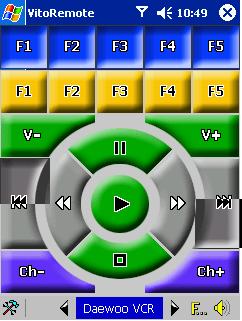
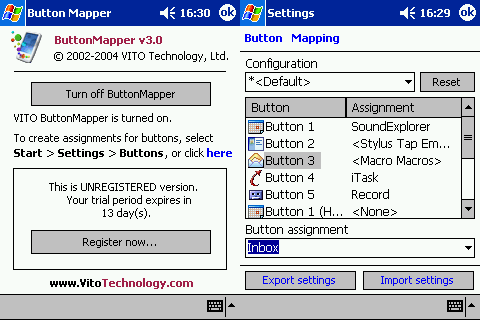
Okay first thing your going to need is ofcourse a POCKET PC or PALM with windows 2003 Mobile on it, and ofcourse make sure that PDA has a infrared port. VITO REMOTE also comes with a Screen Rotator for people who have PDA's where the infrared is on the side of the device and not on the front. Thus putting the infrared on the front since the screen has being rotated 90 degress or 270 degrees just go under settings.... |
|
|
NEW |
|
|
|
|
|
NEW |
|
|
|
|
|
|
|
DOWNLOAD Robosapien VTR for VITO Remote - NOT hosted on geoctiies, but on my MSN group you might have to join but it's for free and you dont havwe to wait for an email.. so CLICK HERE and you can downlaod the VTR FILE NOW!!!!! it's under in the DOCUMENTS FOLDER named. robo1.1.vtr jsut right click and click SAVE AS.. and away you go. |
|
|
|
Steps:
1, DOWNLOAD and INSTALL Vito Remote.
2. Download Robosapien.VTR and save it to \Vito Remote\device\ on your pocket PC
3. goto Manager Devices and check off "robosapien" |
|
|
VITO REMOTE v.3.5 DOWNLOAD NOW |
|
|
|
|
|
VITO TECHNOLOGY WEBSITE |
|
|
|
|
 |
|
|
|
|
 |
|
 |
|
|
|
|
 |
|
|
|
|
|
|
|
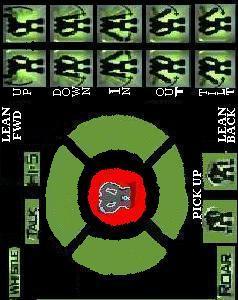
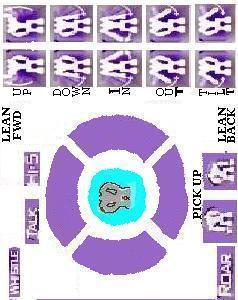
These are my CUSTOM SKIN jobs, for my Remote, make sure your using VITO REMOTE or this skin wont properly work. Simply save the Jpg by right clicking it and clicking 'Save as...' and put it as the background of the REMOTE and make the buttons transparent... Im workin in a better photoshop version right now. |
|
|
|
I use Vito Remote v.2.6 i just happened to find a freeware' off the net for it.. but v3.2 has better button mapping, but is only a 15 day trial... i will be buying the full product once i get my wireless camera into robosapien September 15 2004. just as of yet im on tight money situations |
|
|
|
robosapien.VTR was made using v.2.6 but also works on version v.3.2 |
|
|
|
PROGRAMMING |
|
|
1. Always press the button twice when trying to "read" ir. then you usally wait about 6 seconds and the step will be complete. then move on to the next device
2. If programming a MACRO (check off MACRO BOX)for instance a dance. I tried the maccerena off robosapien.tk website and input each command TWICE. followed by the next command twice, so on and so forth. each "read" can carry 12 sequences" x 3 "reads" = 36 Movements. and you havnt even added in the Sonic/Left/Right Sensors Yet!
3. when Programming your walk forward/backwards/left/right make shure the buttons are pressed twice. cuz if it's pressed only once, it will just do a small command like left arm up instead of walkin forward. the good hting about this. is once programed you can walk fast or slow. just simply press the walk button to start walking regualr and again to start walkin slow. this applies to side turning and so forth |
|
|
|
|
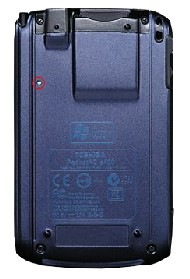
Manufacturer: Toshiba |
|
Model: e400 |
|
|
|
|
|
Overview: |
|
|
|
|
|
|
 |
|
|
|
|
 |
|
|
|
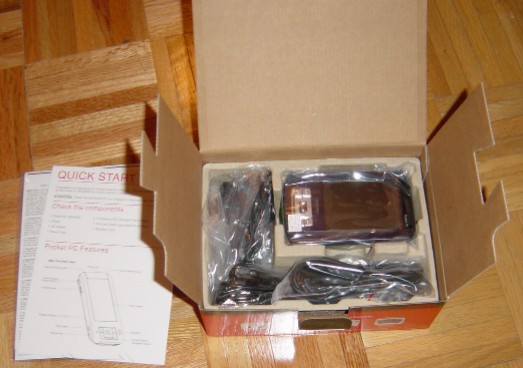
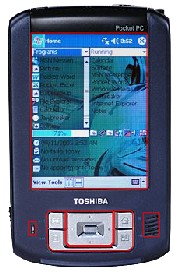
More than just a simple data device, the Pocket PC e400 Series features smart hands-free applications including text-to-speech and voice commands to launch applications for greater productivity while on-the-go. Powered by the battery-efficient Intel� PXA261 processor with Intel XScale technology at 300MHz, the Toshiba Pocket PC e400 Series provides the performance you need to keep you organized and productive. A built-in SD card slot is also included to store your favorite digital and audio files. |
|
|
|
|
|
|
| Operating System: Windows Mobile 2003 |
|
|
|
|
|
|
|
Dimensions: 4.9" x 3.0" x 0.4"
Weight: 4.6 ounces with stylus and battery
Processor: Intel� PXA261 processor 300MHz
Wireless: Infrared
Memory: 64MB SDRAM main memory,
16MB CMOS Flash ROM program memory,
32MB NAND Flash memory ,
128MB Secure Data Memory(optonial i added this to my device |
|
|
|
|
|
|
|
|
|
 |
|
|
|
|
|
|
 |
|
|
|
|
|
|
Other Hardware: 15W AC Adapter |
|
|
|
|
|
|
|
|
Expansion Slot: Secure Digital (I/O)
Battery Type: Lithium Ion 980 mAh
Audio Out: Stereo headphone jack, speaker
Audio In: Microphone
Display: TFT trans-reflective color display
Viewable Image: 3.5" Diagonal
Resolution: 240 x 320 pixels
Input Device: 5-way navigation button,
4 application keys,
3 function scroller,
voice record button,
power button,
Keyboard: Onscreen
Handwriting Recognition: Yes
Software Included:
Pocket Word, Pocket Excel, Pocket Internet Explorer, Microsoft� Windows�
Media? Player 9 for Pocket PC, File Explorer, Microsoft� Active Sync� 3.7,
Microsoft� Outlook�, World Clock, Toshiba Voice Recorder, Toshiba
Text to Speech for Pocket PC, and Voice Command. ArcSoft PhotoBase
included in the e405. |
|
|
|
|
 |
|
|
|
|
|
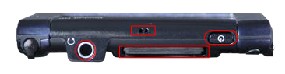
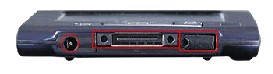
the infrared port on this device is on the LEFT side... i rotate my screen 270 degrees using VITO REMOTE so i can control my robosapien properly adn the infrared faces on the top... really good add on to a remote program |
|
|
|
|