Searching within the current page
Once a post gets really long it can be difficult to find what you want just by scrolling up and down. Say you want to find every post by a certain person, even with the 'index' of posts at the top of the page it can be time consuming.
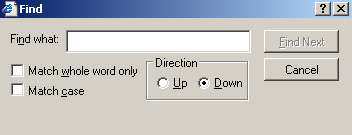
An easy solution is built right into your browser, the "find on this page" command. For Windows Internet Explorer users it is the keystroke CTRL-F or the click the EDIT menu, choose Find. Here is what it looks like:
Put the user name (or any other word) on the line and hit Find Next. The little find window will stay on top of the browser, but the browser will now be showing the page with the first occurrence of the word highlighted. Clicking Find Next again will jump to the second occurrence of the word, and so on. When you are done with the find window click Cancel or the x to close it.
Firefox (from Mozilla) for Windows users: Very similar to IE, click the Edit menu, select Find on this page. Instead of a seperate, floating window, a Search toolbar will appear at the bottom of the browser. Type your word on the line, click Search. Just as with IE, clicking a second time jumps to the second occurrence of the word, and so on.
Macintosh users: Not sure, don't have one! Will ask Moki to write this up for me.
Linux users: Multiple browsers are available, if someone wants to do a quick write up I will include it here.