Histograms and Scatterplots
The position of the graphically
represented keys can be found by moving your mouse on top of the graphic.
The
function keys do not count as a row. Hence, row 1 begins with the yellow shift
key.
| Turn your calculator on | |||||||||
Press
 . . |
|||||||||
| Clearing the memory | |||||||||
Press
 .
Arrow to the STAT menu and press .
Arrow to the STAT menu and press
 .
The list screen will appear. Press .
The list screen will appear. Press
 (You should see a right arrow on the screen.)
 (DEL-A, for delete all). The ever cautious calculator will ask you if
you really mean it. Press
(DEL-A, for delete all). The ever cautious calculator will ask you if
you really mean it. Press
 for yes.
 |
|||||||||
| Clearing the Graph Screen | |||||||||
| Entering data | |||
| one variable | |||
|
Type in the first entry in your list and
press
.
Type in the rest of the list, pressing
after each entry.
|
|||
| two variables | |||
Type in the first x-value
in your list and press
.
Type in the rest of the x-values, pressing
after each entry. Press  . Now type in all the y-values,
pressing
after each entry. Make sure the y-values correspond to the x-values they
sit next to. . Now type in all the y-values,
pressing
after each entry. Make sure the y-values correspond to the x-values they
sit next to. |
|||
| Drawing
the Graphs
Warning: Errors occur if the function register has functions in it. See above for instructions on how to clear the function register. |
||||
| Scatterplot | ||||
|
||||
| Histogram | ||||
|
||||
|
Example graphs |
||||||||||||||||
| Scatterplot | ||||||||||||||||
Problem: Make a scatterplot of the
following data:
|
||||||||||||||||
Solution:
|
||||||||||||||||
|
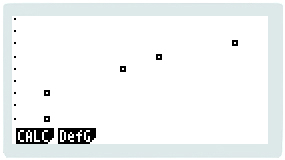
The result should like something like this:
|
||||||||||||||||
| Histogram | ||||||||||||||||
| Problem: Draw a
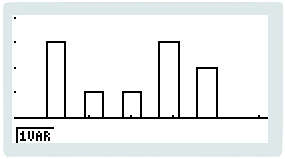
histogram of the following data: 5 1 4 1 3 4 1 4 5 2 |
||||||||||||||||
Solution:
|
||||||||||||||||
| The result should look something like this:
|
||||||||||||||||
| Turning the calculator off | ||
Press
 .
.
|
||
Other Casio fx-9960g pages:
 to
get to Graph Type: Scatter. We want this so press
to
get to Graph Type: Scatter. We want this so press  . (If the Graph Type isn't Scatter, press
  ) to get new menu
tags.
) to get new menu
tags.