The LWO import and export plugins are included with Milkshape 3D 1.6.5 and later, however there has been a recent bug fix.
Download: msLWOPlugins.zip (66 KB, Updated: 7/14/2003)
The plugins are labeled "LightWave LWO..." on the bottom of the Export and Import menus.
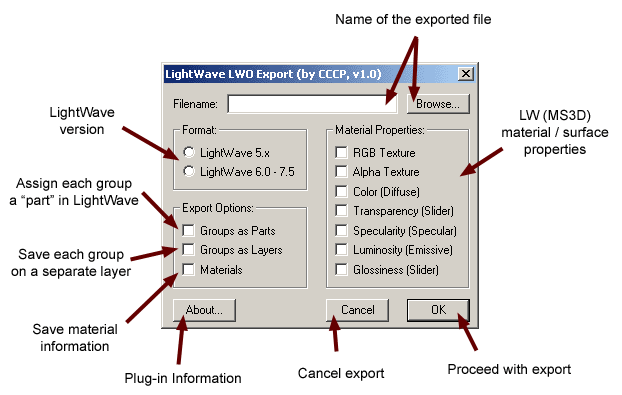
Exporter Features:
Save Groups as Parts or Layers (or both).
All material properties (some with approximate conversion).
Bones support has been removed because it was incorrect. It may be added later,
or maybe even made into a SMD Exporter/Importer for LightWave.
Since LightWave 5.x has less features, the exporter will not allow you to save Groups, RGB, and Alpha Textures if you choose LightWave 5.x format.
LightWave version 6 and above will be able to save all those options only if they are present in the model.
Also, Smoothing will be turned on at 180 degrees for all the surfaces.
Importer Features:
Automatic detecion of both LWO formats (5.x and 6.0+).
Import of mesh and materials, with all the properties.
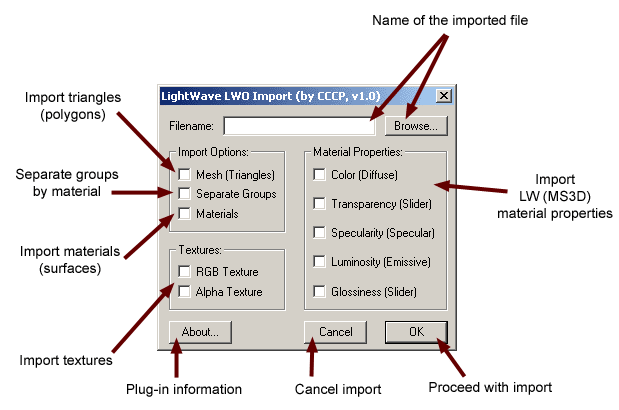
Note: Specular, Emissive, and Glossiness properties of the materials are represented differently in LightWave than in Milkshape, so they are unchecked by default.
If selected, they will use the approximate color(import) or percentage(export).
If an imported model is completely black, make sure "Auto Smooth" is checked in the "Groups" tab before importing, and that the assigned material is not a solid black color.
Directions:
Just copy the DLLs to your Milkshape 3D folder, and start up Milkshape.
They should show up on the bottom of the Export/Import menus as "LightWave LWO...".
Bugfixes:
7/14/2003 - Import v1.01 - Fixed a bug that would sometimes create extra triangles in incorrect groups, resulting in a triangle mess. Thanks to DeaDite for the bug report.
Please report all bugs to cccp_99 AT hotmail DOT com , or post them on the Milkshape forums.
Author: Michael Udaltsov, aka "CCCP"
Back to plugins page