Bugs/Problems (I) saw in N|vu
l = seen in Linux, w = seen in Windows)
- [SOLVED]Mozilla 1.7 crashes after giving error if started with N|vu also running. No problems if N|vu is started after starting Mozilla1.7. Although the N|vu download page does advise linux users to use Mozilla>=1.6 to resolve this, but it still happens with my Mozilla1.7.1-2(Debian) build. l
- Mozilla will start if you use the --no-xshm option to start it from the command line.
- Just upgrade to Mozilla 1.7.1-3 with apt-get and everything works fine :)
- [SOLVED 0.50]Cursor moves
to top line when changing views from Normal to <HTML> Source and
other views. It
should remain at the same position in the new view as it was in the
earlier view. lw
- [SOLVED] N|vu does not
create external style sheet in Linux. The applied styles are shown
only till the file is open. All style info is lost when the file is
opened again as there is no stylesheet. However, if you create a file
in the name of the stylesheet and then add styles to it using
CaScadeS, styles are saved as expected. l
The above problem
was that Nvu wants "FULL" path to the file to create it. If one just
writes foobar.css in the URL: text field, I think it tries to create a
file in the root folder. However, if you write
file:///home/username/path/to/foobar.css, it will create the file as
expected.
- Width of drop down lists (Choose Paragraph
Format, Choose Font, Apply a class to the Selection) changes when drop
down arrow is clicked. . lw
- [SOLVED
in 0.40+]Error on clicking Tools>Validate HTML. (Error Launching browser
window:TypeError:
Components.classes['@mozilla.org/appshell/component/browser/instance;1']
has no properties). The tip at Nvu
Download page
for Linux users did help either. l
- [SOLVED]Clicking
Help>Nvu's Website causes Epiphany to crash. Could be a system problem
too. Just noticed that Thunderbird brings up similar links just
fine. l (.
- [SOLVED]Same problem
as in #6 for Help>FAQ, Help>Bug reports and suggestions, and
Help>Developers' community. l
- [SOLVED in 0.60]Download
Manager doesn't show the files downloaded when a url is opened with
File>Open Web Location. l
- No keyboard
shortcut for CSS editor. lw
- [SOLVED Nvu0.50]"Choose File"
for choosing a template tries to open "/home/username/My Documents" in
Linux, which, by
default, is not there. And the message "You do not have permissions to
view this directory"
is shown. The message is ridiculous as no directory of that name
exists. Is probably a windows feature floating around in Linux build
by mistake? l
- "Retain original Source formating" messes
up html code by inserting empty lines after tags like
<br>, <ol>, heading tags, etc. Choosing "Reformat HTML
source" changes those white spaces back to normal. (Nvu 0.50 -
0.8RC-2) w l
- Last/Only open Tab cannot be closed by
"Ctrl+W". This is annoying when the use has two windows open
with a few tabs in first and say only one tab in second window. If the
use tries to close the window with the single tab by using "Ctrl+W",
it does not close the window, instead opens an empty tab. And if the
user tries to close the window by "Ctrl+Q", Nvu is quits and user
looses the other window too. l
- Tab bar always shows. There is not
option to remove the tab bar if only a single page is being
edited. l
- Cannot
"Paste text without formatting"
with mouse in definition. Ctrl+V works fine. When I try do paste
definition without formatting, the <dd> tag gets deleted
and the
cursor goes back to <dt> tag. l
(27Jul2004)
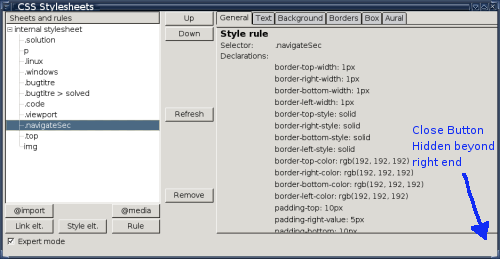
- Grrr.. I loose Close button of
CaScades. In case of a style having a property with length of
text describing it longer than what is viewable, Close button of
CaScades goes out of view. Close button is also lost if size of
CaScades is reduced so that right pane is not wide enough to show all
the property text lengths. l
(29Jul2004)
- CaScades'
"Down" button does not work.
CaScades' "Down" button does not move the style rule down as it should.
I expected it to work as the "Up" button does, but .. : ( l
(30Jul2004) Update:
The button's action has not been implemented yet.
(7Aug2004).
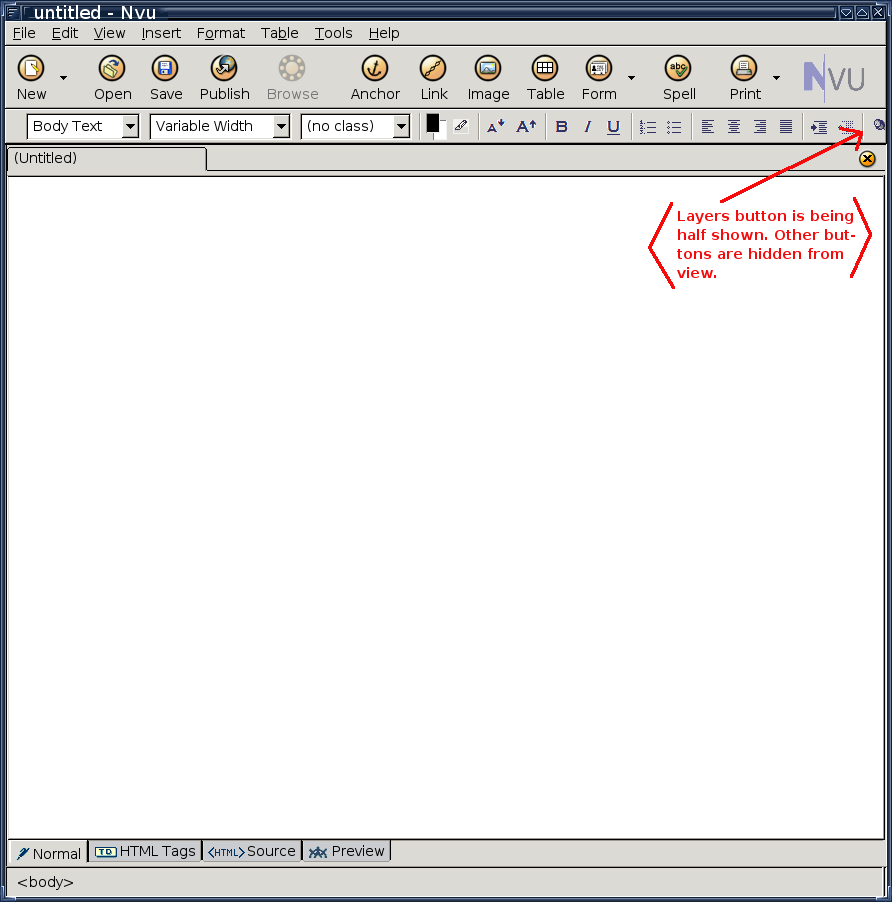
- Editing toolbar gets
truncated if width of Nvu window is less than with of editing
toolbar. The toolbar should show the ">>" (two chevrons)
indicating that some editing buttons are hidden. This feature works
perfectly in Firefox0.9.x and Mozilla1.7(in case of Bookmark Toolbar)
and is surprising that it doesn't handle toolbar nicely in Nvu. lw (1Aug2004)
Click on images to see bigger images.

- Carriage Returns not visible. If I
try to view carriage returns by View > Carriage Return, there is
not change in the view. Carriage returns are just not visible. l (6Aug2004)
- Block
Outline is buggy.
Although
View > Block Outline does show the block outlines in the current
tab, it is not redered in other tabs automatically. Just like the
window title was being shown only for the page opened most recently and
not individually for tabs. l
(6Aug2004).
- Cannot use @import button to import another
style sheet. I tried using the "@import" button to import
another style sheet. Typed in the full filename and media info, and
clicked on "Create Import At Rule". At first no rule is added in
CaScadeS' left pane for the @import add operation. After clicking on
"Refresh", the @import rule was listed, and below it were rules from
the imported style sheet. Closed CaScadeS, and saved the
document. Then tried to apply a rule to a paragraph from the "Apply
class to the selection" drop down menu. The drop down menu didn't have
any of the style rules from the imported style sheet. Even tried
editing code by hand, and no style was applied. Re-opened CaScadeS,
the @import rule was still there. So, just for testing I closed the
file and re-opened again, ..ahem.. the @import style rule was
gone. Probably, it never gets saved in the original style sheet. l (7Aug2004).
- Markup cleaner doesn't show "OK" button
after cleaning up. The Tools > Markup Cleaner does not
change the "Clean" button to "OK" after cleaning the markup. w l (10Aug2004) till
0.8RC-2
- How to loose Tabs in Nvu in a few
clicks. Open two or more html files. Click (left button) on
empty part of tabs toolbar. Right-click on empty space in tab toolbar
(context menu appears everywhere on tab toolbar!!). Click on "Close
Tab". In most of the cases, both web pages which were opened will
close, and you will loose the tab toolbar altogether. Bug :
- Web pages are closed and the visible page becomes
uneditable.
- Loss of tab toolbar and items in "File > Recent". (But
"Recent" entries are not lost from profile, they are there if Nvu is
restarted). None of the Filemenu choices work. Composition Toolbar
buttons do not work.
- Title of the window does not change.
- Nothing happens (very rare)
In all cases, the "Close
Tab" icon on right side is rendered disabled. Ctrl+W and Ctrl+T do not work. The only
solution after this is to restart Nvu. l
(15Aug2004, Nvu 0.41--0.60)
- 0.41 Buggy Format Toolbar behaviour. Since
0.41. I have noticed that many times when I select text and try to format it
to be Heading1, Heading2, Paragraph, etc. or apply a class to it,
nothing happens. After I select the text and apply format info, it
just greys out the background of selected text without applying any
formatting styles. l (23Aug2004, Nvu
0.41,0.50)
- [SOLVED] Horizontal Line Propterties dialog box doesnot change
width and height properties. The Horizontal Line Properties dialog box doesnot
save changes made to width and height properties. The 3-D shading, and
position (left, center, right) do work as expected. But there is no
change in the inline styles when either width or height or both
properties of horizontal rule are changed. It seems like that
N|vu does not remember the changes made and keeps them as they were
default (100%, 2px). lw (25Aug2004, Nvu 0.41, 0.50, 0.60).
- [SOLVED 0.60]Table
cell(s) or table background colors cannot be changed after setting
once. Cell
background or table background color cannot be changed once it has
been set with the Table Properties GUI. lw (25Aug2004, Nvu 0.41,
0.50)
- Nvu on Linux does not support the auto copy
behaviour of selected text. In Linux, any text selected with
the mouse is automatically copied in a buffer, and can be pasted with
wheel mouse click. N|vu doesn't support it. I had noticed it in
0.3, but forgot to add it earlier. l
(25Aug2004, Nvu 0.3~0.8RC-2)
- Nvu doesnot support a:hover like style
rules in Normal or Preview modes. N|vu does not render the
changes as suggested by an a:hover rule in the style sheet attached
with the web page. The odd behaviour has been noted in Normal and
Preview mode. To view these changes, the only way out is to view the
page in a web browser. l (2Aug2004, Nvu
0.41)
- Nvu does not update an image put on web
page with style sheet. I have noticed that if there is a rule
in the style sheet attached with an html page, changes in the image
are not reflected in N|vu. E.g. I attached an image as background for
body(bottom, repeated horizontally), which displayed fine. But when I
made some changes to the image with an image editor, and saved, N|vu
showed the same old image even after closing and reopening the html
file. l (2Aug2004, Nvu 0.41) Bug
pending full investigation.
- Save button is not activated when a
particular type of change is done in a document. There are a
couple of very basic operations that when done in the document being
edited, do not make the "unsaved changes" red-floppy icon to
appear. Also the "Save" button is greyed-out. One case I can remember
is "Insert > Table of Contents > Update". I had just edited one
heading and saved the document. When I updated the TOC, Nvu
didnot indicate that it needed saving. l
(7Aug2004, Nvu 0.41, 0.50)
- No keyboard shortcut for moving between
different views. There seems to be no way one could use the
keyboard to move between Normal view, HTML Tags view, Source view or
Preview mode. Should have noticed it long time back. l (14Aug2004, Nvu 0.41, 0.50, 0.60).
- Bidirectional text cannot be indented from
the right. The increase/decrease indent function works only for
the left-indent. This is OK for text written from left-to-right, but
provision should be made to make the feature to work on the right
indent for right-to-left indent. l
(14Aug2004, Nvu 0.41)
- Nvu Site Manager creates new directory with
wrong permissions. When the user tries to create a new
directory in a local site(using file:// protocol), the site manager
creates the site with permissions d-wxr-----t. It is good that it sets the sticky
bit but its illogical to not set the "read" bit for the owner!! The
result is a directory which the user own but cannot read! l (23Aug2004, Nvu 0.41, 0.50)
- Nvu
-edit
<url>
option only works with full
path for local file. I tried
to open this file(local copy) using $
nvu -edit nvulinux.html. But
when Nvu started it
said "www.nvulinux.html" not found. Nvu worked fine when I provided it
with full path for the file. It should work for files in current
directory. This is what is expected for a normal Linux program. Will
have to check for Windows too. l
(30
Aug2004, Nvu 0.41, 0.50)
- Cannot
change background image. If
a user tries to change an already set background image, Nvu does not
save the changes. The only way to do it is to delete the path for the
current image, save the document to get default background. Then the
user can set the new background image. l
(06 Oct2004, Nvu 0.41)
- Insert > TOC > Update TOC does not
save changes. I made a new section on a web page which already
had a TOC(made with Insert > TOC > Insert). After making all
changes, I saved the document. Then to insert the new section's
heading to the TOC, I did Insert > TOC > Update. The changes
were seen in the TOC but the "Save" button stayed in its inactive
position as if there were no changes to be made. This behaviour is
repeatable and reproducible 100%. Workaround: after Insert > TOC
> Update, make a small change in your document and then save
it. l (11 Oct2004, Nvu 0.41)
- Cursor looses focus(not always, but mostly
when I'm editing a particular file). When I save the document
using Ctrl+S, the
blinking cursor is lost. This was noticed when I tried to reposition
the cursor after saving to do more edits. l (11 Oct2004, Nvu0.41, 0.50)
- [SOLVED]Left vertical
margin bar changes width. The left vertical margin bar changes its width with
changing vertical size of block. This is very annoying as it shifts
the whole viewport left or right when ever this width change
happens. A better option could be if the text represented
vertically. But I'm not sure if its possible to do it in
XUL. l
(12 Oct2004, Nvu0.50)
- Syntax highlighting for source is not done
in realtime. In case I start to write something between <span></li> tags, it is show as <span> New text added in source view.</li>.
The text between the tags should be rendered black rather than color
of the tag. l (12Oct2004, Nvu0.50, 0.60,
0.70, 0.8RC-1, RC-2)
- Spell
Checker does not work consistently.
The spell checker works fine for the text currently being written in a
file. But it does not mark the wrong/unrecognised word spellings
consistently in the rest of document text. Even if it marks the wrong
word spellings, it sometimes does not mark them all in the page. For
example, it is not marking all the "Nvu" or "Ctrl" strings in this
page. It only marks the words for the blocks of text I click on in the
page. l
(13 Oct2004, Nvu0.50)
- Add to Dictionary uses 100% cpu.
When adding new words to the dictionary, Nvu uses 100% cpu for about
4-5 seconds. l
(21Oct2004, Nvu0.50)
- How to loose all TOOLBARS in Nvu
with a
few clicks.(continued from
#22) Open an html page in Nvu. Click
somewhere on the page to bring the cursor focus to the page. In the
status bar, right click on a tag and select change tag. Press "ESC"
button and hover your
mouse over each toolbar in Nvu. One-by-one as you hover over the
toolbars, they will vanish. But don't worry, if you have an unsaved
document you can save it by using Ctrl+S,
and close Nvu in the normal way by Ctrl+Q
, i.e. file menu
shortcuts seem to work fine. The question is "Do you remember them?" l
(21 Oct2004, Nvu0.50, 0.60)
- [WORK-AROUND] Uses 100% CPU
to change from or to <HTML> Source view mode. My machine's CPU usage
reaches 100% whenever I change from <HTML> Source view to any
other view. l
(2Dec2004, Nvu0.50, 0.60) . Spell checker
was playing spoil sport.
- [SOLVED] Credits
section of "About" shows Nvu0.60 to be based on Firefox
1.0. Although
release notes indicate that Nvu 0.60 is based on Mozilla 1.7.1, the
credits section of "About" says it is based on Firefox1.0. Probably,
the devs forgot to roll back that part after deciding to use Mozilla
1.7.1 for 0.60. (2Dec2004, Nvu0.60) wl
- [SOLVED] HTML Validator
does not work in Nvu 0.60. Tools > Validate HTML does not work in 0.60. It
opens a window but the mouse icon changes to busy and remains like
that if the window is not closed. (2Dec 2004)
- Overlapping line numebers in <HTML>
Source view. Create a new document, type-in a few characters
and press "Return" (i.e. Enter) once. Change to source view and you
will notice that line numbers just before </body> line are overlapping!l 0.8RC-1
- ........
(in case you have noticed buggy behaviour with N|vu, and want it to
be listed here, just send me an email at boneywasawarriorvayayix at yahoo dot com with
details about how to reproduce the bug, Nvu version, PC info, and OS
version and if you permission to put your name/email(plain text, no
mailto: tags) for reference..)
©2004
Boney