Visual Studio Project
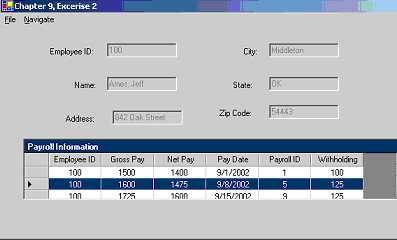
This project allows the user to navigate from employee to employee. As you navigate through the employee names, a complex bounded database displays the detail payroll records for the currently selected employee. The actual Payroll form shows the each employee name and their contact information. The subform shows the payroll information of each specific employee. The user can navigate through the different employees and update any incorrect information. The user also has an option to add or delete employee that are new or no longer work at the company. The user can click File/Update to record any changes that they made to the database. The application will ask if they are sure they want to make the changes permanent. Also, the user can click File/Exit to exit the application. The user will then be prompted to verify that they want to actually close the program. If the user confirms that they want to exit then, the form unloads. The user can click Navigate/First to navigate to the first record in the database. The user can click Navigate/Next to navigate to the next record in the database. The user can click Navigate/Previous to navigate to the previous record in the database. The user can click Navigate/Last to navigate to the last record in the database. |