How to crop standard (4:3) footage so it can be incorporated into a widescreen (16:9) project without distorting it.
There are several ways of doing this so I have selected what I think is the simplest in both Video Studio and Premier Pro:
Video Studio:
First open a widescreen (16:9) project and insert the standard (4:3) video clip into an overlay track.
The overlay options will appear and the footage will be centred in the preview window.
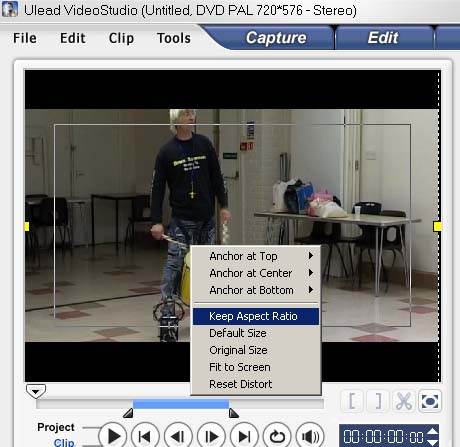
Drag the yellow handles at the left hand and right hand sides to the edge of the screen.
Now "right click" inside the yellow markers and select "Keep Aspect Ratio" as shown in the screenshot below.
Note that you will lose 72 pixels from both top and bottom of your standard clip. If your subject is not centred you can click and drag the clip in the preview window up or down to suit your requirements.
Premier Pro:
First open a widescreen (16:9) project and insert the standard (4:3) video clip into video 1.
Next click "play" then "stop" in the preview window to show the clip.
Click in the preview window and white "handles" will appear at the sides of the clip.
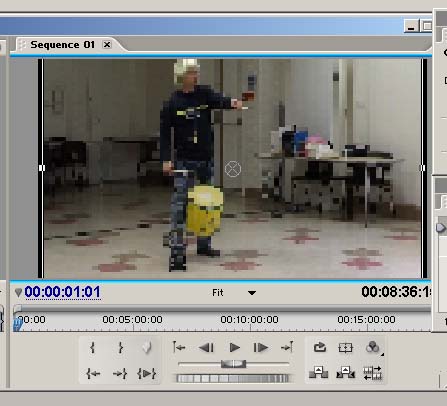
Drag either the left or the right handle to the edge of the screen.
You will see the clip expand to fill the screen as shown in the screenshot below.
Note that you will lose 72 pixels from both top and bottom of your standard clip. If your subject is not centred you can drag it up or down to suit your requirements.
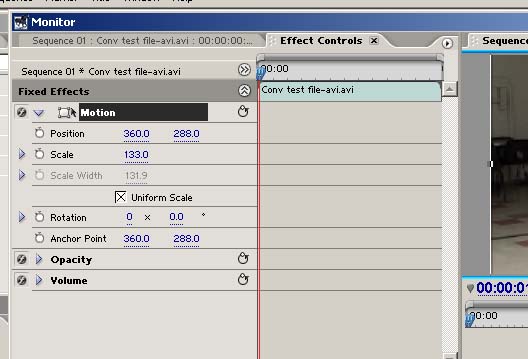
An alternative mthod is to click on the "Effects Controls" tab, open the Motion effect, then adjust the scale to 133.0
See screenshot below:
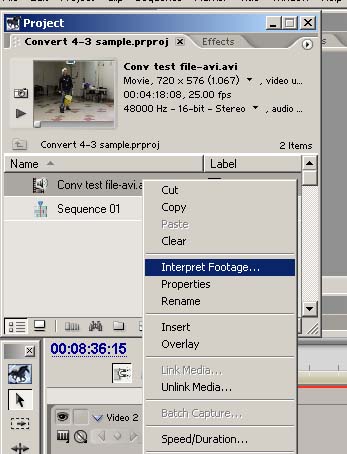
Finally, a word of warning, DO NOT use the "Interpret footage" function as shown in the screenshot below.
This will not crop the video clip but will stretch it to fit widescreen causing distortion.