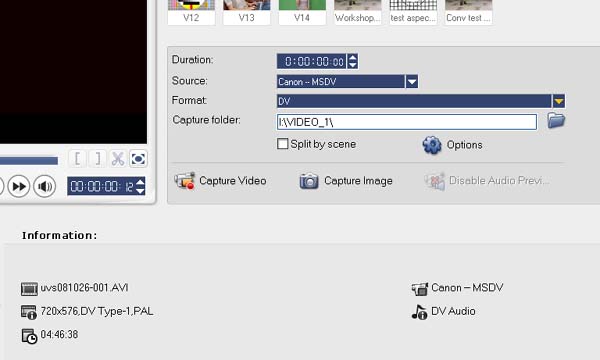
Video Studio Capture Settings: Set these before doing any capturing.
Choose the source (if more than one) from the drop-down menu.
Choose DV (or AVI) from the Format menu.
Choose your video drive for the capture folder otherwise it will default to your C drive.
You can see a detailed description of the capture source in the Information area.
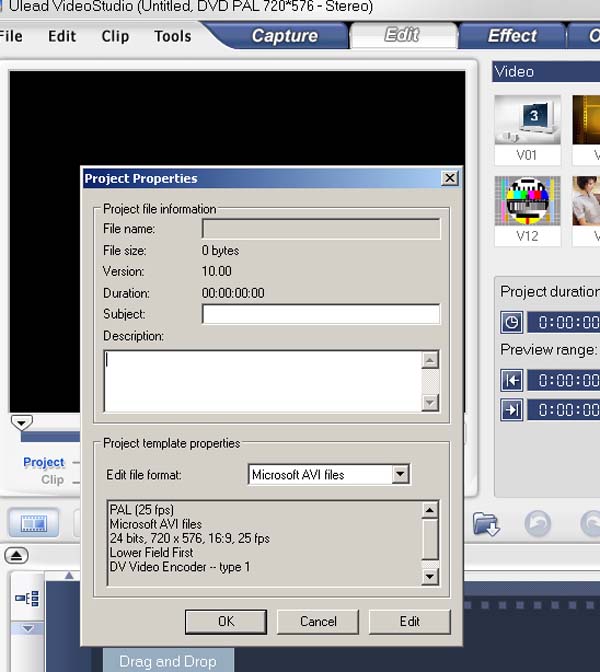
Video Studio Project Settings: Set these before doing any editing.
Check your Project Settings by choosing "File" then "Project Properties".
Make sure they are as shown below or you will not be able to write back to DV tape or do frame accurate editing.
Make any changes by selecting "Edit".
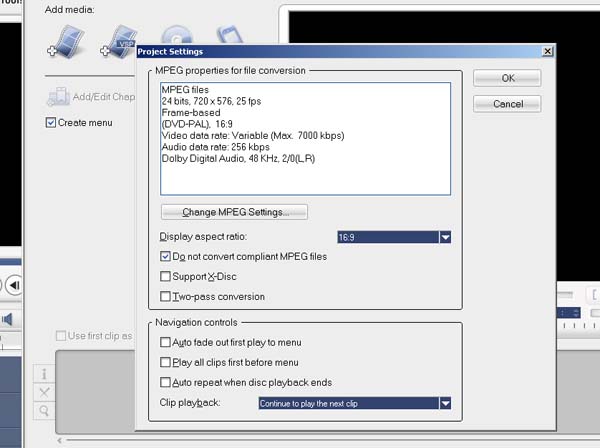
Video Studio mpeg settings: Set these before making any DVDs.
To check your mpeg settings (i.e. your DVD output) click on the small cog wheel in the menu at the bottom left hand side of the add media screen.
Click the "Change MPEG Settings" to edit them. You can edit them individually or choose a preset such as " HQ 16:9 (Dolby Digital)" recommended.