1. Open a new image 525 x 275 and
flood fill with white
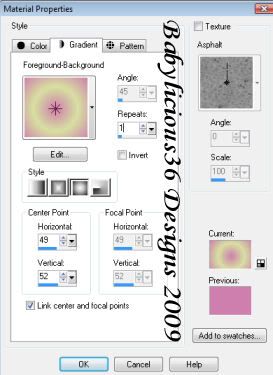
2. Select 2 colours of choice from
your tube and use the following Gradient
settings
3. Keep this layer selected and
use the following Filters Unlimited 2 settings
4.Copy and paste your tube of
choice as a new layer, resize and position on
the right side of your tag
5. Layers New raster layer, select
all and paste into selection paper of choice.
6. Select all, selections,
contract by 5 and hit delete, select none and
move this layer to the top
7. Give it a drop shadow of
2,2,80,5.00 black and then -2,-2,80,5.00 Black
8.Add embellishments of choice( I
used hear, doodle and flowers)
9. Copy and paste a butterfly of
choice, resize, duplicate and mirror, put them
right next to each other and merge these 2
layers visible
10. Duplicate this layer 2 times
and on the original use the following Xenofex 2
Constellation settings.
11. Repeat for the 2 duplicate
layers but hit random each time. Hide the 2
duplicate layers
12. Add �Information and any text
or word art of choice
13. Edit copy merged, open
animation shop and paste as a new animation
14. Back to psp, hide the first
butterfly layer and unhide the next, edit copy
merged and paste after current frame in
animation shop
15. Back to psp, hide the second
butterfly layer and unhide the next, edit copy
merged and paste after current frame in
animation shop
16. View Animation, file save as
and follow the prompts
Your Done!!