Let's Start
1. Open a new image 550 x 550
2.now open up 3 papers of choice,
resize to fit the image and copy and paste each
paper as a new layer
3. On the bottom layer, layers
load mask and select mask and click okay, delete
mask layer and merge group
4. On your middle and top layer
repeat the above steps.
5. Now resize each layer by 115%
and hide the middle and top layers
6. Copy and paste a frame of
choice as a new layer.
7. Select your magic wand tool and
magic wand inside of all the blank parts,
selections, modify expand by 10
8. Layers new raster and either
flood fill with color of choice or paste a paper
of choice into selection.
9. layers new raster, open up your
closeup tube of choice, copy and paste into
selection on the new raster layer,
10.select none and move the paper
and tube under the frame layer
11. Select your frame layer,
select all, float and defloat, duplicate 2 times
for a total of 3 layers
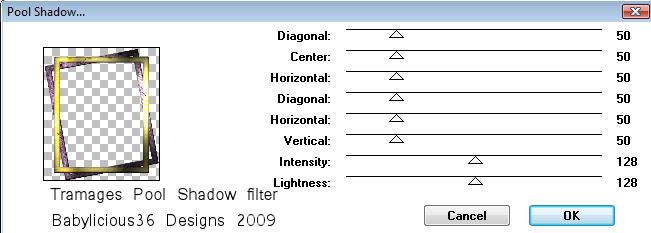
12. On the bottom layer use the
following Tramages Pool Shadow settings
13. On your middle layer repeat
the settings but change the lightening.
14. Repeat for the top layer,
select none and hide the middle and top layers
15. Copy and paste some elements
of choice, I used both butterflies, Bead#4,
Bead string and also a swirl bling.
16. Give each layer a drop shadow
of choice, I used 2,2,80,5.00 BLACK
17. Copy and paste your main tube
of choice as a new layer, dropshadow and
position to the side of your tag.
18. Add � Information and text of
choice
19. Edit copy merged and paste as
a new animation in animation shop
20. Back to psp, hide both bottom
mask and frame layers, and unhide the middle
layers, edit copy merged and paste after current
frame in animation shop
21. Back to psp, hide both middle
mask and frame layers, and unhide the top
layers, edit copy merged and paste after current
frame in animation shop
22.Select all and change the frame
properties to 40 or setting you like
23. File save as and follow the
prompts
YOUR DONE!!