Ok lets get started
1. Open a new image 400 X 450 and flood fill with white.
2. Select your rounded rectangle, Foreground color of choice, background null and a width of 5.00
3.Draw out a reasonable size rectangle, see mine for reference.
4. Duplicate and move this below the original, go to toadies and use the following What Are You settings.
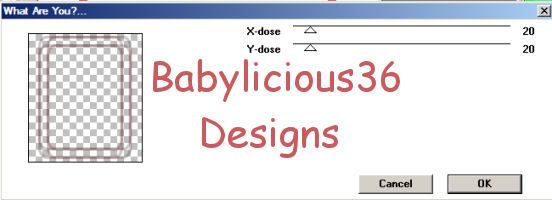
5.Back on your original rectangle,Magic wand inside of it. Selections modify expand by 2
6. Layers,new raster layer and flood fill with a color from your tube. Move this layer below and add a texture effect of choice.
7. On your rectangle give it a drop shadow of 2,2,80,5.00 black and then repeat using -2,-2,80,5.00 black.
8. Copy and paste your tube as a new layer, use the following drop shadow settings.

9.Add your name using a font of choice
10. Add the correct �Information
11.Select your white background, layers new raster layer and floodfill with color of choice.
12. Layers, load/save mask and load your mask from disk, select your mask and click ok. Delete the mask and merge group.
13. Select your paper layer and use the following eyecandy 4000 Fire settings

14. Edit copy merged, open animation shop and paste as a new animation
15.Back to psp and undo fire, redo and change to random seed to 466.
16.Edit copy merged and paste after current frame in animation shop.
17.Back to psp and undo fire, redo and change to random seed to 233
18.Edit copy merged and paste after current frame in animation shop
19. View Animation
20. If you are happy, go to file save as and follow the prompts.
YOUR DONE!

