1. Open a new image 500 X 500 and
floodfill with white
2. Layers new raster layer,
floodfill with black
3. Layers, Load mask from disk,
select mask and click okay
4. On your layer palette, delete
mask layer and merge group, duplicate 1-2 times
and merge down onto original mask layer
4. Resize your mask layer by 110%
5. Select preset shapes, star of
choice and draw out a star, Foreground Black,
Background Null and a width of 10.0, see my tag
for sizing
6. Convert your star to a raster
layer and move to the top left a bit
7. Open up my Checkered background
and put it as your pattern in your colour
pallett- Angle 0, Scale 100
8. Magic wand inside of your star
and selections, modify expand by 3
9. Layers, New raster layer and
flood fill with the Checkered background.
10. Keep Selected and paste as a
new layer a close up tube of choice, position
inside of the star
11. Selections invert on the star
layer then delete on the tube layer, select none
12. Change the opacity of your
tube to 80% and move the star preset to the top
13. On the star layer, Eyecandy
4000 Gradient Glow with the following settings(
make sure its on fat/ colour white)
14. Merge visible your star, tube
close-up and the Checkered background
15. Now use the following Eyecandy
4000 Shadow Lab settings
16. Copy and paste your tube of
choice as a new layer
17. Use the following Mura
Meisters Copies settings
18. On this same layer, layers,
load mask from disk, select mask from above, and
click okay
19. Delete the mask layer on the
layer palette and merge group. move this layer
to above the original mask and resize by 110%
20. Copy and paste your tube as a
new layer and resize by 80% and position to the
bottom right.
21. Give it a drop shadow of
-1,-1,70,11.00 Black
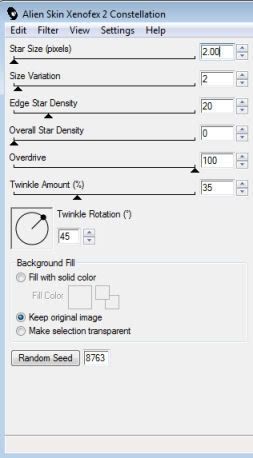
22. On the tube mask layer use the
following Xenofex 2 Constellation Settings
23. Add your name, I added the
above gradient glow and drop shadow.
24. Add your © Information
25. Crop your image if need and
file save as.
This Tutorial was written on the 18th
April 2009 by Mell aka Babylicious36
ALL TUTORIALS ARE REGISTERED WITH TWI.
This tutorial is written using my
imagination and is in no way copied from any other
tutorial. Please do not Steal.. You may print this out
for future use.
This page was assembled by Mell aka
Babylicious36
Artwork � Ismael Rac
www.xeracx.com
MPT6179