
Resume
Bethany Smith
Bethany's Home Page
|
|
|
|
|
1994 - 1997 San Manuel High School San Manuel
2000 - 2002 San Manuel, Mammoth School District San Manuel, AZ
Click here to return to the menu
Autobiography lesson plan
Author - Bethany Smith
Subjects - Autobiographies, and use of Power Point
Learning Level - 5th grade
Snap Shot - To learn what Autobiographies are and write one of their own. Work with the computer teacher so they can make Power Point presentations for each of them.
Invitation - Will students be able to write their own autobiography? Will they be able to use Power Point to present it? Can we show them an example of Power Point to get them excited?
Anticipatory Set - I’m goring to
start out by asking them questions about autobiographies.
“Do you know who Clamity Jane is? How do you know?
Where can you find out about her?’
Eventually get the answer Autobiography or Biography.
Task- The students need to know paragraph structure. Essay form; beginning, middle and end. They need to know what a Biography or Autobiography is. The students also need to have a basic knowledge of Power Point in order to use it.
Modeling - I will have out several examples of Biographies and Autobiographies also one I have written out as an example.
Interactions - Have the students write paragraphs about people and three paragraph essays about people. Have them look up facts about people. Have the students ask each other questions. Have them interview each other then give the person interviewed the questions and answers. Have the person interviewed take their interview and use it to write about them selves.
Checking For Understanding - Grade their paragraphs and essays or have them read each other’s work. Have each student stand up and read their Biographies and give their Power Point presentation. Ask them if they could do the paper again what would they do differently.
Reinforcement - Have the students go to the library and check out an Autobiography of some one they would like to know about. Also ask them some critical thinking questions about how to find out about people and what are some other resources.
Assessment - Did the student let
us know things about them we don't know? Were their transitions between
parts of their life clear? Did they use the Power Point effectively.
Click here to return to the menu
http//:www.geocites.com/Athens/Styx/2967/teaching.html
lesson plans, general teaching sites and tools to aid
in teaching.
http://www.ed.gov/databases/ERIC_digests/index
http://www.usgs.gov/
Excellent science lesson plans
http://www.edhelper.com/
Crosswords, Math Sheets, Reading Lessons
http://www.abcteach.com/
Printable worksheets for student teachers
http://www.ed.gov/
U.S. Department of Education.
http://www.pbs.org/kcet/publicschool/
You can explore the American Public Education System.
http://www.edgate.com/
Internet for research.
http://www.mhln.com/
Preview textbooks and sample lesson plans.
http://www.abcteach.com/
Offers educational help for teachers, students, and
parents regarding student progress.
http://www.innovativeclassroom.com/
http://www.middleschool.net/
A website built by teachers for teachers.
http://www.proteacher.com/
This site offers interaction for the student and
teacher. Teachers can communicate with one another to
generate ideas for their classroom in Social Study,
Math etc. Parents can voice their opinions and visit
with other parents, teachers, and children. Students
can get extra help on homework.
http://www.dogpile.com
This search engine is grea When you find the right
words, you can search over 300,000,000 search
engines at one time. This site has been a big help
with every class that I needed to find information
quick and fast.
http://quest.arc.nasa.gov/
It has great lesson Science plans for teachers and
parents.
http://dir.lycos.com/Reference/Education/
Answers any question about education.
http://www.education-world.com/
Lots of info. for teachers to use
http://www.educationindex.com/
Annotated guide to the best links on the web for
educators.
http://www.google.com
Search engine
EVENING CLASS
http://www.lessonplanspage.com/ScienceSSMars1IntroSolar56.htm
This is a link to an introduction for a thematic unit
showing what would be involved to colonize Mars. It is
targeted for 5th and 6th graders
http://www.alternativeparenting.com/lesson_plans/K_through_3/science_nature/dinosaurs.htm
This page is targeted toward K-3rd graders, to
introduce them to dinosaurs.
http://www.primenet.com/~suejahns/article1.html
http://www.kinderart.com/multic/yarn.htm
http://www.sitesforteachers.com/
http://askeric.org/Virtual/Lessons/
http://www.lessonplanspage.com/ScienceSSMars1IntroSolar56.htm
This is a lesson plan on the most heavenly bodies of
the solar system.
http://encarta.msn.com/alexandria/templates/lessonFull.asp?page=1575&lvstart=K&lvend=12&majorsubject=Science&minorsubject=&source=%2D99&keyword=&search=1
This is a lesson plan on space and the solar system
and what it is.
http://www.historychannel.com/tdih/index.html
http://www.discovery.com/stories/science/sciencetitanic/sciencetitanic.html
http://www.scholastic.com/index.asp
http://www.lessonplanspage.com/
http://www.abcteach.com/Portfolios/portfolioTOC.htm
http://www.siteforteachers.com/search.cgi?c=computers&sp=internet
http://www.primenet.com/~suejahns/article1.html
This is an article about Constructivist Theories.
http://www.lessonplanspage.com/ScienceSSMars1IntroSolar56.htm
This article described the bodies of the solar system.
http://www.crayola.com/index.cfm
http://www.teach-nology.com/teachers/
http://www.proteacher.com/030000.shtml
Click here to return to the menu
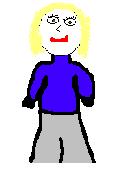
Project 2: The second project was creating a picture of your self useing only paint.
Project 3: In this project we created a news letter for a hypathetical school. We put in information for parents and ativities the school was planning.
Project 4: In project 4 we made a gradebook in Excell.
Project 5: This project had us create a database for our students.
Project 6: This project had us creating a story board useing only Auto Shapes.
Project 7: Our last project was creating
a Power Point presentation on what ever we wanted.