0. Abstract
1. Netscape vs. Internet Explorer file PUT
2. Detailed look at Internet Explorers Data Transfer
3. Solaris TCP Socket Information
4. Solution!
5. More Options
0. Abstract
Client's push data to an FTA via a HTTP PUT. Given the function of an FTA as a data relay, we would expect performance on the LAN side to be exceptionally fast compared to the WAN link. When a client uses IE to connect and push data to the FTA, the data transfer rate is approximately an order of magnitude slower than when Netscape is used. This is a problem given the market share of IE, and the natural users perception that we have poorly written application code.
1. Netscape vs. Internet Explorer file PUT
Upon initial examination of the problem, we suspected a known issue with IE's implementation of SSL (much discussed on mod_ssl mailing lists). Given that the delay problem is more pronounced when the clients connect with HTTP, we ruled this out.
A network dump during the middle of a netscape client data transfer
is as follows (with the client gilgamesh connecting to the web server yangtze):
| ID
time delta from
to prot
port port
-- -------- ---- -- ---- ---- ---- 673 0.00115 gilgamesh -> yangtze TCP D=443 S=36044 Ack=3923408783 Seq=2221259514 Len=612 Win=24820 674 0.00039 gilgamesh -> yangtze TCP D=443 S=36044 Ack=3923408783 Seq=2221260126 Len=1460 Win=24820 675 0.00005 gilgamesh -> yangtze TCP D=443 S=36044 Ack=3923408783 Seq=2221261586 Len=612 Win=24820 676 0.00011 gilgamesh -> yangtze TCP D=443 S=36044 Ack=3923408783 Seq=2221262198 Len=1460 Win=24820 677 0.00004 gilgamesh -> yangtze TCP D=443 S=36044 Ack=3923408783 Seq=2221263658 Len=612 Win=24820 678 0.00013 gilgamesh -> yangtze TCP D=443 S=36044 Ack=3923408783 Seq=2221264270 Len=1460 Win=24820 679 0.01812
yangtze -> gilgamesh TCP D=36044 S=443 Ack=2221261586
Seq=3923408783 Len=0 Win=8760
681
0.00115 gilgamesh -> yangtze TCP D=443 S=36044
Ack=3923408783 Seq=2221265730 Len=612 Win=24820
687 0.01802
yangtze -> gilgamesh TCP D=36044 S=443 Ack=2221267802
Seq=3923408783 Len=0 Win=8760
|
Here the data being sent by gilgamesh is in four colors, each representative of an acknowledgment packet sent by the web server yangtze. A quick interpretation of the information suggests that data is moving in large chunks and is being acknowledged quickly by the server. This is what a healthy transfer should look like.
In looking at a similar snapshot of the IE exchange, we see something
different:
| ID
time delta from to
prot port port
-- -------- ---- -- ---- ---- ---- 405 0.00133 host22 -> yangtze TCP D=443 S=1742 Ack=1746871970 Seq=3921643711 Len=1160 Win=17250 406 0.00013 host22 -> yangtze TCP D=443 S=1742 Ack=1746871970 Seq=3921644871 Len=1160 Win=17250 407 0.00014 host22 -> yangtze TCP D=443 S=1742 Ack=1746871970 Seq=3921646031 Len=1160 Win=17250 408 0.00014 host22 -> yangtze TCP D=443 S=1742 Ack=1746871970 Seq=3921647191 Len=1160 Win=17250 409 0.00011 host22 -> yangtze TCP D=443 S=1742 Ack=1746871970 Seq=3921648351 Len=1160 Win=17250 410 0.00014 host22 -> yangtze TCP D=443 S=1742 Ack=1746871970 Seq=3921649511 Len=1160 Win=17250 411 0.00014 host22 -> yangtze TCP D=443 S=1742 Ack=1746871970 Seq=3921650671 Len=1160 Win=17250 417 0.00111 host22 -> yangtze TCP D=443 S=1742 Ack=1746871970 Seq=3921651928 Len=1160 Win=17250 412 0.00006 host22 -> yangtze TCP D=443 S=1742 Ack=1746871970 Seq=3921651831 Len=97 Win=17250 413 0.01653 yangtze -> host22 TCP D=1742 S=443 Ack=3921646031 Seq=1746871970 Len=0 Win=9280 414 0.00001 yangtze -> host22 TCP D=1742 S=443 Ack=3921648351 Seq=1746871970 Len=0 Win=9280 415 0.00001 yangtze -> host22 TCP D=1742 S=443 Ack=3921650671 Seq=1746871970 Len=0 Win=9280 416 0.09311 yangtze -> host22 TCP D=1742 S=443 Ack=3921651928 Seq=1746871970 Len=0 Win=9280 418 0.00021 host22 -> yangtze TCP D=443 S=1742 Ack=1746871970 Seq=3921653088 Len=1160 Win=17250 419 0.00016 host22 -> yangtze TCP D=443 S=1742 Ack=1746871970 Seq=3921654248 Len=1160 Win=17250 420 0.00019 host22 -> yangtze TCP D=443 S=1742 Ack=1746871970 Seq=3921655408 Len=1160 Win=17250 421 0.00017 host22 -> yangtze TCP D=443 S=1742 Ack=1746871970 Seq=3921656568 Len=1160 Win=17250 422 0.00017 host22 -> yangtze TCP D=443 S=1742 Ack=1746871970 Seq=3921657728 Len=1160 Win=17250 424 0.00015 host22 -> yangtze TCP D=443 S=1742 Ack=1746871970 Seq=3921658888 Len=1160 Win=17250 425 0.00006 host22 -> yangtze TCP D=443 S=1742 Ack=1746871970 Seq=3921660048 Len=97 Win=17250 423 0.00004 yangtze -> host22 TCP D=1742 S=443 Ack=3921654248 Seq=1746871970 Len=0 Win=9280 426 0.00009 yangtze -> host22 TCP D=1742 S=443 Ack=3921656568 Seq=1746871970 Len=0 Win=9280 427 0.00036 yangtze -> host22 TCP D=1742 S=443 Ack=3921658888 Seq=1746871970 Len=0 Win=9280 428 0.09719 yangtze -> host22 TCP D=1742 S=443 Ack=3921660145 Seq=1746871970 Len=0 Win=9280 |
NOTE: We had to juggle the order of the numbers here since solaris snoop seemed to have interpretive problems with the packet flow. Further research with tcpdump confirmed that the above ordering is correct.
The most interesting thing to see here is the size of the last chunk of data is being passwd to the server (the packets marked in yellow). The notion of a chunk here is a collection of data packets sent to the server which are then acknowledged by the server with a single ACK packet. What we need to look at is the fact that it is much smaller than the other three chunks - too small in fact to trigger the automatic ACK response that the other data chunks enjoy. We see this directly in the ~0.1 second delay in server response (underlined time values).
2. Detailed Look at Internet Explorers Data Transfer
In order to understand what is going on, we need to understand the method that IE seems to employ in deciding the size and number of data packets.
According to Sean Everhart (a most helpful and friendly person working in the Critical Problem Resolution, Developer Support Tools department at Microsoft), IE seems to internally buffer data in 8217 byte chunks (ie. you POST a file of a given size and IE takes 8217 byte pieces out of it to send on to the network layer).
During the initial connection, there is an exchange of information regarding
the general network characteristics that both the client and server will
use. An example of this is as follows:
| 1 0.00000
host22 -> yangtze TCP D=443 S=1210 Syn Seq=3359941126 Len=0 Win=16384
Options=<mss 1160,nop,nop,sackOK>
2 0.00006 yangtze -> host22 TCP D=1210 S=443 Syn Ack=3359941127 Seq=1075308152 Len=0 Win=9280 Options=<nop,nop,sackOK,mss 1160> |
Here, in the initial handshake (as the client connects to the host), the IE client located on host22 tells the server yangtze that the Maximum Segment Size (MSS) that it will use on the network is 1160 bytes. This is the largest chunk of data that it is willing to put into any one packet.
According to Sean, IE then takes the 8217 byte internal buffer,
breaks it into some number of pieces which are MSS in size, and throws
the remaining (rounding error) data into the last packet. Looking
again at the IE data we see that this is the case:
| 406
0.00013 host22 -> yangtze TCP D=443 S=1742 Ack=1746871970
Seq=3921644871 Len=1160
Win=17250
407 0.00014 host22 -> yangtze TCP D=443 S=1742 Ack=1746871970 Seq=3921646031 Len=1160 Win=17250 408 0.00014 host22 -> yangtze TCP D=443 S=1742 Ack=1746871970 Seq=3921647191 Len=1160 Win=17250 409 0.00011 host22 -> yangtze TCP D=443 S=1742 Ack=1746871970 Seq=3921648351 Len=1160 Win=17250 410 0.00014 host22 -> yangtze TCP D=443 S=1742 Ack=1746871970 Seq=3921649511 Len=1160 Win=17250 411 0.00014 host22 -> yangtze TCP D=443 S=1742 Ack=1746871970 Seq=3921650671 Len=1160 Win=17250 417 0.00111 host22 -> yangtze TCP D=443 S=1742 Ack=1746871970 Seq=3921651928 Len=1160 Win=17250 412 0.00006 host22 -> yangtze TCP D=443 S=1742 Ack=1746871970 Seq=3921651831 Len=97 Win=17250 |
Here, the remaining rounding data is in the eighth packet colored in red. This explains the sizes of the data that we are seeing, but it does not explain why it is that the delay on the last ACK packet is so high.
3. Solaris TCP Socket Information
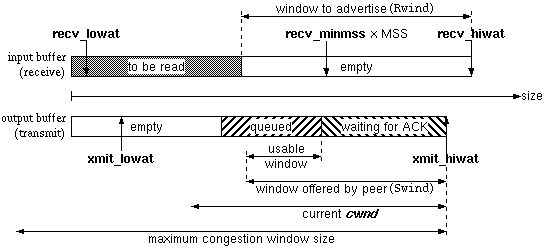
Solaris sockets enjoy the same kind of behavior as most other kinds of unix sockets. In general, you fill them up with data until they reach a certain point. At that point, the side receiving the data will return a packet acknowledging the receipt of the data. If the server socket receives some data, but less than the amount to automatically trigger the ACK, it will wait some amount of time then send the ACK anyway. In general you don't want to send an ACK for every packet received for performance reasons.
Here we have borrowed a most excellent illustration of the terrible details involved in this process:
There are several relevant parameters here:
| Parameter | Definition |
| recv_lowat | The minimum amount of data in the receive buffer to trigger an ACK response |
| recv_hiwat | The advertised size of the receive buffer - how much data you can put in it |
| xmit_lowat | The minimum amount of data required in the send buffer to automatically send it on it's way |
| xmit_hiwat | The maximum room in the send buffer |
How this relates to the problem is as follows - it seems like the first three chunks of data are enough to trigger the automatic sending of the ACK packets (recv_lowat). Unfortunately it seems that the last packet does not enjoy this fate - the combined size of the two last packets falls below the value defined in recv_lowat. How we deal with this is resolved in the next section!
4. Solution!
The natural tendency would be for us to modify the recv_lowat and be done with it. This is what we tried, till we found the parameter was not directly tunable from the TCP level. This parameter is set as a socket option (SO_RCVLOWAT) during it's creation and can not be modified after this point.
Since there is no (immediate) way to resolve the problem, we then attempted to mitigate the symptoms presented by the problem. In solaris there is a TCP parameter called tcp_deferred_ack_interval . It is the time delay between reviving a quantity of data less than recv_lowat, and the sending of the related ACK. By adjusting this parameter from 100 ms to 1 ms, we were able to lower the transmission time of a 18 MB file from a little over 4 minutes, to approximately 36 seconds. This is in the end the only parameter which influenced the result.
5. More Options
It would be good to see if we can get to the root of the problem by adjusting the recv_lowat parameter. Since we are using Apache and Open/ModSSL, we should be able to look into this.
Other options are increasing the size of the recv_hiwat to allow a larger area for data to flow into, increasing the number of data packets allowed between ACKs, and making sure that the selective ACK option is in place. All of these parameters have simple to tune parameters, and have been set up in the S70nddconfig startup file. Note though that at this time the CGI program accessing data is maxing out the CPU on the FTA so further networking performance gains will have to wait till it is optimized.
For more information on performance tuning: