How to Interface Arduino with an Ultrasonic Sensor
เราจะแนะนำคุณเกี่ยวกับการเชื่อมต่อ Arduino กับเซ็นเซอร์อัลตราโซนิกเพื่อวัดระยะทางและแสดงบนหน้าจออนุกรม เราจะเริ่มต้นด้วยการอธิบายวิธีเชื่อมต่อเซ็นเซอร์อัลตราโซนิก จากนั้นเราจะเพิ่มจอแสดงผล LCD I2C ให้กับโปรเจ็กต์ในตอนท้าย
ส่วนประกอบที่จำเป็น
1.บอร์ด Arduino (เช่น Arduino Uno)
2.HC-SR04 อัลตราโซนิคเซนเซอร์
3.จอแสดงผล LCD I2C (เช่น 16x2 ตัวอักษร)
4.สายจัมเปอร์
HCSR04 Ultrasonic Sensor Pinout
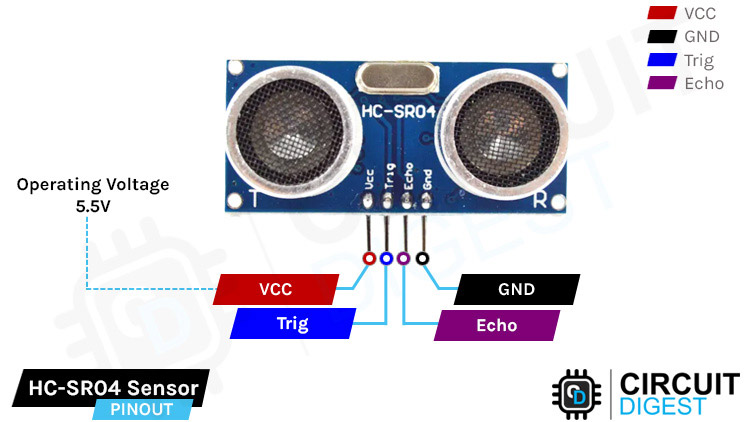
VCC - The supply pin of the HC-SR04 Module.
GND - This is the Ground pin of the module
Trig - This is the trigger pin of the HC-SR04 module
Echo - This is the echo pin of the HC-SR04 sensor module.
Working of Ultrasonic Sensor
เซ็นเซอร์อัลตราโซนิกประกอบด้วยส่วนประกอบสำคัญหลายอย่างที่ทำงานร่วมกันเพื่อวัดระยะทางหรือตรวจจับวัตถุโดยใช้คลื่นเสียงความถี่สูง แกนกลางของมันคือทรานสดิวเซอร์ ซึ่งโดยทั่วไปทำจากคริสตัลเพียโซอิเล็กทริกซึ่งทั้งส่งและรับคลื่นอัลตราโซนิก
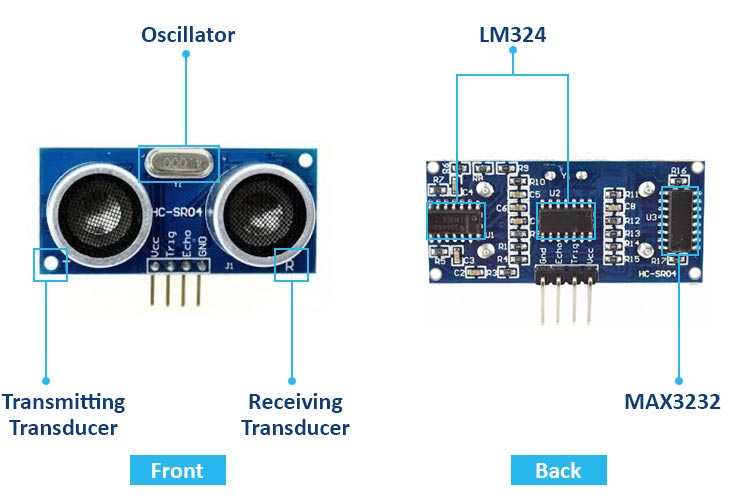
การทำงานของเซ็นเซอร์เริ่มต้นด้วยเครื่องส่งสัญญาณอัลตราโซนิก ซึ่งจะส่งคลื่นเสียงความถี่สูงออกมาสู่สิ่งแวดล้อม
ที่ด้านหลังของเซ็นเซอร์อัลตราโซนิก เรามีเซ็นเซอร์ MAX232 ทางด้านขวา ซึ่งจะแปลงสัญญาณไฟฟ้าที่ได้รับจากพินตรีโกณมิติ แปลงเป็นพัลส์อัลตราโซนิคและส่งผ่านด้านเครื่องส่งสัญญาณ คลื่นเหล่านี้จะกระเด็นวัตถุที่ขวางทางและตรวจพบโดยเครื่องรับอัลตราโซนิก ไอซี LM324 สองตัวทางด้านซ้ายใช้พัลส์อัลตราโซนิกนี้แปลงเป็นสัญญาณไฟฟ้าและส่งไปยังเอคโคพิน
Circuit Diagram for Arduino Interfacing with Ultrasonic Sensor and 16x2 LCD
แผนภาพวงจรสำหรับการเชื่อมต่อ Arduino กับเซ็นเซอร์อัลตราโซนิคและจอ LCD ขนาด 16x2
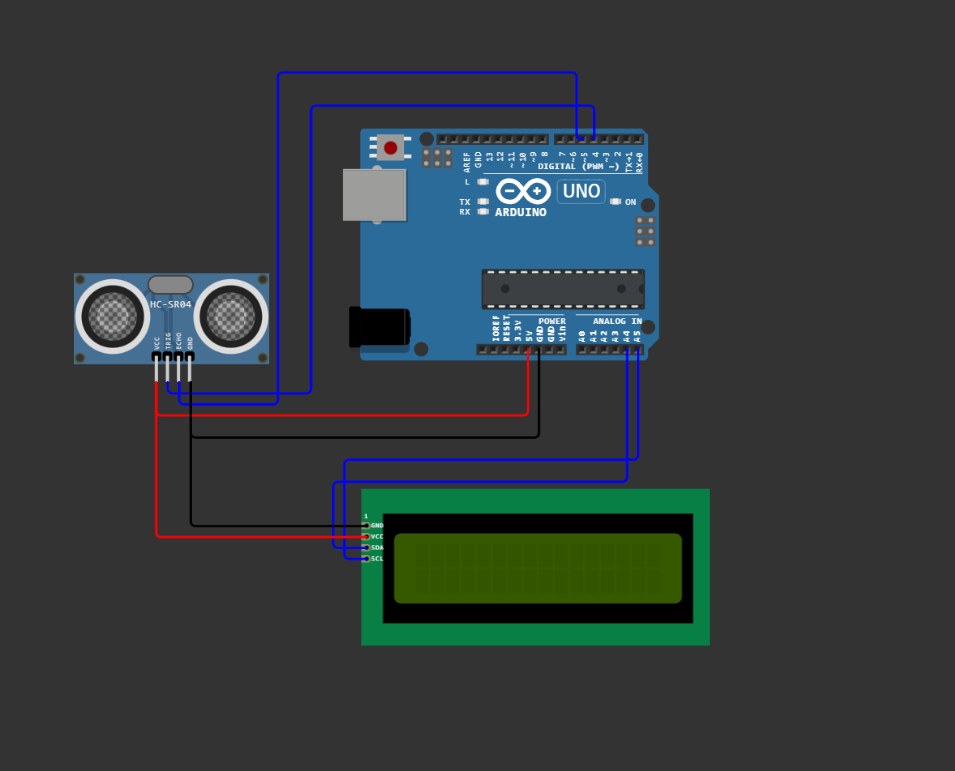
เชื่อมต่อเซ็นเซอร์อัลตราโซนิกกับ Arduino ตามที่กล่าวไว้ก่อนหน้า (TRIG เพื่อพิน 4, ECHO ถึงพิน 5)
เชื่อมต่อ I2C LCD เข้ากับ Arduino:
SDA ถึง A4 (สำหรับ Arduino Uno)
SCL ถึง A5 (สำหรับ Arduino Uno)
วีซีซีถึง 5V GND เป็น GND
Code for Interfacing Arduino with Ultrasonic Sensor and 16x2 LCD
ตรวจสอบให้แน่ใจว่าคุณได้ติดตั้งไลบรารีที่จำเป็นสำหรับ I2C LCD คุณสามารถใช้ไลบรารี "LiquidCrystal_I2C" เพื่อจุดประสงค์นี้ได้ คุณสามารถติดตั้งผ่าน Arduino Library Manager ได้เช่นกัน
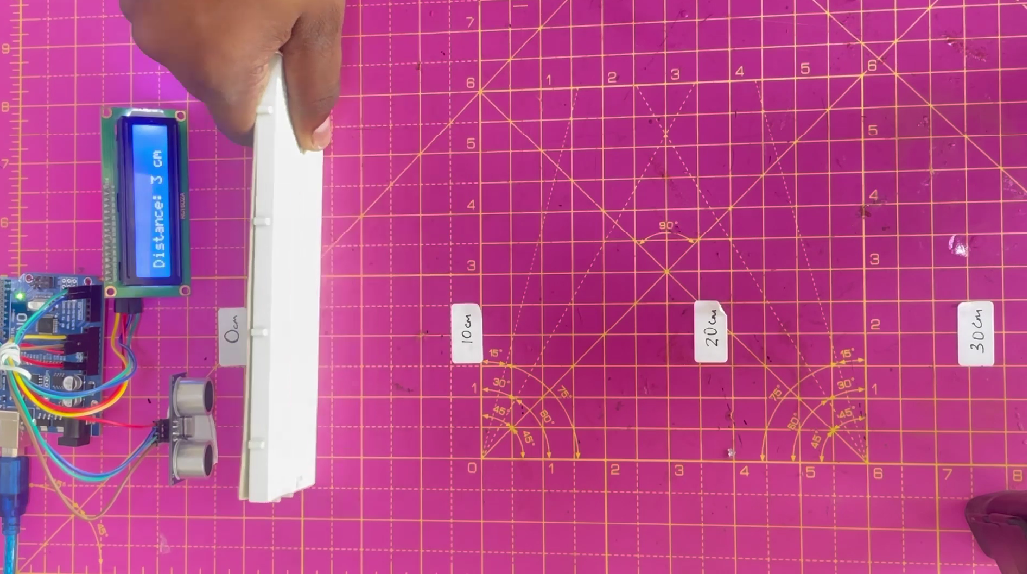
การวัดระยะทางโดยใช้ Ultrasonic Sensor และ LCD พร้อม Arduino
นี่คือการสาธิตการทำงานของ Arduino และ Ultrasonic Interfacing พร้อมค่าระยะทางแบบเรียลไทม์ที่แสดงบนหน้าจอ
Code
Code for Arduino and Ultrasonic Senser
const int trigPin = 4; // Trigger pin of the ultrasonic sensor (connected to Arduino digital pin 2)
const int echoPin = 5; // Echo pin of the ultrasonic sensor (connected to Arduino digital pin 3)
void setup() {
Serial.begin(9600); // Initialize serial communication for debugging
pinMode(trigPin, OUTPUT);
pinMode(echoPin, INPUT);
}
void loop() {
// Trigger the ultrasonic sensor by sending a 10us pulse
digitalWrite(trigPin, LOW);
delayMicroseconds(2);
digitalWrite(trigPin, HIGH);
delayMicroseconds(10);
digitalWrite(trigPin, LOW);
// Measure the time it takes for the echo to return
long duration = pulseIn(echoPin, HIGH);
// Calculate the distance in centimeters
// Speed of sound in air at room temperature is approximately 343 meters/second or 0.0343 cm/microsecond
// Divide the duration by 2 to account for the time it takes for the sound pulse to travel to the object and back
int distance = duration * 0.0343 / 2;
// Print the distance to the Serial Monitor
Serial.print("Distance: ");
Serial.print(distance);
Serial.println(" cm");
delay(1000); // Delay for readability (adjust as needed)
}
Code for Arduino, Ultrasonic Sensor, and LCD Display
#include
#include
LiquidCrystal_I2C lcd(0x27,16,2);
const int trig=4;
const int echo=5;
void setup() {
// put your setup code here, to run once:
lcd.begin();
lcd.backlight();
lcd.print("Distance : ");
pinMode(trig,OUTPUT);
pinMode(echo,INPUT);
Serial.begin(9600);
}
void loop() {
// put your main code here, to run repeatedly:
digitalWrite(trig,LOW);
delay(2);
digitalWrite(trig,HIGH);
delay(10);
digitalWrite(trig,LOW);
long duration = pulseIn(echo,HIGH);
long distance=duration*0.034/2; //speed of sound=340 m/s =0.034 cm/microsecond.
lcd.setCursor(10,0);
lcd.print(" ");
lcd.setCursor(10,0);
lcd.print(distance);
Serial.print("Distance : ");
Serial.println(distance);
Serial.print(" cm")
delay(10);
}
ลิงค์ไปยังสมาชิกในกลุ่มลิงค์ไปยังเว็บ
แหล่งอ้างอิงhttps://circuitdigest.com/microcontroller-projects/interface-arduino-with-ultrasonic-sensor?fbclid=IwAR1MUceihAK-c-j7F3rUeKLD2TrtUdgM23cwtlB0X6oWA5blvNY_qrYKVEY