

Overview of Access Database
 Microsoft Office Access, previously known as Microsoft Access, is a relational database management system from Microsoft that combines the
relational Microsoft Jet Database Engine with a graphical user interface and software-development tools. It is a member of the Microsoft Office suite
of applications, included in the Professional and higher editions or sold separately. In mid-May 2010, the current version of Microsoft Access 2010 was
released by Microsoft in Office 2010; Microsoft Office Access 2007 was the prior version. Access stores data in its own format based on the Access Jet
Database Engine. It can also import or link directly to data stored in other applications and databases. Software developers and data architects can use
Microsoft Access to develop application software, and "power users" can use it to build simple applications. Like other Office applications, Access is
supported by Visual Basic for Applications, an object-oriented programming language that can reference a variety of objects including DAO (Data Access
Objects), ActiveX Data Objects, and many other ActiveX components. Visual objects used in forms and reports expose their methods and properties in the
VBA programming environment, and VBA code modules may declare and call Windows operating-system functions.
Microsoft Office Access, previously known as Microsoft Access, is a relational database management system from Microsoft that combines the
relational Microsoft Jet Database Engine with a graphical user interface and software-development tools. It is a member of the Microsoft Office suite
of applications, included in the Professional and higher editions or sold separately. In mid-May 2010, the current version of Microsoft Access 2010 was
released by Microsoft in Office 2010; Microsoft Office Access 2007 was the prior version. Access stores data in its own format based on the Access Jet
Database Engine. It can also import or link directly to data stored in other applications and databases. Software developers and data architects can use
Microsoft Access to develop application software, and "power users" can use it to build simple applications. Like other Office applications, Access is
supported by Visual Basic for Applications, an object-oriented programming language that can reference a variety of objects including DAO (Data Access
Objects), ActiveX Data Objects, and many other ActiveX components. Visual objects used in forms and reports expose their methods and properties in the
VBA programming environment, and VBA code modules may declare and call Windows operating-system functions.
History of Access Databases
Project Omega
 Microsoft's first attempt to sell a relational database product was during the mid 1980s, when Microsoft obtained license to sell R:Base.[2] In the late
1980s Microsoft developed its own solution codenamed Omega.[3] It was confirmed in 1988 that a database product for Windows and OS/2 was in development.
The project was going to supplement Microsoft's lineup of Windows applications.[5] It was going to include "EB" Embedded Basic language,[3] which was going
to be the language for writing macros in all Microsoft's application, but the unification of macro languages did not happen until the introduction of VBA.
Omega was also expected to provide a front end to the Microsoft SQL Server. The application was very resource demanding and there were reports that it was
working slow on then-available 386 processors. It was scheduled to be released in the 1st quarter of 1990,[9] but in 1989 the development of the product was
reset and it was rescheduled to be delivered no sooner than in January 1991. Parts of the project were later used for other Microsoft projects: Cirrus
(codename for Access) and Thunder (codename for Visual Basic, where the Embedded Basic engine was used). After Access's premiere, the Omega project was
demonstrated in 1992 to several journalists and included features that were not available in Access.
Microsoft's first attempt to sell a relational database product was during the mid 1980s, when Microsoft obtained license to sell R:Base.[2] In the late
1980s Microsoft developed its own solution codenamed Omega.[3] It was confirmed in 1988 that a database product for Windows and OS/2 was in development.
The project was going to supplement Microsoft's lineup of Windows applications.[5] It was going to include "EB" Embedded Basic language,[3] which was going
to be the language for writing macros in all Microsoft's application, but the unification of macro languages did not happen until the introduction of VBA.
Omega was also expected to provide a front end to the Microsoft SQL Server. The application was very resource demanding and there were reports that it was
working slow on then-available 386 processors. It was scheduled to be released in the 1st quarter of 1990,[9] but in 1989 the development of the product was
reset and it was rescheduled to be delivered no sooner than in January 1991. Parts of the project were later used for other Microsoft projects: Cirrus
(codename for Access) and Thunder (codename for Visual Basic, where the Embedded Basic engine was used). After Access's premiere, the Omega project was
demonstrated in 1992 to several journalists and included features that were not available in Access.
Features
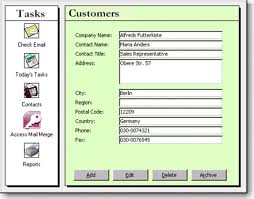 Users can create tables, queries, forms and reports, and connect them together with macros. Advanced users can use VBA to write rich solutions with advanced
data manipulation and user control. The original concept of Access was for end users to be able to "access" data from any source. Other uses include: the import
and export of data to many formats including Excel, Outlook, ASCII, dBase, Paradox, FoxPro, SQL Server, Oracle, ODBC, etc. It also has the ability to link to data
in its existing location and use it for viewing, querying, editing, and reporting. This allows the existing data to change and the Access platform to always use the
latest data. It can perform heterogeneous joins between data sets stored across different platforms. Access is often used by people downloading data from enterprise
level databases for manipulation, analysis, and reporting locally. There is also the Jet Database format (MDB or ACCDB in Access 2007) which can contain the application
and data in one file. This makes it very convenient to distribute the entire application to another user, who can run it in disconnected environments.
One of the benefits of Access from a programmer's perspective is its relative compatibility with SQL (structured query language) � queries can be viewed graphically or
edited as SQL statements, and SQL statements can be used directly in Macros and VBA Modules to manipulate Access tables. Users can mix and use both VBA and "Macros" for
programming forms and logic and offers object-oriented possibilities. VBA can also be included in queries. Microsoft Access offers parameterized queries. These queries
and Access tables can be referenced from other programs like VB6 and .NET through DAO or ADO. From Microsoft Access, VBA can reference parameterized stored procedures
via ADO. The desktop editions of Microsoft SQL Server can be used with Access as an alternative to the Jet Database Engine. This support started with MSDE (Microsoft
SQL Server Desktop Engine), a scaled down version of Microsoft SQL Server 2000, and continues with the SQL Server Express versions of SQL Server 2005 and 2008.
Microsoft Access is a file server-based database. Unlike client�server relational database management systems (RDBMS), Microsoft Access does not implement database triggers,
stored procedures, or transaction logging. Access 2010 includes table-level triggers and stored procedures built into the ACE data engine. Thus a Client-server database system
is not a requirement for using stored procedures or table triggers with Access 2010. Tables, queries, Forms, reports and Macros can now be developed specifically for web base
application in Access 2010. Integration with Microsoft SharePoint 2010 is also highly improved.
Users can create tables, queries, forms and reports, and connect them together with macros. Advanced users can use VBA to write rich solutions with advanced
data manipulation and user control. The original concept of Access was for end users to be able to "access" data from any source. Other uses include: the import
and export of data to many formats including Excel, Outlook, ASCII, dBase, Paradox, FoxPro, SQL Server, Oracle, ODBC, etc. It also has the ability to link to data
in its existing location and use it for viewing, querying, editing, and reporting. This allows the existing data to change and the Access platform to always use the
latest data. It can perform heterogeneous joins between data sets stored across different platforms. Access is often used by people downloading data from enterprise
level databases for manipulation, analysis, and reporting locally. There is also the Jet Database format (MDB or ACCDB in Access 2007) which can contain the application
and data in one file. This makes it very convenient to distribute the entire application to another user, who can run it in disconnected environments.
One of the benefits of Access from a programmer's perspective is its relative compatibility with SQL (structured query language) � queries can be viewed graphically or
edited as SQL statements, and SQL statements can be used directly in Macros and VBA Modules to manipulate Access tables. Users can mix and use both VBA and "Macros" for
programming forms and logic and offers object-oriented possibilities. VBA can also be included in queries. Microsoft Access offers parameterized queries. These queries
and Access tables can be referenced from other programs like VB6 and .NET through DAO or ADO. From Microsoft Access, VBA can reference parameterized stored procedures
via ADO. The desktop editions of Microsoft SQL Server can be used with Access as an alternative to the Jet Database Engine. This support started with MSDE (Microsoft
SQL Server Desktop Engine), a scaled down version of Microsoft SQL Server 2000, and continues with the SQL Server Express versions of SQL Server 2005 and 2008.
Microsoft Access is a file server-based database. Unlike client�server relational database management systems (RDBMS), Microsoft Access does not implement database triggers,
stored procedures, or transaction logging. Access 2010 includes table-level triggers and stored procedures built into the ACE data engine. Thus a Client-server database system
is not a requirement for using stored procedures or table triggers with Access 2010. Tables, queries, Forms, reports and Macros can now be developed specifically for web base
application in Access 2010. Integration with Microsoft SharePoint 2010 is also highly improved.
To view a tutorial about Access Database click here
Microsoft Office Access, previously known as Microsoft Access, is a relational database management system from Microsoft that combines the
relational Microsoft Jet Database Engine with a graphical user interface and software-development tools. It is a member of the Microsoft Office suite
of applications, included in the Professional and higher editions or sold separately. In mid-May 2010, the current version of Microsoft Access 2010 was
released by Microsoft in Office 2010; Microsoft Office Access 2007 was the prior version. Access stores data in its own format based on the Access Jet
Database Engine. It can also import or link directly to data stored in other applications and databases. Software developers and data architects can use
Microsoft Access to develop application software, and "power users" can use it to build simple applications. Like other Office applications, Access is
supported by Visual Basic for Applications, an object-oriented programming language that can reference a variety of objects including DAO (Data Access
Objects), ActiveX Data Objects, and many other ActiveX components. Visual objects used in forms and reports expose their methods and properties in the
VBA programming environment, and VBA code modules may declare and call Windows operating-system functions.
Microsoft's first attempt to sell a relational database product was during the mid 1980s, when Microsoft obtained license to sell R:Base.[2] In the late
1980s Microsoft developed its own solution codenamed Omega.[3] It was confirmed in 1988 that a database product for Windows and OS/2 was in development.
The project was going to supplement Microsoft's lineup of Windows applications.[5] It was going to include "EB" Embedded Basic language,[3] which was going
to be the language for writing macros in all Microsoft's application, but the unification of macro languages did not happen until the introduction of VBA.
Omega was also expected to provide a front end to the Microsoft SQL Server. The application was very resource demanding and there were reports that it was
working slow on then-available 386 processors. It was scheduled to be released in the 1st quarter of 1990,[9] but in 1989 the development of the product was
reset and it was rescheduled to be delivered no sooner than in January 1991. Parts of the project were later used for other Microsoft projects: Cirrus
(codename for Access) and Thunder (codename for Visual Basic, where the Embedded Basic engine was used). After Access's premiere, the Omega project was
demonstrated in 1992 to several journalists and included features that were not available in Access.
Users can create tables, queries, forms and reports, and connect them together with macros. Advanced users can use VBA to write rich solutions with advanced
data manipulation and user control. The original concept of Access was for end users to be able to "access" data from any source. Other uses include: the import
and export of data to many formats including Excel, Outlook, ASCII, dBase, Paradox, FoxPro, SQL Server, Oracle, ODBC, etc. It also has the ability to link to data
in its existing location and use it for viewing, querying, editing, and reporting. This allows the existing data to change and the Access platform to always use the
latest data. It can perform heterogeneous joins between data sets stored across different platforms. Access is often used by people downloading data from enterprise
level databases for manipulation, analysis, and reporting locally. There is also the Jet Database format (MDB or ACCDB in Access 2007) which can contain the application
and data in one file. This makes it very convenient to distribute the entire application to another user, who can run it in disconnected environments.
One of the benefits of Access from a programmer's perspective is its relative compatibility with SQL (structured query language) � queries can be viewed graphically or
edited as SQL statements, and SQL statements can be used directly in Macros and VBA Modules to manipulate Access tables. Users can mix and use both VBA and "Macros" for
programming forms and logic and offers object-oriented possibilities. VBA can also be included in queries. Microsoft Access offers parameterized queries. These queries
and Access tables can be referenced from other programs like VB6 and .NET through DAO or ADO. From Microsoft Access, VBA can reference parameterized stored procedures
via ADO. The desktop editions of Microsoft SQL Server can be used with Access as an alternative to the Jet Database Engine. This support started with MSDE (Microsoft
SQL Server Desktop Engine), a scaled down version of Microsoft SQL Server 2000, and continues with the SQL Server Express versions of SQL Server 2005 and 2008.
Microsoft Access is a file server-based database. Unlike client�server relational database management systems (RDBMS), Microsoft Access does not implement database triggers,
stored procedures, or transaction logging. Access 2010 includes table-level triggers and stored procedures built into the ACE data engine. Thus a Client-server database system
is not a requirement for using stored procedures or table triggers with Access 2010. Tables, queries, Forms, reports and Macros can now be developed specifically for web base
application in Access 2010. Integration with Microsoft SharePoint 2010 is also highly improved.