/*Stylesheet CG Main v1.6.0*//*Main*/body {background-color: #ffffff;color: #000000;font-family: Verdana, Helvetica, Arial, sans-serif;font-size: 0.8em;margin: 0em;}pre
{
font: bold 100% courier new, courier, monospace;
color:navy;
}p {font-size: 1.0em;line-height: 1.4em;}ul {font-size: 1.0em;line-height: 1.4em;}ol {font-size: 1.0em;line-height: 1.4em;list-style-type: decimal;}ol ol {
font-size: 1.0em;list-style-type: lower-alpha;}ol ol ol {
font-size: 1.0em;list-style-type: lower-roman;}ol ul {
font-size: 1.0em;}ul ul {
font-size: 1.0em;}ul ol {
font-size: 1.0em;}h1 {font-size: 1.5em;}h2 {font-size: 1.375em;}
h3 {font-size: 1.25em;}
h4 {font-size: 1.125em;}h5 {font-size: 1.0em;}h6 {font-size: 0.875em;}img.leftalign {float: left;position: relative;padding-right: 15px;}img.rightalign {float: right;position: relative;padding-left: 15px;}
/*Links*/a:link {color: #3399cc;} 

a:visited {color: #9966cc;}

a:hover {background-color: #dedede;color: #006699;}

a:active {color: #cc0000;}p.caption {color: #669999;font-size: 0.875em;font-weight: bold;}
/*Tables*/
table {
/*table fix to allow for Quirks mode in WebCT - do not delete*/
background-color: #ffffff;color: #000000;font-family: Verdana, Helvetica, Arial, sans-serif;font-size: 1em;
}table.unbordered {padding: 2px;}table.unbordered th {
padding: 2px;}table.unbordered td {
padding: 2px;}table.bordered {border: 1px #cccccc solid;border-collapse: collapse;
padding: 2px;}table.bordered th {
border: 1px #cccccc solid;background-color: #dedede;
padding: 2px;}table.bordered td {
border: 1px #cccccc solid;padding: 2px;}
/*Display Formats*/div.boxtext {border: 1px #999999 solid;padding-left: 1em;padding-right: 1em;margin-bottom: 0.5em;margin-top: 0.5em;}div.paneltext {background-color: #dedede;padding-left: 1em;padding-right: 1em;
margin-bottom: 0.5em;margin-top: 0.5em;}div.quotetext {font-style: italic;margin-left: 1em;margin-right: 1em;}div.definition {border: 1px #999999 solid;padding-left: 1em;padding-right: 1em;
margin-bottom: 0.5em;margin-top: 0.5em;}div.definition h3 {font-size: 1.0em;font-weight: bold;}div.definition p {font-size: 1.0em;}pre.literal {
font-size: 1.0em;}/*Questions*/table.question {
font-family: Verdana, Helvetica, Arial, sans-serif;width: 100%;padding: 4px;}td.qnum {background-color: #cccccc;font-size: 2em;color: #666699;text-align: left;width: 0.7em;}td.qbody {font-size: 1em;
line-height: 0.8em;}
table.qinput {
width: 100%;padding: 8px;font-size: 1em;line-height: 1.4em;}#feedback {margin: 8px;padding: 8px;
position: static;
font-family: Verdana, Helvetica, Arial, sans-serif;font-size: 1em;
line-height: 1.2em;position: static;}#feedback p, #feedback ul, #feedback ol , #feedback table {font-size: 1em;}

.Qfeedbackgeneric {
display: none;background-color: #bfd5ea;border: 1px #666666 solid;
line-height: 1.2em;padding-top: 4px;padding-bottom: 4px;padding-left: 6px;padding-right: 6px;}

.Qfeedbackcorrect {
display: none;
background-color: #c1e8bd;padding-top: 4px;padding-bottom: 4px;padding-left: 6px;padding-right: 6px;
border: 1px #666666 solid;
line-height: 1.2em;}

.Qfeedbackincorrect {
display: none;
background-color: #ffcccc;padding-top: 4px;padding-bottom: 4px;padding-left: 6px;padding-right: 6px;
border: 1px #666666 solid;
line-height: 1.2em;}

.Qfeedbackcorrect-chb2 {
display: none;
background-color: #c1e8bd;padding-top: 4px;padding-bottom: 4px;padding-left: 6px;padding-right: 6px;
line-height: 1.2em;}

.Qfeedbackincorrect-chb2 {
display: none;
background-color: #ffcccc;padding-top: 4px;padding-bottom: 4px;padding-left: 6px;padding-right: 6px;
line-height: 1.2em;}

#feedback TABLE {
font-size: 1em}


/*Popups*/#popup {margin: 8px;padding: 8px;
position: static;
font-family: Verdana, Helvetica, Arial, sans-serif;font-size: 1.0em;
line-height: 1.2em;}
/*Header*/#header {background-color: #9999cc;padding-left: 6px;padding-right: 6px;margin-left: 10px;margin-right: 10px;margin-top: 10px;margin-bottom: 10px;padding-top: 4px;padding-bottom: 4px;font-size: 1.2em;font-weight: bold;}#header h1 {font-size: 1.25em;display: inline;font-weight: normal;letter-spacing: 0.06em;}#header a:link, #header a:hover, #header a:visited, #header a:active {
background:transparent;}
/*Logo*/#logo {position: relative;padding-left: 4px;padding-right: 4px;}
/*Index*/#index {font-family: Verdana, Helvetica, Arial, sans-serif;padding-left: 12px;}#index a:link, #index a:visited {color: #006699;background-color: #ffffff;padding-top: 3px;padding-bottom: 3px;text-decoration: none;}#index a:hover {background-color: #dedede;}#index h2 {font-size: 1.25em;
color: #006699;}#index ol {
line-height: 1.7em;}#index ol.section {
line-height: 1.7em;
list-style-type: upper-alpha;}#index ol.section ol {
list-style-type: decimal;}/*Table of Contents*/td#maintable-toc {border-bottom: 1px #cccccc solid;}td#maintable-content {border-left: 1px #cccccc solid;
border-bottom: 1px #cccccc solid;}#toc {font-size: 0.8em;padding-right: 0px;font-family: Verdana, Helvetica, Arial, sans-serif;background-color: #ffffff;}#toc h2 {font-size: 1.25em;
text-align: center;}#toc a:link, #toc a:visited {display: block;color: #006699;background-color: #ffffff;padding-top: 3px;padding-bottom: 3px;text-decoration: none;}#toc a:hover {background-color: #dedede;}#toc li {text-indent: 0px;text-align: left;}#toc #toc-title {
}
#toc ol {list-style-type: decimal;}#toc ol ol {
list-style-type: lower-alpha;}
#toc ol.section {list-style-type: upper-alpha;}#toc ol.section ol {list-style-type: decimal;}li.currentpage {font-weight: bold;
color: #006699;}div.currentpage {font-weight: bold;
color: #006699;}/*Main Content*/#main-content-withtoc {background-color: #ffffff;margin-left: 10px;margin-right: 10px;padding-left: 20px;padding-right: 20px;margin-bottom: 20px;}#main-content-notoc {background-color: #ffffff;margin-left: 10px;margin-right: 10px;padding-left: 20px;padding-right: 20px;margin-bottom: 20px;}
/*Footer*/#footer-withtoc {padding-left: 6px;padding-right: 6px;margin-left: 180px;margin-right: 10px;margin-top: 10px;margin-bottom: 10px;padding-top: 4px;padding-bottom: 4px;font-size: 0.8em;position: static;text-align: center;}#footer-notoc {padding-left: 6px;padding-right: 6px;margin-left: 10px;margin-right: 10px;margin-top: 10px;margin-bottom: 10px;padding-top: 4px;padding-bottom: 4px;font-size: 0.8em;position: static;text-align: center;border-top: 1px #cccccc solid;}#footer a:link, #footer-withtoc a:link, #header a:hover, #header a:visited, #header a:active {
background:transparent;}#bottom-nav {padding-left: 10px;padding-top: 4px;padding-bottom: 4px;padding-right: 10px;
position: absolute;right: 10px;bottom: 0px;}.floatright {
float: right;margin-top: 10px;margin-left: 10px;display: inline;}.floattopright {
float: right;margin-top: 0px;margin-left: 10px;display: inline;}/*Longdescriptions*/#longdesc {margin: 10px;}
-----------------------------12052273501150
Content-Disposition: form-data; name="userfile"; filename="mtb_fa1.html"
Content-Type: text/html

<!DOCTYPE HTML PUBLIC "-//W3C//DTD HTML 4.01 Transitional//EN" "http://www.w3.org/TR/html4/loose.dtd">
<html lang="en">

<head>
<meta http-equiv="Content-Type" content="text/html; charset=UTF-8">

<meta name="keywords" content="Minitab, Factor Analysis">
<meta name="description" content="Using Minitab to complete a factor analysis or PCA with rotation">
<meta name="author" content="Alan Fielding">
<meta name="sponsor" content="Alan Fielding">
<meta name="date" content="Jan 5th, 2005">
<meta name="copyright" content="">
<meta name="generator" content="Created by courseGenie, licensed to Manchester Metropolitan University.">

<title>MMU - Clustering and Classification methods for Biologists</title>
<link rel="stylesheet" type="text/css" href="cg_af.css">
<script type="text/javascript" src="cg.html"></script>

</head>


<body>

<noscript>Your browser does not support Javascript. You should still be able to navigate through these materials but selftest questions will not work.</noscript>

<a href="#Main"><img src="buttons/btn_skip.gif" alt="Skip to main content" width="1" height="1" border="0"></a><div id="header">

<a name="_top"></a>

<h1>PCA &amp; Factor Analysis using Minitab</h1>

</div>


<div id="main-content-notoc"> <a name="Main"></a> 
  <h2>Factor Analysis</h2>
  <h3>Menu Options</h3>
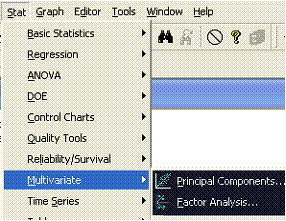
  <p>This section highlights the main elements in a Factor Analysis using Minitab. 
    Factor Analysis is accessed from the multivariate menu of the Stats menu.</p>
  <img src="images/pic001.gif" width=" 286" height=" 221" alt="Minitab Stat menu showing Factor Analysis as an option from the multivariate sub-menu" border="0" class="normal"> 
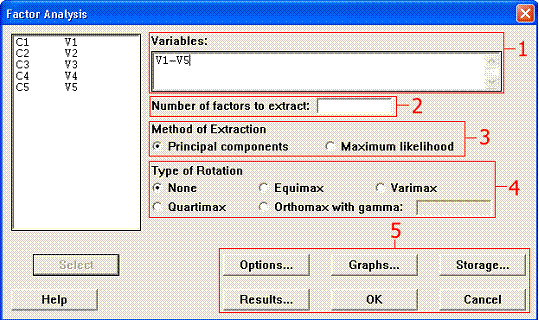
  <p>The main factor analysis window has many options, that I have split into 
    5 sections for explanatory purposes.</p>
  <img src="images/pic002.gif" width=" 539" height=" 321" alt="Minitab Factor Analysis main options window" border="0" class="normal"> 
</div>
<div id="main-content-notoc">
  <p>&nbsp;</p>
  <h4>Section 1</h4>
  <p>Obviously you must select some variables to analyse.</p>
  <h4>Section 2</h4>
</div>
<div id="main-content-notoc">
  <p>You should only enter a value here after an initial analysis has suggested 
    the likely 'dimensionality' of the data. This will always be a number between 
    1 and the number of variables.</p>
  <h4>Section 3</h4>
</div>
<div id="main-content-notoc">
  <p>Leave this alone! It will always be Principal Components</p>
  <h4>Section 4</h4>
</div>
<div id="main-content-notoc">
  <p>This will either be None or Varimax if you want a rotated solution.</p>
  <h4>Section 5</h4>
</div>
<div id="main-content-notoc">
  <p>There are a variety of additional options accessible via these buttons. These 
    are described below.</p>
</div>
<div id="main-content-notoc"> 
  <h5> Options:</h5>
  Don't change any of these. 
  <h5> Graphs:</h5>
  <p>This is the same as the PCA with the addition of any extra graphs. See the 
    later analysis for an example.</p>
  <h5> Storage: </h5>
  <p>There are 7 options, although the 7<sup>th</sup> may be 'greyed out'. Only 
    the first 3 are likely to be of value, although, with the exception of the 
    scores, they store information that is already presented in the output.</p>
  <ol start="1">
    <li>Loadings: Enter column numbers (one column for each factor) to store the 
      factor loadings. The rotated factor loadings are stored if you specified 
      a rotation.</li>
    <li>Coefficients: Enter column numbers (one column for each factor) to store 
      the factor score coefficients.</li>
    <li>Scores: Enter column numbers (one column for each factor) to store the 
      factor scores.</li>
    <li>Rotation matrix: this is a matrix used during the rotation - it is of 
      no interest to you.</li>
    <li>Residual Matrix: this is another matrix that you are unlikely to gain 
      anything from.</li>
    <li>Eigenvalues: Enter a column to store the eigenvalues.</li>
    <li>Eigenvector matrix: Enter a matrix to store the eigenvectors of the matrix. 
      Again these are unlikely to be of much value to you.</li>
  </ol>
  <h4> <b>Results</b></h4>
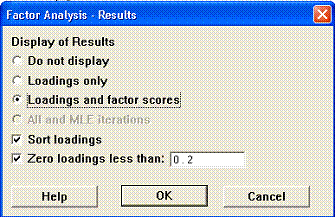
  <p>There are two useful options here. The first sorts the loadings so that the 
    biggest loadings come first. The second 'blanks' (actually sets them to 0.000) 
    loadings less than a specified value. 0.2 is a common value used. Remember 
    these are correlation coefficients so small values could be interpreted as 
    not being significantly different from 0. The advantage is that it clarifies 
    which variables are associated with a Factor. An example is given later.</p>
  <h2>Analyses</h2>
  <h3><b>Analysis 1</b></h3>
  <p><b>Default options for the PCA_EG1 data file</b></p>
  <p><b>Factor Analysis: V1, V2, V3, V4, V5</b></p>
  <p>Principal Component Factor Analysis of the Correlation Matrix</p>
  <p>Unrotated Factor Loadings and Communalities</p>
  <pre>
  Variable  Factor1 Factor2 Factor3 Factor4 Factor5 Communality
  V1       -0.803*  0.337*  0.342*  0.347* -0.061   1.000
  V2       -0.947* -0.170  -0.164  -0.009   0.219   1.000
  V3       -0.919* -0.099  -0.274  -0.198  -0.178   1.000
  V4       -0.192  -0.837*  0.476* -0.189  -0.005   1.000
  V5        0.159  -0.894* -0.255   0.331  -0.040   1.000
  Variance  2.4480  1.6518  0.5110  0.3044  0.0848  5.0000
  % Var     0.490   0.330   0.102   0.061   0.017   1.000</pre>
  <pre>Factor Score Coefficients</pre>
  <pre>
  Variable  Factor1  Factor2 Factor3 Factor4  Factor5
  V1       -0.328    0.204   0.670    1.139  -0.716
  V2       -0.387   -0.103  -0.321   -0.028   2.578
  V3       -0.375   -0.060  -0.536   -0.650  -2.100
  V4       -0.078   -0.507   0.932   -0.619  -0.059
  V5        0.065   -0.541  -0.500    1.087  -0.473
  </pre>
  <h4 align="left" class="Normal">Factor Loadings</h4>
  <p align="left" class="Normal">What are they and how do they relate to the eigen 
    vectors?</p>
  <ol>
    <li> 
      <p align="left" class="Normal">As with the PCA eigen vectors they provide 
        information about the contribution that each variable makes to a factor. 
        The most important variables, for each factor, are highlighted by an asterisk 
        (added by me, not part of the usual output). Note that the pattern is 
        very similar to those observed in the Minitab PCA of the same data.</p>
    </li>
    <li> 
      <p align="left" class="Normal">The factor loadings are obtained from the 
        eigen vectors by a process of &quot;normalisation&quot; that involves 
        multiplying each eigen vector by the square root (the singular value) 
        of its eigen value. For example, for v1 component 1, the PCA eigen vector 
        is -0.513, and the square root of 2.449 is 1.565: -0.513 x 1.565 = -0.803.</p>
    </li>
    <li> 
      <p align="left" class="Normal">If a &quot;pure&quot; PCA is required the 
        eigen vectors can be obtained from the loadings by dividing each loading 
        by the square root of the eigen value. For example, -0.803 / 1.565 = -0.513.</p>
    </li>
    <li> Most usefully the loadings are simple correlation coefficients between 
      the original variables and the newly derived factors. The matrix plot below 
      shows these patterns. Examine the salmon pink plots (row 5), which show 
      the relationships between v1 - v5 and the scores on the first factor. Note 
      how v1, v2 and v3 are highly correlated. Similarly, examine the pale blue 
      plots (row 6), v1 - v5 and the factor two scores. This time it is v4 andv5 
      that are correlated. Thus, we are picking out the same patterns that were 
      shown by the loadings.</li>
  </ol>
</div>
<div id="main-content-notoc"> 
  <p align="center"><img src="http://uk.geocities.com/images/pceg1c.jpg" width="498" height="298" alt="v1-v5 &amp; pc1-pc5 scatter plot"></p>
  <p><p align="left" class="Normal">It is also worth noting from the above scatter 
  matrix that the scores from the five factors (yellow plots in the bottom right) 
  are uncorrelated (orthogonal) with each other. This property is exploited later 
  in the <a href="http://uk.geocities.com/mr.htm">multiple regression</a> and <a href="http://uk.geocities.com/da.htm">discriminant 
  analysis</a> modules.</p>
</div>
<div id="main-content-notoc">
  <h4>Communalities</h4>
  <p>The first table also gives information about quantities called communalites. 
    This appears to be rather pointless as all of the entries are 1.000. The communality 
    concept arises from the fundamental philosophical, and computational, difference 
    between PCA and FA. This next short section is very important. </p>
  <p align="left" class="Normal">Whereas PCA is a variance orientated technique 
    Factor Analysis is concerned solely with correlations between variables. Factor 
    Analysis assumes that observed correlations are caused by some underlying 
    pattern in the data resulting from the presence of a number of predetermined 
    factors. Strictly, we should know in advance, on the basis of some theory, 
    how many factors there should be. The contribution of any variable can then 
    be split into a common component, i.e. that part which contributes to the 
    factors, and a unique component ('noise'). The sum of the common components 
    is called the communality. The subsequent FA methodology is very similar to 
    PCA except that the variability to be partitioned between the factors is that 
    held in common, unique variability is excluded from the analysis. This makes 
    sense since we are investigating factors composed of a number of variables, 
    any unique variance cannot be contributing to a factor, so should be excluded. 
  </p>
  <p align="left" class="Normal">Forcing the analysis to use as many factors as 
    there are variables partially overcomes this difference between PCA and FA. 
    This is demonstrated by the fact that the communalities are all 1.000, thus 
    all of the variability is assumed to be common and all of it will be used 
    in the analysis (as in a PCA).</p>
  <h4 align="left" class="Normal">Factor score coefficients</h4>
  <p>Factor score coefficients are used to calculate factor scores on the new 
    factors. For example, the scores on factor 1 are -0.329*V1+-0.386*V2+-0.375*V3+-0.077*V4+0.065*V5 
    (Assuming that V1 to V5 have first been standardised).</p>
  <h3><b>Analysis 2</b></h3>
  <p>As above but with sorted loadings and factor scores less than 0.2 blanked 
    (using options available from the Results button). The only difference between 
    this and analysis 1 is in the presentation of the information from the analysis.</p>
  <p><b><img src="images/pic003.gif" width=" 336" height=" 218" alt="Factor Analysis results options windows showing 3 options ticked: loadings &amp; factor scores; Sort loadings; Zero loadings less than 0.2" border="0" class="normal"></b></p>
  <p><b>Factor Analysis: V1, V2, V3, V4, V5</b></p>
  <p>Principal Component Factor Analysis of the Correlation Matrix</p>
  <p>Unrotated Factor Loadings and Communalities</p>
  <pre>
Variable  Factor1  Factor2   Factor3   Factor4   Factor5  Communality
V1        -0.803   0.337     0.342     0.347    -0.061    1.000
V2        -0.947  -0.170    -0.164    -0.009     0.219    1.000
V3        -0.919  -0.099    -0.274    -0.198    -0.178    1.000
V4        -0.192  -0.837     0.476    -0.189    -0.005    1.000
V5         0.159  -0.894    -0.255     0.331    -0.040    1.000
Variance   2.4480  1.6518    0.5110    0.3044    0.0848   5.0000
% Var      0.490   0.330     0.102     0.061     0.017    1.000
  </pre>
  <p>Sorted Unrotated Factor Loadings and Communalities</p>
  <p>These are the same loadings as the previous table but note how the loadings 
    have been sorted and small loadings set to 0. It is now clear the Factor 1 
    is variables V2, V3 and V1 while Factor 2 is mainly V4 and V5 plus some V1, 
    etc.</p>
  <pre>
Variable Factor1  Factor2  Factor3  Factor4  Factor5 Communality
V2      -0.947    0.000    0.000    0.000    0.219    1.000
V3      -0.919    0.000   -0.274    0.000    0.000    1.000
V1      -0.803    0.337    0.342    0.347    0.000    1.000
V5       0.000   -0.894   -0.255    0.331    0.000    1.000
V4       0.000   -0.837    0.476    0.000    0.000    1.000
Variance 2.4480   1.6518   0.5110   0.3044   0.0848   5.0000
% Var    0.490    0.330    0.102    0.061    0.017    1.000
</pre>
  <p>Factor Score Coefficients</p>
  <pre>
Variable Factor1  Factor2  Factor3  Factor4  Factor5
V1      -0.328    0.204    0.670    1.139    -0.716
V2      -0.387   -0.103   -0.321   -0.028     2.578
V3      -0.375   -0.060   -0.536   -0.650    -2.100
V4      -0.078   -0.507    0.932   -0.619    -0.059
V5       0.065   -0.541   -0.500    1.087    -0.473
</pre>

</div>
<div id="main-content-notoc"></div>

<p><a href="../pc_eg1.html">Back to PCA Example 1</a> 
<p align="center" class="RDsmall">

<div id="footer-notoc">
<p>Built with courseGenie</p>

</div>
</body>

<!-- ARCHIVE by GEOCITIES.WS -->
</html>