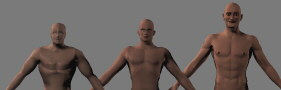
- Left: Poser 1 model
- Middle: Poser 2 model
- Right: Poser 3 model
[CHERYLSOFT] [COMPUTING]
[PAGE 1] [SAMPLE
IMAGES]
Poser 3 sports many new features as well as a redesigned interface. Somewhere along the way, a merger took place and Fractal Design became MetaCreations. At that point, many applications (such as Bryce and Kai's Power/Super Goo) emerged featuring interfaces that were sleek and unique. Poser 3 is no exception. The interface may take a little getting used to, but it is easy to use and customizable.
However, the biggest change in Poser 3 lies under the hood. Unlike earlier versions, Poser 3 can be expanded with any new figure designed specifically for it. That is, users can buy new models from developers such as Zygote and import them into Poser. Not merely static props, these figures are fully posable. This allows animals (some are included) as well as different-looking people to be used.
As was mentioned previously, Poser 1 models were not great. Poser 2 models were a big improvement, and they are still available in Poser 3. However, the new human models included with Poser 3 really shine. Unlike in older versions of the software, faces and hands can be fully posed. They also have more detailed and realistic features.
|
Model Evolution!
|
A big annoyance in earlier versions of Poser was the sheer baldness of the figures. In Poser 2, a few hairstyles were included, but they needed to be imported as props, manually sized and positioned, and then attached to the head. Poser 3 makes that process easier because it assumes that you want the "wig" to be the right size, shape, and position to fit on the head. It also automatically attaches itself to the head (in the program's terms, the head becomes the parent of the hair).
In Poser 2, you could apply an image to the figure - for example, changing the color of the clothes on the clothed figure. Unfortunately, to do this you needed to make a new bitmap image, using templates as an example. Poser 3 still allows you to do this, but for simple changes it isn't necessary. Instead of merely being able to change the color of a figure, any portion (skin, shirt, pants, eyes, lips) can be colored simply and quickly in the "Surface Material" window. No painting required!
Poser 2 included animation, but users had to struggle to get any realistic looking motion, particularly walking. Poser 3 makes that chore a snap with the "Walk Designer." By manipulating a "path" you can state where the character starts walking and where the character ends up, and how long it should take to get there. An animation sequence is automatically created.
To add interest to walking, there are several sliders that allow you to mix certain walking styles including strutting, shuffling, sneaking, and running. Mix a little run and strut and watch the realtime preview break into a jog. You can also control other factors such as stride (for a power walk), leg lift (for marching) and hip swing. The walk designer gives great results and is far, far easier than attempting to design a walk by hand.
Each version of Poser gets better and better. However, there are some things still missing from the program. Here's my wish list:
Blah...
QUICK LOOKS |
|
| PRODUCT | Poser 3 |
| PUBLISHER | MetaCreations |
| DESCRIPTION | Graphics tool for drawing and animating realistic people and animals. |
| PROS |
|
| CONS |
|
If you would like to buy Poser 3 and have it delivered directly to your door, click the link below: