Single Block Controller Card
Rev. January 1998
Building instructions
Printed circuit board
The currently available PCB blck1r6 supports one block. Hovewer it has
been designet as a part of a PCB of 10 x 15 centimeters that will support
four blocks :
Printet circuit board layout from soldering side:
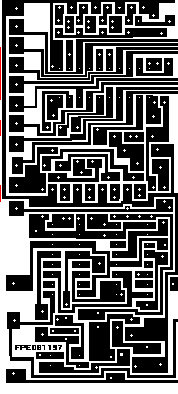
Unfortunately, both Netscape Communicator and Microsoft Internet Explorer does not handle
GIF pictures very well. Therefore, I suggest that you download blck1r6.bmp instead.
Load it into Windows Paint and print it on a Laser Printer with size 97% (This is how I do it
you might need to select another size) Then you are ready to photocopy it onto the PCB, and
etching. After etching you need to drill all the holes. I use 0.7 mm holes, except for the
connectors where I use 1.2 mm.
blck1r6.bmp
component list
IC1 74LS374 8 BIT LATCH
IC2 P620 AC OPTOCOUPLER
RL1, RL2 MEISEL M4-5H 5 VOLT RELAY TWO POLE FOR DIL 16 SOCKET
D1,D2 1N4148
D3 DIODE BRIDGE 1600MA
T1 BDW93 DARLINGTON POWER TRANSISTOR
T2 - T10 BC546 NPN TRANSISTOR
C1,C2 POLYESTER CONDENSATOR 22 NF
R1 1 OHM 5 WATT
R2 - 14 1KOHM 1/4 WATT
R15 - 2.2KOHM 1/4 WATT
R16 - 5.6KOHM 1/4 WATT
R17 - 10 KOHM 1/4 WATT
R18 - 22 KOHM 1/4 WATT
R19 - 10 KOHM 1/4 WATT
Soldering step 1.
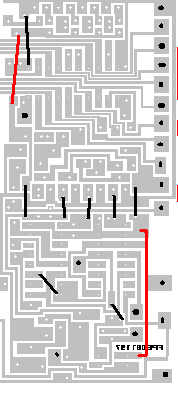
This is a picture of the component side of the PCB.
Wires are shown as black lines - only solder at each end of wire
The read wire should be insolated and probably be installed later
The black dots are connectors
Soldering step 2
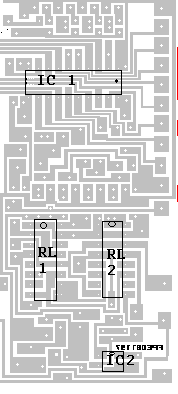
The picture shows the placement of the two Integrated circuits IC1 and IC2. And
the two relays RL1 and RL2. I would suggest that all of them are placed on sockets
Make shure that IC1 are placed with leg 1 at the upper right corner (indicator
to the right)
Make shure that IC2 are placed with leg 1 towards upper left (indicator pointing
uppward)
RL1 and RL2 should be placed with relay coil at the top
Soldering step 3
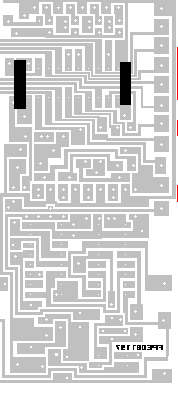
this picture shows the placement of the two condensators c1 and c2
Soldering step 4
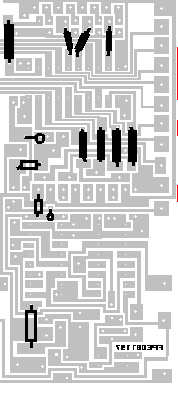
This Picture shows all the 1k 1/4w resistors
Soldering step 5
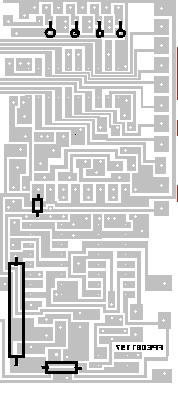
This Picture shows the rest of the resistors
The big one to the lower left is 1 OHM, 5 Watt.
This is the resistors for the analog to digital converter
from top left 2.2K 1/4 watt, 5.6k 1/4W, 10k 1/4W and 22k 1/4W
then below 1K 1/4 watt
One resistor are used for traindetector
at the bottom 10k 1/4W
Soldering step 6
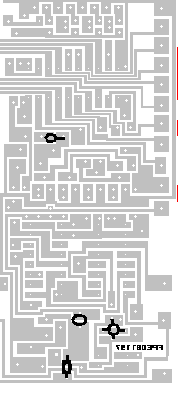
This Picture shows all the diodes
from top 1n4148 with catode ring to the right
at the bottom 1n4148 with catode ring at the top
One red 3mm LED are used for indicating overload and for pulling a/d converter to
approx. 4 volt. This should be placed above the second 1n4148 as indicated in
the image. The long anode leg should be mounted at the upper hole
One diode bridge are used to get a 1.4 voltage drop across IC2 for train detection.
this is to the right in the picture. feets with ac indicators should go up and down,
and feets with + and - should be to the right and left.
Soldering step 7
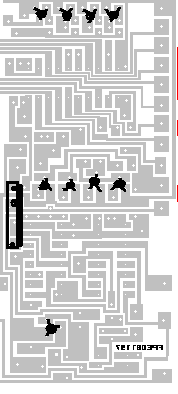
This Picture shows the transistors
The big one to the left is T1 - BWX93 - Power transistor. Make shure that you mount it
in the correct holes. (it should be one empty hole below it). Also make shure that the
heat sink are placed towards right
All the other transistors are BC546. Start with the first four at the upper edge. Make
shure that base goes down. The four transistors in the midle shold be mounted with base
upwards. The last one should be mounted with base towards right.
Test Setup
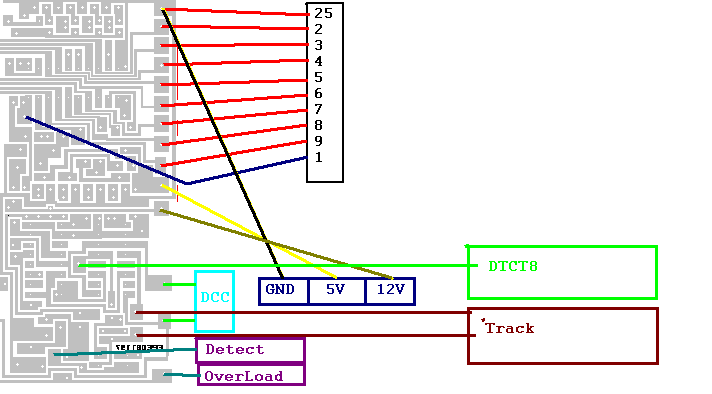
This Picture shows wireing for testsetup
Connect DB25 plug as indicated (do not connect to computer yet)
Connect GND
connect 5 Volt stabilized power for IC uses less than 100ma
connect track power 12 - 16 Volt DC, max track voltage will be approx. 4Volt less
Connect to Track
Train should now run at maximum speed
start software
connect db25 plug to computer
Optionally connect :
DCC input
Connect LED for train detection via 560 Ohm resistor to "Detect"
Future connections
DTCT8 is a circuit that could be used if you want to divide a block into multiple
sections for train detections. This is usefull in long mainline blocks where you
want to have automatic stop of trains at signals.
Feedback to computer
1. Short Circuit detection is implemented on the card, but I have not built any software for
it yet. But it could be connected to a input line as indicated
2. Train detection feedback to computer is possible by connecting detect to a input line on
the computer. This will be documented next month.
Multiple blocks
If you have multiple I/O ports or a 8255 circuits.
Instead of using pin 1 you should connect card select to an aditional 8bit port. This makes
it possible to connect up to eight of these cards directly to the computer. Block numbers
will be 1,2,4,8,16,32,64 and 128
IC 74154 makes it possible to connect up to 255 blocks to the computer (Block number 1 - 255)
This will be fully documented next month
This page hosted by
 get your own Free Home Page