PRINTING FROM THE PALM
One user challenged us to come up some solutions (cheap) for printing from the Palm.
SIX alternatives were presented:
Options 1,2,5 require additional hardware, and 6 to a lesser extent as well, and while perhaps the "easiest" carry the greater expense. The phone-fax solution almost mandates a moden connection (although severe techheads could use a 9v battery and phone wire between the palm cradle and the fax port!). This defaults our choice to software redirection (#3).
I thought this would be easy, but no!
PalmRedirector is $19.95 shareware that allows you to select your WIndows default printer as a device for printing from the Palm. However, I found it extremely limited and kludgy, without much success in pursuing option #6 above. It really worked best for sending data to the clipboard and printing from there. (Go to PalmGear and look at Palm ReDirector, PRDPad, PRDSend).
TealPrint (you know the Teal name) comes with helpful instructions if you have the HARDWARE solutions (1,2,5) and has the advantage of printing directly from the Palm applications (memo, todo, datebook, address) as well as some other Teal applications.
PrintBoy is a handy program that is similar to TealPrint, but also allows printing from the Palm clipboard. It is $14.99 commercial software, but a demo is available. I was able to use PalmRedirector and PrintBoy together, but had to cut the data from the PC Redirector window and paste it into Notepad to print it -- too many steps.
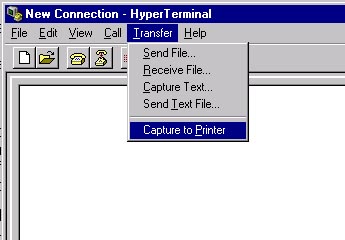
I don't have that much hair to pull out! But I persisted in finding a better solution, and as luck would have it, I finally figured one out! Every PC with a parallel printer and a serial port is like a giant printer cache for the serial Palm device! Using Hyperterminal under windows, I set the port to COM1: (the same as the cradle), and in the TRANSFER pulldown, I set "capture to printer".
This, quite simply, works!!!! You print from Printboy to the PC (as if it were a printer), Hyperterminal prints to the printer, and there you have it folks.
If you want to fiddle around with formatting your text a little before you print it, you should capture the text and cut and paste on the desktop.
Should I try to set up my IrDA adapter to a specified com port and use hyperterminal as well (I think I did and I think it worked, but I am in a daze after this whirlwind of effort).
Next up, security issues.
Hotfiles at ZDnet (now TechTV) has a great selection of PDA utilities for securitiy issues -- but we warn you - some encourage you to put all your passwords in one place and encrypt this data ---- um, We'll stay with the sticky note pasted to the monitor, okay? Look at Strip on Handango for an example of this kind of program.
Paypal announces they will no longer support PalmOS app -- oh well.
One member says that "Displex" is a 'miracle cure' for screen wear and tear apparently this stuff is sold for taking scratches out of cell phones and works great on PDA screens as well.
Extreme interest was expressed in pursuing future meetings devoted to "database" applications, with a special interest in updating PC MSAccess databases from Palm data acquired in the field. HandiBase, Pendragon Forms, and Access to DB (?) were mentioned as potential subjects.
One member has access to a PC Projector so we can have slide/PowerPoint(tm) presentations. POSE (Palm Operating System Emulator) is available from Palm and allows you to run an app on the PC monitor and do a screen capture (PrintScrn-PrintScrn) that you can edit in Paint(c) or other graphics program to include in your slides.
If you have experience with a DB program and are willing to help out, drop us a note.
David Pogue's PalmPilot the Ultimate Guide, O'Reilly & Associates remains the most frequently referenced book in our meetings.
See you in September (I think that is a partial verse from "Summer Love").