Previous meeting Minutes
Once again, interest was high in the keyboards available for the Palm platform. Mention was made of a folding keyboard, which can fit in a pocket.
Bob L. brought his GPS with DeLorme software to show how the palm can be used for trip planning and directions en route He pointed us to Solu/SolusPro software, which allows you to download maps for selected regions, as well as DeLorme "StreetsPlus".
Bob also gave a good review of Concept Kitchens "Write/Right", which is available at the Franklin Covey store in the St Louis Galleria.
A new visitor/member was interested in our thoughts on using the Palm in her work environment - which is in Human Resources for a large company. What she has in mind is a database of:
That can travel with the appropriate HR executive for instantaneous access, and can be periodically updated, not necessarily on the Palm itself. Obviously, she would like to be able to sync this data across several Palm platforms, if needed. Several database applications were mentioned:
After brainstorming a bit though, a couple of other approaches, including spreadsheets:
were suggested as alternates. The Quicksheet application has some appeal, because it allows for data exchange with a desktop application (Excel) that may be easier to use than a complete database application.
A little more thought, and we realized that this "database" was really just a searchable list - it is unlikely that anyone would really want to sort out the entire company salary structure by hire date, position, salary, etc. (at least on the Palm), when the real "key" to the search would be a person name. So we suggested a DOCUMENT to carry all this inofrmation, with a search engine, such as built into DOC, or TealDoc, to go from name to name. Reference was again made to MakeDoc (a copy of which will be uploaded to this site), which allows you to convert text files to very compact files for reading, searching, and bookmarking on the Palm. Text formatting on the desktop can be easy using the cut (control-C) and paste (control-V) shortcuts through Palm Desktop applications.
Again, three solutions: Database, Spreadsheet, Text
At this point, we suddenly realized a very important issue! SECURITY! How would it feel to lose your Palm? How would it feel to lose it knowing that the salary of every employee of your company was on it??? Okay then, it is probably easier to encrypt TEXT than to encrypt a database or a spreadsheet application. We didn't have an encrpytion program right at hand, but we know they exist for the Palm -- at least for "docs" -- and because of this, we recommend the searchable list as the only solution for the problem posed. More on encryption when we find out more!
Solutech was mentioned as a local (St Louis) firm pursuing Palm specific applications.
We discussed unusual Infrared applications of the Palm: using it as a remote controller (like X10) for appliances, model trains, televisions (OmniRemote PacificNeotek) and so forth.
Wayne showed us some more features of DiddleBug, a timer/reminder with graphic notes, scribbles, and text.
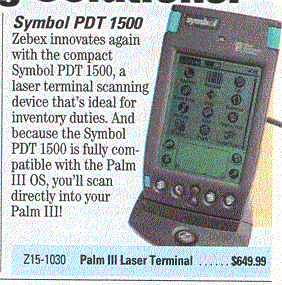
We talked at length about shopping applications of the Palm, and computers in general. One member indicated she saves a phenomenal amount of money each week by organizing her coupons and using a shopping list with HandShop. This led us to a discussion or bar codes -- since hand coding numerous shopping items is so tedious -- and we recalled the demo earlier this year of the Palm with the built-in bar code reader (Symbol PDT 1500 - Zebex - about $650 from Tiger Direct
There appears to be some delay in filling orders for the VISOR from Handspring.
TRG, the makers of Palm add-on memory and FlashPro, have announced their own "clone" of the Palm, with pricing quite similar to the original product -- we'll wait, but you can try TRG.