
Clauses are special, declarative statements that are placed after the colon that begins the class but before variable declarations, access mode statements, inner class declarations, and functions.
The Class statement has the following clauses:
Renames cannot be used with any other clause except Template and Reference, and for those clauses there are restrictions. There can be more than one of the same clause; having several of a particular clause is a syntactical convenience: it has the same meaning to the compiler as if you used only one clause and listed several items. For example, Inherit A; Inhert B; means the same to the compiler as if you'd written Inherit A, B;.
The order that clauses are specified does not matter functionally, with one exception: the order of Template and Reference clauses determines the order that type parameters are specified when parameterizing the class.
inherits-clause: Inherits [Inline] <inherits-component>;
inherits-component: resolved-typeidentifier [{ extended-translation-options
}]
This clause specifies that the class is derived from one or more other classes, known as base classes. A derived class shares an is-a relationship with its base class(es):
Unlike in C++, there is only ever one copy of a base class, so QDL inheritance corresponds with virtual inheritance in C++. Unlike in C++, all inheritance in QDL is public.
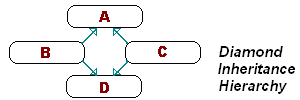 What this means
is, if two classes B and C derive from the same class A, and a fourth
class D derives from both of these classes, there is still only one copy of A.
This can be represented by a diamond inheritance diagram, like the one on the left.
What this means
is, if two classes B and C derive from the same class A, and a fourth
class D derives from both of these classes, there is still only one copy of A.
This can be represented by a diamond inheritance diagram, like the one on the left.
In order for it to be possible to share A between B and C, at least one extra indirection is required to access any member of A from B or C, or to convert a reference to B or C to a reference to A. That's because the physical location of A relative to B or C can change depending on the layout of the class hierarchy. This extra overhead is present regardless of whether a class D is actually created that derives from B and C; it is the very possibility that introduces the overhead. Even single-inheritance hierarchies will have this overhead by default.
Inline provides a partial way around this problem. In the Inherits clause, Inline means that the base class is embedded into the derived class, such that the derived class always knows the location of the base class. There's just one catch, which is that you must make sure your hierarchy does not require two copies of a base class; the compiler will not allow it. In the diamond hierarchy above, either B or C could have inline inheritance from A, but not both. If both used Inline inheritance, then the attempt to define D would fail: B and C would each need their own embedded copy, which is not allowed in QDL.
Under the multiple-inheritance OO model, base classes can usually be classified as mixin, interface, and main classes. Mixin classes are general-purpose classes that can be tacked onto any kind of inheritance hierarchy, while interface classes are usually abstract classes that specify a contract for derived classes to follow. Main classes, meanwhile, provide a derived class with its primary identity or main purpose. Usually, for every new class you create, you only need one main base class. This is part of the idea behind languages that support only single inheritance; mixins, it is argued, are not really necessary, and a separate mechanism can be provided for interfaces (as in Java).
If you stick to one main base class while deriving, you can always make the main base class Inline (but not the interfaces or mixins) without worrying about the type of conflict mentioned above.
In a Final class, all base classes are implicitly Inline.
When a base class A contains an abstract function with a specific signature--call it F--and another base class B has a concrete (i.e. not Abstract) version of F, there is no conflict; the compiler will automatically map the Abstract F to the implemented F, such that calling A.F actually calls B.F. This only works if both A.F and B.F are visible to the derived class, D, after enacting the translation options of the Inherits clauses.
If a D.F overrides B.F, A.F maps to D.F instead.
The optional extended-translation-options section can be used to alter the interface of the base class.
extended-translation-options: [rename-metastatement | access-metastatement]*
rename-metastatement: Rename (old-resolved-identifier
As new-identifier | old-resolved-typeidentifier As
new-resolved-typeidentifier);
access-metastatement: (Public | Private | Protected)
[{ access-list-spec }] <access-name-spec>;
access-name-spec: (resolved-identifier | resolved-typeidentifier)
The access-metastatement is used to change the access of members of the base class. There is no restriction on the access changes that can be made. * Actually, it may be a good idea not to allow Private members in the base, otherwise invisible, to be made visible again--i.e. Private->Protected or Public may be disallowed *
Conflicts between members of classes from which the class being defined is multiply derived do not have to be resolved in the translation options. For example, if both A and B have an F, C can multiply inherit from both without explicitly resolving the conflict. However, because the scope resolution operator has been removed from the language, this makes F completely inaccessible, just as though the translation options had privatized both Fs. The compiler may issue a warning about the conflict.
The textual order of the metastatements does not matter. Each metastatement must use the original name of the member. For example:
Inherits Base {
	Rename A as B;
	Protected B;
};
This does not have the effect of making Base.A Protected. In fact, the Protected metastatement is illegal unless Base actually has a member B.
renames-clause: Renames <renames-component>;
renames-component: resolved-typeidentifier [{ extended-translation-options
}]
This clause specifies that the class being defined is an alias to another class. In other words, this new class is an existing class with a new name and, optionally, altered semantics. The relationship between the class being defined and the existing class is not derived/base, but rather alias/aliased. To illustrate the difference, check out the following snippet:
Class A:
	Function Q;
End Class;

Class B:
	Inherits A;
	Function R;
End Class;

Function F (B: @ B):
	B.R;
End;

Sub Main:
	A: A;
	A.Q;
	F A; // Error
End Sub;
The reason this doesn't work is because an A is not a B, even though the reverse is true. However, if Class B had used the Renames clause instead of Inherit, then an A would also be a B, so the code would have compiled just fine. The Renames clause allows you to perform value-adding and make interface modifications on a class while retaining full compatibility with the existing class.
The Renames clause is useful for:
A class can be aliased even if it is Final. You can alias an array type (even though you cannot derive from one), but you must specify the type of the array's elements.
An alias class cannot contain any data members. The body of the class definition for an alias class may contain extra functions, with the following constraints:
The alias class may contain sections with restricted access modes (Private, etc.)
When you retrieve the Class of an alias class, you will find that the name stored in the Class structure is that of the aliased class. Extending the example above, Class(B).Name is "A".
None of the modifiers that can be applied to a class can be used with an alias class. An alias class will effectively use the modifiers and clauses of the class which it aliases.
You may have noticed that you can have a set of extended-translation-options; this works the same way as it does for Inherits. You may also have noticed that you can specify more than one resolved-typeidentifier in the clause. This is done to allow you to combine two or more alias types of the same aliased type into one. For example:
Class Nifty String Renames String:
	Sub Print:
		StdOut.Print This;
	End Sub;
	Sub Randomize:
		This = Math.Random (1 To 100);
	End Sub;
End Class;
Class Ultimate String:
	Renames Path String, Nifty String;
End Class;
You cannot "derive" from multiple non-alias classes, directly or indirectly. For example, the clause Renames String, Double would be invalid.
Both of these clauses specify that the class is a parameterized type. A parameterized type is a class that takes one or more other classes as parameters in its type name. The Template clause defines a "normal" parameter, while the Reference clause defines a parameter to which type the class is a reference. There may be any number of Template clauses but only one Reference clause. The Template clause will be discussed first.
template-clause: Template <name-typeidentifier> [: [Inherits]
specification-resolved-typeidentifier];
reference-clause: Reference name-typeidentifier [: [Inherits]
specification-resolved-typeidentifier];
For example:
Class Spec:
	Function A;
	Function B;
End Class;

Class MyParameterizedType:
	Template T: Spec;
	Function Constructor (T: T):
		@ReferenceToT = @T;
	End;
	Function Call_AB Return T:
		ReferenceToT.A;
		ReferenceToT.B;
		Return ReferenceToT;
	End;
Private:
	ReferenceToT: @ T;
End Class;
What has been defined here is:
To instantiate MyParameterizedType, you need a class that conforms to Spec. For example:
Class ConformsToSpec:
	Function A:
		StdOut.Print "A";
	End;
	Function B:
		StdOut.Print "B";
	End;
	Function C:
		StdOut.Print "C";
	End;
End Class;

Function Main:
	C: ConformsToSpec;
	CRef: @ ConformsToSpec;
	P: MyParameterizedType ConformsToSpec (C);
	CRef @= P.Call_AB;
End;
In this case, ConformsToSpec is a class that conforms to Spec, meaning that it has all the members of Spec within it, and those members have matching signatures and protocols. It is important to notice that ConformsToSpec is not a derivative of Spec, yet it can be used as a parameter to MyParameterizedType because it has matching members. Notice also the syntax used for instantiating the template class. The type being used as a parameter (ConformsToSpec) immediately follows the template class name (MyParameterizedType).
When MyParameterizedType::Call_AB is called (last line of Main), it is able to in turn call ConformsToSpec::A and ConformsToSpec::B. The function is declared as returning type T (which follows specification Spec), but from the point of view of Main, it actually returns a reference to ConformsToSpec.
The optional Inherits keyword that precedes the specification class name in a Template or Reference clause changes the nature of the parameter(s). It means that the parameter(s) must actually be a derivative of the specified interface class, rather than just conforming to it. If the template clause above had read
Template T: Inherits Spec;
Then ConformsToSpec could not be used as a parameter to MyParameterizedType, because it is not derived from Spec. Using the Inherits keyword is preferable because it reduces overhead.
As the syntax shows, you do not need to have a specification class. However, this severely restricts what can be done with the parameter within the parameterized class. Without a specification class:
That said, having no specification class is the only way to be able to accept an unknown-size array as a template parameter. Also, having no specification class can save memory in some cases because no pointer to template parameter information need be stored in each class instance.
The parameterized type feature of QDL is used to make possible:
A class can take multiple reference parameters. For example:
Class Multi-Param:
	Template MemMan: Inherits Memory Manager;
	Template ListType: Inherits Abstract List;
End Class;
The order of Template and Reference clauses determines the order that parameters are specified when parameterizing the class. For instance, if two clauses in class P are in this order:
	Template T1: Interface 1;
	Template T2: Interface 2;
And
Then you might use P X1 X2 as the parameterized name for the class.
Only one copy exists of Static members of a parameterized class. In other words, two instances of a template class that have different sets of template arguments still share the same static variables. Static members cannot have the type of the template argument, or be references thereto. Similarly, Static member functions cannot have as arguments, or return, the template argument type or references thereto.
The class may not contain members that do not have a known size. As a result, member variables cannot have the type of a template argument, though they may be references thereto.
When the Inherits keyword is used, then the class used must be derived from the specification class. This makes it really simple to make a class that is compatible with the template class: simply derive from the specification class.
When the Inherits keyword is absent, however, the members of the template parameter must conform to members of the specification class. The exact meaning of conformance will be discussed here, with:
For P to conform to S:
The Reference clause specifies that the class is a reference type. There is one built-in reference class, @, and the Reference clause allows you to define more. There are two additional reference types in the standard library, # (reference that supports automatic reference counting) and $ (garbage-collection prevention reference).
For an idea of how this works, here is an example:
Class Cool Ref Spec:
End Class;

Class Cool Ref:
	Reference T: Cool Ref Spec;
	Function Constructor (NewT: @ T):
		@This = @NewT;
	End Function;
	Operator @= (NewT: @ T):
		T @= NewT;
		AccessCount = 0;
	End Function;
	Operator . Return @ T:
		AccessCount++;
		Return T;
	End Function;
	AccessCount: Integer(0);
Private:
	T: @ T;
End Class;

Class MyClass:
	Function PrintHello:
		StdOut.Print "Hello!!\n";
	End Function;
	X: Integer;
End Class;

Function Main:
	X: MyClass;
	R: Cool Ref MyClass (X);
	R.PrintHello;
	StdOut.Print "AccessCount: ", X.AccessCount, "\n";
	R.X++;
	StdOut.Print "AccessCount: ", R.AccessCount, "\n";
End Function;
The output is as follows:
Hello!!
AccessCount: 1
AccessCount: 3
As you can see, Cool Ref is behaving exactly like a reference. Granted, if Template had been used in place of Reference, behaviour would be similar to that of a reference; however, the Reference clause makes the behaviour coincide exactly. Given:
Then:
QDL template classes are very different from those in C++. C++ template classes are like a glorified macro expansion mechanism: the code that makes up such a class is recompiled to produce a new executable routine for each different set of template parameters with which the class is used. The meaning of expressions in the class's code have to be re-evaluated given the new parameter(s).
Here are some disadvantages of both approaches:
| Table of Contents | Qwertie's Site/Mirror |