Overview of Computers
Becoming Computer Literate and Computer Competent
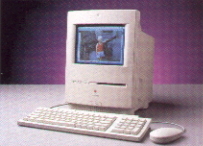
Computer literacy is simply having an understanding of what a computer is and how to use it. And having some skill using a computer is generally what is meant when you hear the term computer competent. Since you are here and reading this you are already computer literate and competent. To expand on your literacy and competence we will learn; We do have some boring stuff to get out of the way first. So, let's get started. Hey, I will throw in some pictures. That may help. Four Types of Computers Supercomputers On Dec 7, 1999 the newspaper announced that IBM is planning on building a new supercomputer of staggering power to resolve one of the most baffling mysteries of the human body: How proteins are formed. Minicomputers Microcomputers Microcomputers are of two types, personal computers and workstations. Since we are using microcomputers, let's take a look at the various parts of a personal computer. Parts and Phases of a Computer System When we think about an automobile we first see it as a way to get from place to place. At least that is what you think until it breaks down. Suddenly you remember it has body parts, cooling parts, fuel parts, electrical parts and yes, you guessed it a computer. When those parts are put together you have a complete car. It is your personal transportation sytem. And if all the parts are working properly it will get you from place to place just fine. It is best to think of the computer as a system just like your car. And like your car, the computer you are working with has five or six parts. The first five parts listed below are found in every computer. Since you are connected to the Internet then you also have the sixth part.
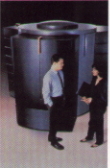 Costing millions of dollars these are the largest and most powerful of the various types of computers. They are maintained in a special room or environment to keep them clean and above all cool. Heat is a problem for a computer. Make sure your computer has lots of air circulation to keep it cool. It will last a lot longer. Supercomputers are about 50,000 faster than the computers we use at home and are used by large organizations principally for such things as research, oil exploration, weapons development and weather forecasting.
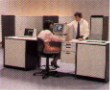 Costing up to $10 million, mainframe computers can process billions of characters of data. This type of computer was the backbone of the computer industry for many years. Its popularity has declined recently because of developments in the smaller desktop computers like ones we use. Their gain in speed and power has made the mainframe somewhat unnecessary. Banks, airlines, universities, government agencies and other large organizations use mainframes.
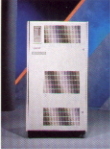 These computers are about the size of a refrigerator. Costing thousands of dollars they are smaller than the mainframe in processing speeds and data-storage capabilities. Until recently they were used in medium sized companies or in divisions of large companies for special tasks such as accounting. Like the mainframe the use of the minicomputer is rapidly declining because of the recent advancement of microcomputers which are now much more powerful.
Finally, something we have all seen and have setting on our table now. These are relatively small computers costing in the thousands of dollars and in some cases are as inexpensive as a few hundered dollars. I saw an ad in the newspaper for a computer selling for $399. That price included only the system unit and you had to buy a monitor, keyboard, mouse and printer to go with it. In addition, there is an internet provider that you have agree to use for at least one year. If you already have a computer connected to an internet provider and just want to upgrade your existing system then you can find real bargains. A 1992 survey found that 85% of a sampling of U.S. workers and 88% of Canadian workers, used a microcomputer on the job. There are few places you can go to today and not see a microcomputer at work.
The Purpose of a Computer System: Data Processing
Since I brought it up in number 3 above I guess I better talk a little bit about converting raw data into information. After all that is what the computer is all about. In a later page I will go into some detail on the processing of raw data. For now all we need to say is that the fundamental purpose of a computer is to process data. This includes refining, summarizing, categorizing, and otherwise manipulating data into a useful form.
And here you thought it was to surf the net and chat with your buddies. Well, even that is processing data. If you don't enter raw data into the computer and then tell the computer what you want to do with it or where you want it to go, this silly thing called a computer will only sit here and be a really good night light.
The Phases of Data Processing: Input, Processing, Output, Storage
To process data into information the computer goes through four actions.
The types of hardware are generally classified according to the elements of a computer system that we talked about earlier. Remember, they were input, processing, output, storage and communications.
Input Hardware
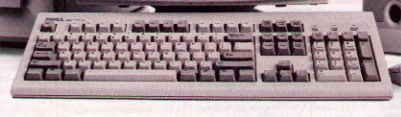 Collecting raw data and processing it into a computer useable form is the job of hardware. The most common form of input hardware is the keyboard. It looks like a typewriter, and it works like one, except it has additional keys. These added keys are used to enter special codes and commands. When we get into the page on input we will look at each of these keys and get to know them well.
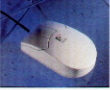 Another input device you have on your desk is the mouse. It can be rolled by hand on a desktop to direct the arrow, called the cursor, on the display screen. The cursor is the blinking symbol on the computer screen that shows where the data may be entered next. Notice that I said "entered" next. It certainly appears that way, but later we will see that it is not really "entered" there, it is only displayed there. The mouse also has two buttons used to exucute commands.
Processing Hardware
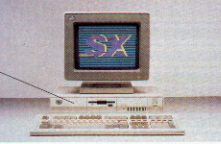 Processing hardware receives, interprets, and executes software instructions. With our computers the hardware we are talking about now, processing hardware, is inside the box that everything else is plugged into. It is called the system unit and it contains the power supply and the electronics that do the processing.
The System Unit
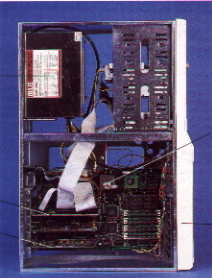
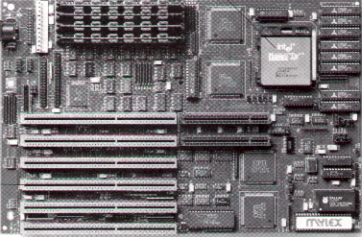
The main parts of the system unit are the power supply and the motherboard.
Output Hardware Output hardware are devices that display the information processed by the computer in a for that people can understand. The most familiar types of output devices are monitors and printers. Monitors A monitor is an output device that is a television-like screen displaying text and graphics. The term is used interchangeable with scree, video display screen, and cathode-ray-tube (CRT). Information displayed on a monitor is daid to be in softcopy. Softcopy mens the output is in a form that can't be physically touched and is best used for informaton that needs to be viewed only occasionally such as an airline's departures and arrivals display. Printers A printer is a device that produces text or graphics printed on paper. Information displayed on paper is said to be in hardcopy form. Hardcopy means the putput is in a form that can be phicially touched and is commonly used for information that must be seen repeatedly or by many people, such as a school or business report. Storage Hardware Earlier we discovered that main memory or primary storage was temporary storage. That is, the data or instructions contained in it are volatile and disappear when the computer's dlectical power is turned off. Clearly, people need to store data and information in a form tha tis nonvolatile. Nonvolatile storage is permanent storage used to preserve data and programs. Storage hardware - also called secondary storage - stores data and instructions in a permanent form. Although they may still be built into the cabinet housing the system unit, these devices are not part of the central processing unit and main memory. The materials on which dta and instructions are stores as electomagnetic sifnals are called media. Example are floppy disks and hard disks. Floppy Disks A floppy disk is inserted into a device called a disk drive. A disk drive accesses the magnetic signals on the diskette and inputs them to the computer. This is also called "read". A disk drive also takes the electronic data in the computer and converts into magnetic form on the diskette for permanent storage. This is called "write". Because floppy disks can be carried around, they are used to move data and programs form computer to computer. Hard Disks A hard disk consists of rigid disks permanently installed inside a hard disk drive.
Hard Disk Communications Hardware Communications hardware sends dta, information,or programs from one computer or storage decice to another. The principal communications device is a modem. A modem (pronounced "MOH-dem") changes the electonic signals of the computer into a form that can be sent over telephone lines. Software As mentioned, software or programs consists of instrucitons that tell the computer to hot perform certain tasks. The are two types of software; Systems Software and Applications Software.
Systems Software Systems software consists of programs tha tallow the computer to manage its own resources and run basic probrams. It tells the hardware what to do but not how to solve problems related to a business or progession. As an example it will not help you make predictions for your tax bill next year. However, it will tell the computer where to store the data used during processing to redict the tax bill. An important part of systems software is the operating system. The operating system helps the computer manage its own resourcces, such as run programs and manipulate files. Since you are using a personal computer you will probably hear of or use the follwoing operation systems. DOS (Disk Operating System) used on IBM and IBM compatible machines. DOS with Windows and Windows NT, both developed by Microsoft for use on IBMs and IBM compatible machines. More than likely you are using the same operating system as I am, Windows98 or possibly Windows95. Applications Software
Applications software consists of computer programs designed to satidfy a user's specific needs. Examples are programs to perform payroll processing or word processing. This software may be either packaged or custom written.
If you use a personal computer you will probably learn to use some or all of the following programs:
Data and Information In the world of computing data are not just a hodgepodge of numbers or letters. They are organized precisely into five increasingly sophisticated layers. Procedures Procedures are guidelines to follow for using hardware, software, or data. For example, when you buy a software package, you get a box that contains not only one or more floppy disks but also a booklet or two, which is called documentation. Documentation consists of written descriptions and procedures about how to use a program. People People involved with computers are two types, computer professionals and general users.
Computer Professionals Some types of computer professionals you may encounter are the following: General Users Finally it comes to us. Computers are becoming standard business tools for all types of employees, from company presidents on down, as well as people at home. These people are called users, or end-users. The skills they need include knowing how to use the programs we discussed under application software. Home users may also use entertainment software, educational software for children, and personal finanacial management software.
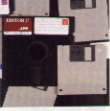 A floppy disk - or simply diskette - is a thin plastic disk that can be magnetically coded with data. The diskette is enclosed in a paper or plastic covering. The two sizes of floppy disks most commonly used with personal computers are 5 1/4-nch disks and 3 1/2-inch disks. There is a larger capacity disk now available and we will talk about that in a later module.
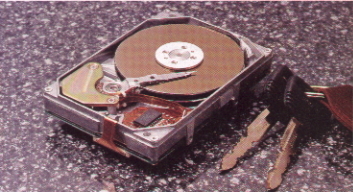 Pictured here is a hard disk which consists of rigid disks permanently installed inside a hard disk drive. You cannot touch the disks in a hard disk drive or narmally see them since the case is hermetically sealed to keep out contamination like dust and smoke. Hard disks are more expensive that floppy disks because they store much more data and access data faster. They do read and write data in the same manner as a floppy disk. The hard drive is usually designated as drive C.
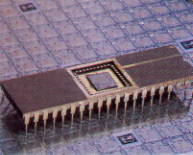 We are finished with "Overview of the Computer." E-mail me with any questions you may have. If you have no questions, then left click on the microprocessor chip and we will complete a short exam on the material and then move to the magic and mystery of the computer, "Input Hardware."