How do I ... And for Me
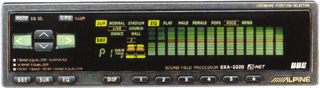
Setting up with an in dash equalizer
INTRODUCTION
As most of the enthusiasts know, it is virtually impossible for any speakers reproducing recorded media accurately. This is due to many factors such as phase cancellation in the car, sonic delays, obstructions and etc.Ideally, the most preferred method of obtaining
the best sonic reproduction in the car audio environment is to use a 1/3
octave 31 band equalizer. However, most of the average joe does not
have access to equipment that are used for setting up the equalizer.
Basically, the equipment needed are:
- A media that generates pink noise. - In this case, a specially recorded CD.
- Real Time Analyzer - A machine that shows the actual frequency response.
The Real Time Analyzer or better known as the RTA machine, is a VERY PRICEY piece of equipment. Not many people are willing to spend money or the effort to get one.
So. How do we get the best sound reproduce in our car? For me, an in dash equalizer with 7 or 14 band settings, preset settings (to memorize settings) and a sub woofer output such as the Alpine ERA-G320.
Why? You may
ask. When I have just told everyone that the best equalizer is the
31 band type and then contradict myself by preference to the in dash equalizer
?
THE REASONS
Simple. Budget and time are the reasons.With different music, artists and most importantly, recording labels available these days, there isn't any guarantee that all CDs or tape are recorded with the same equalization settings in the recording studio. The 31 band (typically trunk mounted) equalizer may be set up to reproduce ideal sonic reproduction of the pink noise but will not help making a poorly recorded media to sound good.
Using the above mentioned
in dash equalizer, I am able to use my very own precision tool (like my
own ears) to set up for my preferred sonic accuracy (Isn't that what's
all about?).
HOW TO E.Q. ?
With an equalizer like the Alpine ERA-G320, I am able to set up the entire car stereo as follows:- First, get hold of a well recorded audiophile CD (what ever that suits you).
- Then, make sure the sub woofer is NOT connected/ activated.
- Now, set the equalizer settings to flat or default positions.
- Play the music and by using your ears, listen for the areas which need to be adjusted. For example, if you hear that the midrange is too high, try lower down the setting at about 500~1000 Hertz.
- When you have obtained a pretty acceptable (by your own standard) sonic spectrum, save the settings with the preset button or record the setting down on a piece of paper.
- Next, with the sub woofer output set to minimal position, connect it to the rest of the system.
- Keeping in mind that the function of a sub woofer is to add more dynamic response or IMPACT to the music, increase your sub woofer volume or the sub amplifier's gain sparingly and listen for the overall sound reproduced in the system. You might want to try different phase setting for the sub woofer. Some time, with the sub woofer playing out of phase, you can get more accurate music reproduce in the car.
- Voila, your DONE.