WAVS
wavs are files containing sound with the extention .wav
They can be music clips, funny sounds, voice......just about anything that can be recorded. Many of us on irc have short wavs of our own voices. Only clean sounds are allowed in Neverland......and many found on irc channels are anything but! Discretion is advised when getting wavs from unknown sources.
In order to hear the wavs being played on irc , both parties must have the same wav file. The dcc send command is used to get the file from the one playing it so both can hear. You also need a chat program capable of doing wavs. Both Mirc and Pirch are excellent choices.
Usually you'll need to configure your chat program somewhat to get it to play/hear wavs. Help is provided in channel, but here are a few guidelines for mirc:
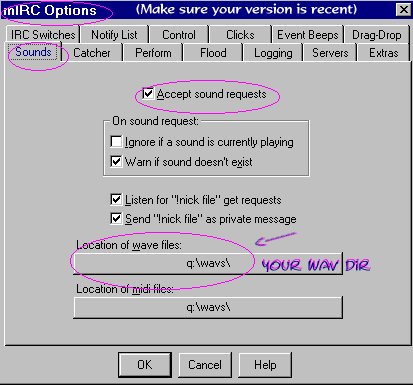
First, make sure you know what directory your wavs are in, or where you want them. Then go to Options/Sound Requests and make sure the path is the same as where the wavs are to go. Check the boxes in that section at the same time. Then go to Dcc Send Options and make sure the path is the same there. That should enable you to hear and receive wavs in channel.
To play them in channel, it helps to put a line in Alias:
/s /sound # $1.wav < $1.wav > *2
It needs to be all on one line, so it might be best to copy this line and paste it there. When that's done, you should be able to type: /s thenameofthewave in channel and play your wav.
It's not nearly as complicated as it seems. And someone will always be glad to help you in channel if you have problems.
Since we send wavs back and forth a lot, it's nice to have an auto-send set up too. That line goes in Remote/Events. Make sure the listening box is checked. Paste this line in: 1:ON TEXT:!yournick*:*:/dcc send $nick c:\wavs\ $+ $parm2 [c:\wavs being the directory where your wavs are.]
[Home]
[Wav Info] [History][Op
Info] [N'Land
Fun]