Page hosted by GeoCities
Turbo Pascal Memory
.
Written for beginners
.
The article explains the properties of memory in DOS real mode Turbo
Pascal programs. It does not explain programming, but it gives some background
information to programmers how to use variables, typed constants and pointers.
Program / Data
The program is the list of instructions that tells the computer, what
to do with the data. The data can be constants but most often the data
are varying. That means that the program does the same procedures over
and over with varying numbers (values) and strings.
On this early point it must be mentioned that the program is some kind
of data too, but this is valid only for the operating system, when it loads
the program from disk to RAM. From the standpoint of your application,
the program is not data, it is the list of commands (instructions) which
is absolutely static as long as the application is running in the computer.
Data can be stored in fast RAM and on the disk. The disk space is virtually
unlimited, but it is somewhat more complicated to maintain, compared with
the data in RAM.
Data in RAM are held in "VARIABLES", named locations whose addresses
are managed by the program or, more precisely, by the compiler. Indeed
the names of the variables are known to the compiler only, they are not
saved in the .EXE program file. In the running machine program the variables
simply have addresses.
Kinds of data
Constant data are saved in a code segment, i.e. the memory range where
the program itself is located. The code segments are explained below. Note
that "typed constants" are not constants but variables, see below.
Variable data are divided in several kinds.
-
Global data
-
Local data
-
Heap data
-
(file data)
Global data are the variables which the programmer
declared on top of the program or unit with the Pascal "Var" instruction.
They reside in the DS: data segment, which is limited to max. 64 kB. They
occupy memory space as long as the application program runs.
There are typed constants in Turbo Pascal, made with the Const
instruction instead of the Var instruction. These are by definition normal
variables in the data segment, they simply are "filled" with a startup
value. Example:
Const COMport : Integer = 1;
Typed constants are a Turbo Pascal specialty!
Local data are the variables which the
programmer declared in a procedure or function below the Procedure declaration
and before the Begin -- End; clause. They are alive only as long as the
procedure or funcion is running in its begin - end; clause. On entry at
Begin the value in the variables is undefined. The total available memory
space is limited to the value which was declared with the $M(xxxx, ....)
compiler instruction (usually 16kB or 32kB), and the programmer must be
aware that all procedures which call each other can add more variables.
On the other hand most local variables do not "live" very long since procedures
return early and thus release the obtained stack memory. The stack not
only holds the local variables but also the return addresses of the procedures,
needing 6 bytes per call, but this is usually not a high value except
in recursive procedures. The parameters to the procedures and the function
results also occupy some space on the stack.
The formal procedure / function parameters are very similar to local
variables in the called (=running) procedure.
Heap data are mass data which are held
by a pointer, the memory was obtained with a New(ppp) or GetMem(ppp,sss)
instruction. They are alive until the pointer is given back to the pool
with Dispose(ppp) or FreeMem(ppp, sss). Usually the pointers reside in
the global data area, the DS: segment, but there they occupy 4 bytes each
only.
PC Memory layout
The available memory for the application program is limited on the low
end and on the high end by particular properties which were fixed when
the PC was developed some 15 years ago. The PC has 1 MB of memory available
in Real mode and in the virtual real mode when running in a Windows DOS-box
etc.
The low 1 kB is used for the interrupt vectors, this was defined by
Intel for the 8086/8088 processor.
The ROM-BIOS data area is just above, beginning at segment address $0040.
It contains the keyboard typeahead buffer and the cursor position on the
screen and similar important data. One of the possibly interesting locations
is the Byte $0040:$0017 where the shift+caps+ctrl+alt+numlk bits are located
and at $0040:$006C is a longint which increments automatically with 18.2
Hz, it can be used for timing and processor independent delay applications.
At midnight it is reset to 0 automatically.
The ROM-BIOS (shorthand ROS) is the program which is part of the PC
from the manufacturer, it contains the necessary programs to handle the
keyboard, the disks and the CRT in textmode for the boot process. The machine
code of the ROM BIOS is placed on top of the 1MB memory area and it can
be expanded downwards by several extensions, eg. the SCSI driver routines,
the silly plug&play and the BIOS password code or by network card drivers
or similar code which must be present at boot time.
Above the ROS data, which usually only is some 512 bytes, the area for
the IO.SYS and the drivers from CONFIG.SYS is located. Modern drivers can
be moved into the high memory area above C800 to keep the space requirements
in the most important low memory as small as possible.
Depending on the amount and qualitiy of the .SYS drivers the bottom
DOS-memory ends somewhere at $0A00 until $1200.
Above the DOS/SYS memory the application program is loaded and it can
occupy memory up until $A000. This is the "famous" 640k limit. The total
amount of memory available for the application program is typically 540kB
up to 600 kB.
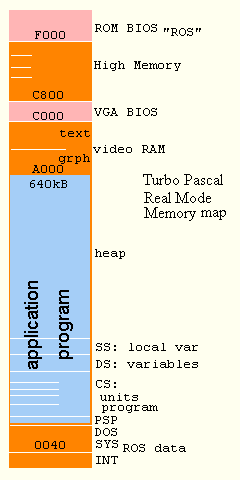 Above
the application programs memory the video RAM is mapped into the 1MB memory
area, followed by the video VGA-BIOS in ROM. This is a special extension
to the ROM BIOS which was introduced when the very old CGA and MDA graphics
were enhanced to EGA and VGA.
Above
the application programs memory the video RAM is mapped into the 1MB memory
area, followed by the video VGA-BIOS in ROM. This is a special extension
to the ROM BIOS which was introduced when the very old CGA and MDA graphics
were enhanced to EGA and VGA.
Above the VGA-BIOS is some memory which can be used by drivers (MOUSE.SYS,
KEYB.COM etc), the "high memory". MSDOS is usually placed above 1 MB by
a special hardware trick which is called the "A20" switch. It is not explained
here.
Application memory layout
The first known area is the PSP memory area, it is 256 bytes
and its layout is historically fixed first by the archaic Intellec system
of the 8008 CPU and later by the CP/M operating system. The programs in
these machines started at $0100 in absolute memory, which was 64kB total!
The PSP area is principally the "descriptive" area of the running application
program, and it can be accessed by skilled programmers for particular special
purposes. Beginners shall not even think of manipulating any location in
the PSP.
Above the PSP the loader of the operating system places the code
of the program. It is the invariable part of the whole application program.
It is referred to as the CS: code segment, but it can contain several
distinct CS: segments, from the main program and for every unit and for
the system unit of the run time library. Each single code segment can be
up to 64kB but there is no limitation on how many CS: segments are used.
The programmer need not take care of the CS: segments usually, it is sufficient
to take care of the units in the program.
The following data segment DS: is used for all the global
variables. They are named global because they are accessible by all procedures
as opposed to the local variables which are "unknown" in another procedure.
The data segment is limited to 64kB. It must be mentioned here that global
variables can be declared in the implementation part of a unit. In this
case they are local to all procedures and functions in the particular unit
and "unknown" in other units. But they are treated as global variables
since they are located in the DS: data segment - and their behaviour to
all the procedures in the particular unit is a global one. Their memory
address in the data segment is an add-on to the really global variables
which are declared in the Interface part of the units. These are a Borland
Turbo Pascal specialty and are not fixed in the Pascal standards. Another
TP specialty are the typed constants in the data segment, as mentioned
above. The typed constants are stored within the .EXE program file and
loaded to RAM at program start at the bottom of the DS: data segment. The
other variables are simply placed above and cleared to 00 at program start
(not proven for all versions of TP!).
If you use dynamic objects additional data area is occupied for each
type of objects.
The stack segment SS: holds the local data and the return
addresses and the parameters of the procedures. Its size cannot be calculated
by the compiler, because it does not "know" at compile time which procedures
can call each other and put their local variables on the stack. It must
be estimated by the programmer and it can be checked in test runs of the
application program with the $S switch ON. The stack pointer is initially
set to the top of the stack memory, eg. to $4000 for 16kB stack, growing
"downwards" whenever procedures are called. The SPtr function can tell
you how far it has grown down towards 0000. There shall be a minimum of
2 kB remaining ($800) for possible hardware interrupts etc at any time
in the program, but this is somewhat a philosophical value, other people
say that 256 bytes are sufficient.
The heap is the remaining memory above the stack. Its minimum
size must be estimated by the programmer and its maximum size can be defined
with the $M switch too. At run time the remaining heap space can be checked
with the MemAvail function from the system - tpu. The heap data area can
be managed in the program with pointers, where New(ppp) or GetMem(ppp,sss)
are the run time procedures which obtain a memory area from the heap manager.
The result of the New(ppp) procedure is an address filled into the pointer
variable - or a program crash if there is not enough free memory available
on the heap. If you need large blocks of memory you better ask the MaxAvail
function instead of MemAvail before you invoke New or GetMem.
It is not wise to occupy heap space in tiny slizes, eg. for single integer
numbers. Pointers are best used with arrays and records of data. The New(ppp)
procedure occupies memory in 8-byte slizes, so it is wise to declare strings
as multiples of 8 bytes, e.g. String[7] or String[15] or String[31]. Together
with the length byte they occupy 8, 16 or 32 bytes. The 8-byte increment
is used by the heap manager for its internal garbage collection when disposed
memory blocks are linked together.
Working with the heap is in some way similar to working with data in
files. The programmer must know which pointers are valid in the moment,
i.e. have real memory available. Note also that the Dispose(ppp) and FreeMem(ppp,sss)
procedures do not set the pointers to Nil.
Programs which use the overlay technique place some code in the
heap. The overlay area is occupied at program start and simply reduces
the available heap space for data. On the other hand it helps to reduce
the amount of necessary CS: memory at large programs and thus increases
the overall memory space on the heap.
If you want to call other application programs with the Exec procedure
you must reduce the maximum heap space with the $M compiler option or reduce
the heap dynamically, which is a rather sophisticated procedure!
Pointer
primer
This is not a complete tutor about pointers, it shall
help simply over the first obstacles. It is strongly suggested that novice
programmers obtain any books and FAQs available, not only about pointers.
Pointers in Pascal are (mainly) the tool to
1) obtain memory from the heap
2) give access to the memory in the program
Pointers are a special kind of variables. They do not hold the data
(integer ... Record ... Array ... Object) but simply the address of the
data in memory. Pointers consist internally of 2 words, the segment and
the offset of the address. This has to do with the way how the 8086 etc.
processors manage the 1 MB memory area in Real Mode.
Assume a simple Record:
Type TSimpRec = Record
Name : String;
Age : Integer;
End;
Now you can declare variables of the type:
Var Pers1, Pers2 : TSimpRec;
this will occupy memory in the data segment as described above, for
2 records.
Var PPers1, PPers2 : ^TSimpRec;
will make two pointers, where each uses 4 bytes of data memory only.
Now you can put the address of the records into the pointers:
PPers1 := Addr(Pers1);
PPers2 := Addr(Pers2); (or shorthand: @Pers2)
This code piece can be used even if the contents of the PersX records
did not contain any useful data.
Now you can access the records in 2 ways:
Pers1.Name := 'Luciano Pavarotti';
Pers1.Age := 43; {or higher?}
but you can also access the record using the pointer, which was previously
set to the address of Pers1:
Writeln(PPers1^.Name,' Age:', PPers1^.Age);
or even more elegant (this is not a pointer property, but a property
of the record which the pointer inherited):
with PPers1^ do
Writeln(Name,' Age:',Age);
You must notice that in Pascal a pointer has the same stringent type
checking properties as the variable type to which it points.
{For the "untyped" Pointer (used very seldom for special
purposes only) and Nil look in your manual please.}
The example above is not very often used in Pascal. Pointers are mainly
used to obtain memory from the heap, which is a big pool of memory.
The heap manager is built in the run time library (SYSTEM.TPU) of Pascal.
There are 4 built in procedures:
Procedure New(Var P : Pointer);
(can be used as function too, especially for objects with an Init procedure,
not explained here)
Procedure Dispose(P : Pointer);
(can include a Done procedure for objects, not explained here)
Procedure GetMem(Var P : Pointer;size:Word);
Procedure Freemem(Var P : Pointer;size:Word);
and 2 functions
function MemAvail : Longint; and
function MaxAvail : Longint;
In fact the New and Dispose procedures are special, the compiler "knows"
the size of the variable where the new pointer shall point to, by the type
properties described above. They cannot be made by the application programmer.
This is similar to the Write procedure, which cannot be made by the programmer
too.
New and GetMem can be used to "create" variables dynamically, they are
alive only as long as you need them. This is usually longer than the local
variables, but seldom during the whole program life.
Pointers can be part of a record and it is also allowed to maintain
an array of pointers. But the programmer is responsible for the validity
of the pointers, that means that it is strongly forbidden to use a pointer
with ^ before it got real memory with New!
Pointers which do not point to a living memory space shall be set to
Nil for easy testing. Note that Dispose does NOT fill Nil into the pointer!
PPers2 := Nil; {invalidate the pointer}
.... testing:
if PPers2 <> Nil then
with PPers2^ do
Begin
.....
End;
It is not "necessary" that invalid pointers are filled with Nil, but
it is usually good for programming.
The pointer is the only vehicle (handle) inside the program, that holds
the address of the memory which was obtained from the heap, so use it with
care. It is not very usual to assign values directly to pointers with :=
but it can be done, if you know what you are doing. But do not overwrite
a pointer which holds an address from the heap, else the memory is lost,
it can never be released with Dispose again. This
is one of the reasons why typical Windows application programs cannot run
for days, the programmers forgot to dispose the memory, so it is filled
up with garbage until all memory is occupied. In Windows the heap memory
is obtained from the operating system, not from a private pool of the application
program.
It is important to consider that pointers contain valid data only between
the New(ppp) procedure (and filling the memory with data) and Dispose.
After dispose the pointer still exists (as a variable), but it is invalid
and must not be used until it gets new memory which it points to with another
New(ppp).
Program flow:
New(ppp); {obtain memory from
the heap}
ppp^ := something;
{use the memory, the pointer is the handle ...}
{here you can use the memory }
another := ppp^;
SomeProc(ppp^);
{also in procedures as var parameter...}
AnotherProc(ppp);
{or simply as pointer}
Dispose(ppp);
{"tilt" it}
From this point the data is no longer alive, the pointer is invalid!
It is a very common source for system crashes to use invalid pointers!
Another very exciting property of Pointers is the fact that they can
be the result of functions. It is (normally) not possible to have
a record or an array as a function result (a string-function is a Borland
TP exception!), but when the function has the New(ppp) built in, it can
deliver a record or whatever, setup with the proper contents. (With Delphi
any record can be a function result, but internally Delphi creates a pointer!)
Pointers are sometimes used by sophisticated programmers to get the
address of procedures and functions in the program's code segment.
One of the typical uses of Procedure Pointers is the ExitProc. If it is
used, the procedure MUST be declared as FAR, to get the segment AND offset
of the procedure. Another use of procedure pointers (in TP: procedure variables
= variabls of "type procedure") is their use as parameters in other procedures.
It means that you can have a procedure which does distinct things on data,
yet this leads directly to objects.
With pointers the pascal compiler allows a particular exception from
the rule, that a type cannot be declared forward. Indeed you can
Type PPerson = ^TPerson;
TPerson = Record
Name : String;
Age : Integer;
Next : PPerson;
End;
The Next element is the main reason for this benefit. So you
can create chained records. It is not really a forward declaration, since
PPersion IS the pointer type of TPerson, not a derived type, by definition
(so much philosophy?).
HINT: do not try to hold all your data in RAM (eg. on the heap)
unless it is really necessary. Usually it is much better and easier to
hold the data in a file, except if you really need frequent access
to the data, eg. for searching and sorting. It is very usual to hold only
some kind of directory or index in RAM, while the main records are on disk.
It is very easy to have an array of Longints containing record numbers
for the Seek(F,...) procedure instead of an array of pointers to
records in the expensive heap memory.
The following explanation is somewhat odd for beginners, but I saw
that it can highlight the context.
You should know that Var - parameters to procedures are very similar
to pointers. The compiler sets the address of the actual parameter into
the parameter list which is posted to the called procedure. But you must
not use the parameter with ^ as usual with parameters, the compiler makes
the necessary indirection. If Pascal did not have the Var parameters they
could easily be faked with the pointer method.
Procedure Add5(Var I : Integer);
Begin
I := I+5;
End; this is the normal way.
Var K : Integer;
......
Add5(K);
using the pointer method:
Procedure Add5(P : ^Integer);
Begin
P^ := P^ + 5;
End;
Invoke it with
Add5(Addr(K)); or Add5(@K);
{Borland shorthand notation for Addr(xxx)}
Var parameters give the procedure "write" access to the data. In function
this modification of parameters is often named a "side" effect, since the
main job of the function is to get the function result. On the other hand,
functions are often used instead of procedures with a simple boolean result,
representing the "ok" of the operation, eg. read a var record from a file.
In this case the function result is more "side effect", while the filled
var record is what the programmer wanted.
ANOTHER
POINTER TUTORIAL for those of you who did not understand my kind of english...
More exotic memory:
EMS memory (LIM expanded memory)
is a somewhat outperformed method of older PC generations to get additional
memory for variables. The key problem of the older 8086 CPU was the limitation
to access only 1MB of memory with its addressing methods. This limitation
also inherited the 16-bit code of real mode programs. The trick of EMS
is a "window" in the high memory area (eg. above the C800 VGA-BIOS) with
64kB in size. A particular hardware on the EMS memory card could map in
memory to this address area in 16kB pages. By switching in and out various
pages of a 1MB or 4MB special memory card the programmer could make use
of this large area, but it needs some procedures to maintain the page mapping
similar to the seek() instruction for disk files. The switching was supported
by a special EMMxxx.SYS driver that has an interrupt vector entry with
several distinct functions. The benefit was higher speed compared with
disk files, the drawback was the necessary overhead and management procedures
in the application program.
Modern computers are sometimes equipped with EMS properties without
special hardware. The EMM386.SYS driver uses the page mapping capabilities
of the 386 and later CPUs. But anyway, the 64k area at C800 or D000 or
whatever is used as a "window" of the large extended memory into the 1MB
area.
Turbo Pascal can use the EMS memory in two ways: Either as buffer for
overlay management, where the whole overlay file is copied to EMS for speed
and by the EMS stream in the Turbo Vision environment. Other usage of EMS
must be programmed from scratch.
XMS memory (extended memory)
is another outperformed method of accessing memory above 1 MB, it was
introduced with the PC-AT and the 80286 CPU. XMS is seldom used with Turbo
Pascal programming.
DPMI
Modern computers and operating systems have another method to access
the larger 4MB or more RAM, the DPMI approach. This can be used with TP
7 in protected mode programs. The benefit of DPMI is the simplicity of
using the New(ppp) as usual to get any amount of memory without having
to deal with drivers and mappers etc.
Segment and Offset - and Paragraphs
In REAL mode, the mode which was introduced in the early 80ies with
the Intel 8086 and 8088 processors, the 1 MB memory is addressed with segments.
Because with a 16 - bit address only 65536 bytes can be addressed (which
was the total memory space of the 8080 and Z80 processors) a method had
to be introduced to address 1024 kB. Intel decided to use the segmentation
method.
A segment is a memory space of 64kB of memory, so it would have been
sufficient to have 16 segments to cover the 1 MB memory area. But the Intel
engineers were clever, they used a 16-bit segment value, such that 64k
distinct segments could be defined. The segment points to a 16-byte paragraph,
thus 64k overlapping segments were established. A paragraph is a memory
area with 16-bytes, but this is a nomenclature consideration only.
A particular linear address can be pointed to with many different seg:ofs
word values, eg.
$0400:$0200 points to the same address as $0420:$0000 and $0410:$0100
==> $04200 as linear address.
The seg:ofs writing is standardized with the Intel familiy of processors
in 8086 mode.
There is no need in a typical application program to know the absolute,
linear address and in most cases the programmer need not be aware of the
contents of the used pointers as numerical values. In the graphic picture
above the segment values are used to show the address.
Franz Glaser, Austria

Sorry, my English is not perfect, but I hope that you will understand
the explanations anyway.