

To include a new record, click on the Insert Record Button of the Navigation
Tool Bar. The program will then open a new record on the grid, so you can begin
to type the Country Key and the Country Name. The Catalog field is a ComboBox,
and when you click on the arrow of the combobox, it will drop down the list of
the avaliable data (data that you have to fill before on the table Catalog);
then you can choose the Catalog you want to use with that Country.
Include a record
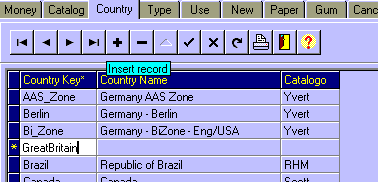
 To move from one field to the other just use de Enter Key or the Tab Key.
